to get the current row, using the TableIterator as the executable
#{bindings.TableIterator.rangeStart+bindings.TableIterator.currentRowIndexInRange+1}
to get the current row, using the TableIterator as the executable
#{bindings.TableIterator.rangeStart+bindings.TableIterator.currentRowIndexInRange+1}
Recently found this issue on an internal forum and found the solution given by Jobinesh.. Thought I could share the info here
Problem description:
“I’m trying to apply a view criteria programmatic way here. When the bind variable for “StartDate” (which is a VO attribute) uses just a “=”. then at runtime the VC gets appended to the query using a TO_DATE for the bind var, which is as expected. However, when the bind variable for “StartDate” uses just a “>=” / “<“>” . then at runtime the VC gets appended to the query using a TO_CHAR for the bind var, which is not that we require. Is there any way to get a TO_DATE for this kind of comparison as well?”
Please take a look at the following sample method :-
public Row getSampleHeaderVORecord(Date activeDate) {
 ViewObjectImpl SampleHeaderVO = getSampleHeader1();
 ViewCriteria viewCriteria = SampleHeaderVO.createViewCriteria() ;
 ViewCriteriaRow vcr1 = viewCriteria.createViewCriteriaRow() ;
 vcr1.setAttribute("StartDate", ">="+(activeDate.));
 viewCriteria.add(vcr1);
 SampleHeaderVO.applyViewCriteria(viewCriteria);
 SampleHeaderVO.executeQuery();
 return SampleHeaderVO.next();
 }
Do let me know.
Sample query that appears at runtime :-
SELECT *WHERE ( ( (TO_CHAR( ForecastHeaderEO.START_DATE, 'yyyy-mm-dd') > '0007-04-02' ) ) )
The TO_CHAR in the last line is what I’m referring to. Is there any way to get a TO_DATE there?
Solution:
ViewObjectImpl SampleHeaderVO = getSampleHeader1();
 ViewCriteria viewCriteria = SampleHeaderVO.createViewCriteria() ;
 ViewCriteriaRow vcr1 = viewCriteria.createViewCriteriaRow() ;
 ViewCriteriaItem vci = vcr1.ensureCriteriaItem("StartDate");
 vci.setOperator(JboCompOper.OPER_ON_OR_AFTER);
 vci.setValue(activeDate);
viewCriteria.add(vcr1);
 SampleHeaderVO.applyViewCriteria(viewCriteria);
 SampleHeaderVO.executeQuery();
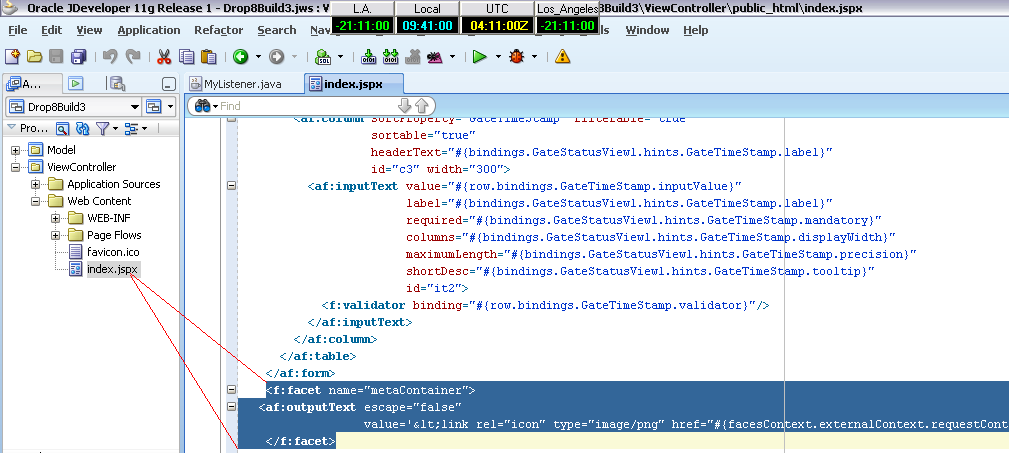
I bet this is a common question among ADF developers who wish to have their own favicon for their page
Please follow the steps to achieve the same
add the following facet to the af:document tag of your adf page
<af:document id="d1">
..
..
..
<f:facet name="metaContainer">
 outputText escape="false"
 value='png" href="#{facesContext.externalContext.requestContextPath}/favicon.ico">' id="o1"/>
 </f:facet>
</af:document>

please note that the favicon specified in the value attribute in the outputext should be in the root-level of your web application
Target URL -- http://127.0.0.1:7101/[Application_Name]-[Project_Name]-context-root/faces/[page_name].jspx
<22-03-2010 09:57:51 AM CLT>    <[ServletContext@27112686[app:[Application_Name] module:[Application_Name]-[Project_Name]-context-root path:/[Application_Name]-[Project_Name]-context-root spec-version:2.5]] Servlet failed with Exception
oracle.mds.exception.MDSRuntimeException: MDS-00168: MDS object oracle.mds.core.MDSInstance@160bf69 is being used after it or its MDSInstance or PManager has been released.
at oracle.mds.core.MDSInstance.checkNotReleased(MDSInstance.java:1078)
at oracle.mds.core.MDSInstance.getPersistenceManager(MDSInstance.java:638)
at oracle.mds.core.MDSSession.getPersistenceManager(MDSSession.java:1992)
at oracle.mds.core.MDSSession.getBaseMO(MDSSession.java:2769)
at oracle.mds.core.MDSSession.getMetadataObject(MDSSession.java:1188)
Truncated. see log file for complete stacktrace
The above mentioned error is due to a known issue for JDeveloper and ADF 11g.
This is related to the initialization of the ADFShare components in a web environment. the oracle.adf.share.http.ServletADFContext must be initialized per request. Normally, this is achieved because the jdev design time adds the ADFBindingFilter to the project web.xml when certain actions are taken
The ServletADFFilter must be used for correct use of ADFContext. ServletADFFilter specifically setup ServletADFContext properly at the start of the request.
<filter>
 <filter-name>ServletADFContextFilter</filter-name>
 <filter-class>oracle.adf.share.http.ServletADFFilter</filter-class>
 </filter>
 <filter-mapping>
 <filter-name>ServletADFContextFilter</filter-name>
 <url-pattern>/*</url-pattern>
 <dispatcher>REQUEST</dispatcher>
 <dispatcher>FORWARD</dispatcher>
 </filter-mapping>
set the following property in the af:document tag of your page
<af:document id="d1" uncommittedDataWarning="on">
uncommittedDataWarning - Specifies whether users should be warned about uncommitted data when navigating off the page or region. Setting this property to ‘on’ will enable the warnings.
we can also call
ViewPortContext.isDataDirty();
to check for any uncommitted data
I was wondering where the system folder in windows resides. searched all the place and stopped until i got this
C:\Documents and Settings\{user_id}\Application Data\JDeveloper

How to defer the mandatory constraint?
The mandatory validation is a database constraint and you do not have any control over it in ADF. You will not have the validation execution tab for these kind of DB constraint validation if you want to defer it based on some condition.But the Error message can be overridden.
if you want to populate the key attribute for the child from the parent then enable “Composite Association -> Cascade Update Key Attributes” for the association
JBO-27024: Failed to validate a row with key oracle.jbo.Key usually occurs
1. Not providing value for a mandatory attribute.
2. Incorrect value for an attribute of different data type
3. any of your other validation rules failed.
the validation is failing because the id attribute may not be getting created properly. Because of this it could not validate the row as the id is null. row.validateEntity() will help to identify the error by calling it when you commit the record and check where exactly the error pops up.
4. when the primary key is not based on a sequence and depends on the composite. The solution is to create a surrogate key. If you want to override the db constraint you must have a surrogate key populated programmatic way every time a new row is created. So that the data is unique all the time and proceed with a customized error message for each attribute, make the surrogate key hidden and read only.
if you want to suppress the validation then use skipValidation=true in pageDef or have the immediate set to true.
This might be a basic information for some experts out there but I felt its worth mentioning it here
how will u differentiate between services and the SID to connect to Oracle using JDBC in the connection string
for SID: it goes like
jdbc:oracle:thin:@localhost:1521:XE
for Services you specify like
jdbc:oracle:thin:@localhost:1521/XE
 Class.forName("oracle.jdbc.driver.OracleDriver");
 conn =
 DriverManager.getConnection(jdbc:oracle:thin:@localhost:1521/XE,system,tiger);
 Statement stmt = conn.createStatement();
 ResultSet rset = stmt.executeQuery(query);
 They point the finger at me.. again!