Author Archives: vtkrishn

Unknown's avatar

About vtkrishn

Vinod Krishnan has over 12 years experience in the Information Technology industry and a multifaceted career in positions such as Senior Consultant, Senior Applications Engineer, Software Engineer and Solution Architect for MNC’s like (Oracle, Capgemini, Keane). His many years of experience have exposed him to a wide range of Oracle Technologies that includes java, J2EE, Weblogic, Fusion Middleware, SOA and Webcenter. For the last five years, Vinod is actively involved in large implementations of next generation enterprise applications utilizing Oracle’s JDeveloper, Application Development Framework (ADF) technologies. He holds a B.Tech. in Information Technology from Anna University of Chennai, India.

Referring custom libraries in jdev 10.1.3.4


I recently happened to work on jdeveloper 10.1.3.4 and was given a task of bringing up the server. The project was using the custom libraries which the embedded oc4j was complaining that it could not find saying

Caused by: oracle.oc4j.sql.config.DataSourceConfigException: Unable to create : com.ibm.as400.access.AS400JDBCDriver
 at oracle.oc4j.sql.config.DataSourceConfigUtils.createConnectionFactory(DataSourceConfigUtils.java:283)
 at oracle.oc4j.sql.DataSourceConnectionPoolImpl.<init>(DataSourceConnectionPoolImpl.java:108)
 at oracle.oc4j.sql.spi.ResourceAdapterImpl.createDataSourceConnectionPool(ResourceAdapterImpl.java:99)
 … 13 more

This was very challenging for me because this is the first time I ran an ADF application on Jdeveloper 10g. I searched on the forum with this error and could easily find that the fix is to copy the library to

..\jdevstudio10134\j2ee\home\applib

This is just for information as this could be helpful for newbie who is still working with Jdeveloper 10g
out of Space for Code Cache for Adapters


If you are facing issues like ‘Out of Space for Code Cache for Adapters’ in Jdeveloper 11.1.1.5 then you must do this changes as discussed in this forum post

Set – JVM Options : XX:ReservedCodeCacheSize=128m in setDomainEnv.sh

Display iterated list in horizontal fashion


Recently I had a challenge of showing the list in a horizontal fashion in two columns which I had thought would be easy to implement using af:iterator and af:panelGroupLayout. But when I actually tried it, the horizontal display of the iterated list becomes a challenge.
I tried a couple of options to display close to the requirement but was not actually reaching there.
Finally I got the solution by using

panelFormLayout id="pfl1" rows="1" maxColumns="2">
forEach items="#{List}" var="row" step="2" begin="0">
..
forEach>
<af:forEach items="#{List}" var="row" step="2" begin="1">
..
</af:forEach>
</af:panelFormLayout>

The step and the begin attribute is the key here along with the maxColumns and rows.

Attempt to validate an already invalid RegionSite


was facing this issue and couldn’t find a proper place to look into then I got to know that this issue is surely related to the view..

After serious debugging found that this issue is mainly because of the usage of a taskflow as a region but the taskflow is not having a default activity..

The default activity somehow got removed and setting it back into the place made my day.


Attempt to validate an already invalid RegionSite:
  <_handleException> ADF_FACES-60098:Faces lifecycle receives unhandled exceptions in phase RENDER_RESPONSE 6
 java.lang.IllegalStateException: Attempt to validate an already invalid RegionSite:

Webcenter – How to create a Space


In this post i will quickly help you how to create a group space.

What is a Space?

WebCenter Spaces provides the Spaces, which bring content together through a single access, accessible through the WebCenter Spaces application of by direct URL, to help groups of people to share information and interact in a collaborative fashion.

Example of Spaces?

  • Large Company intranet with multiple departments like HR, Finance, Administration etc
  • Internet Groups that share common interest

How to create a space in Webcenter Spaces?

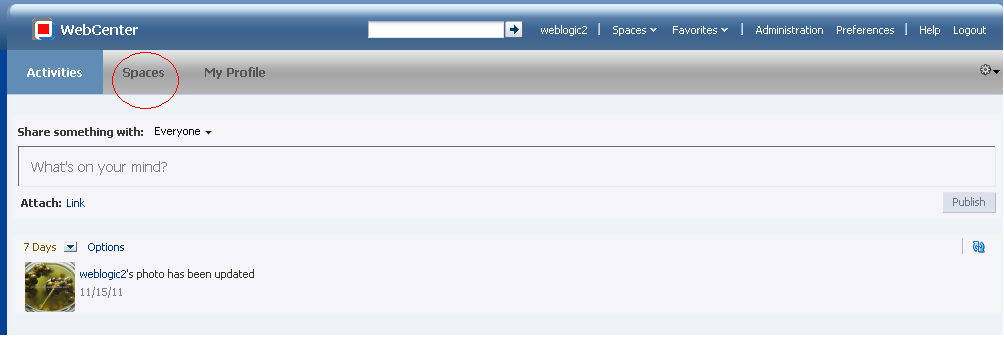
When you login to the spaces the application looks like the following screenshot. You have to click on the Spaces tab to view all available spaces.

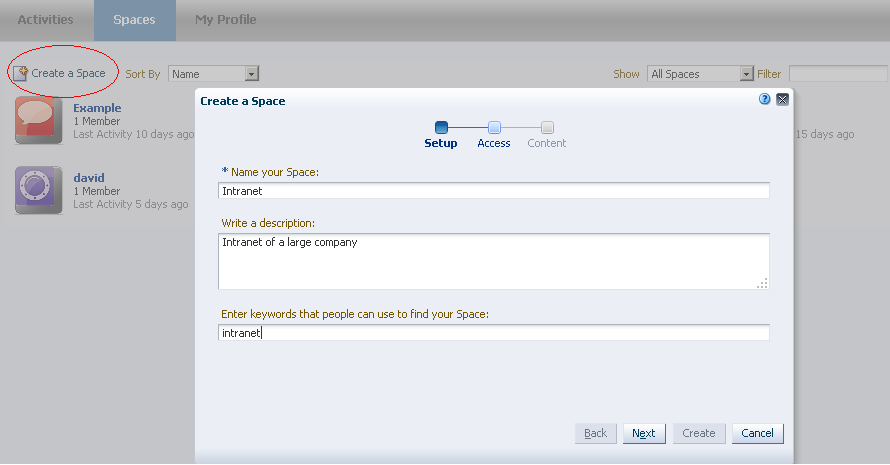
To Create the space , you will have to click on the Create Space link that is marked to open a dialog to create the space. The Name, Description and the Keywords are entered to create a space. Adding keywords will help to find your space  from the available spaces.

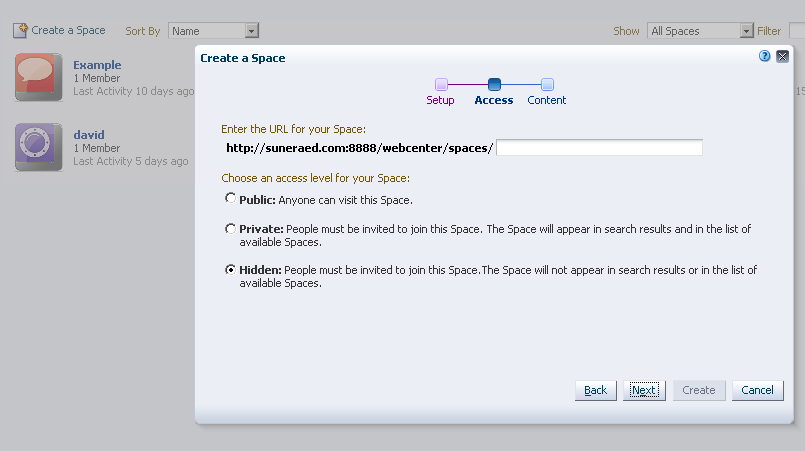
The next section will allow you to provide the URL for your space. You can also set your access level in this section. You can make the space visible to anyone by making it Public or set an invitation based access with the Private access. Keeping it hidden makes your space not visible to others and will not appear in the search results also.

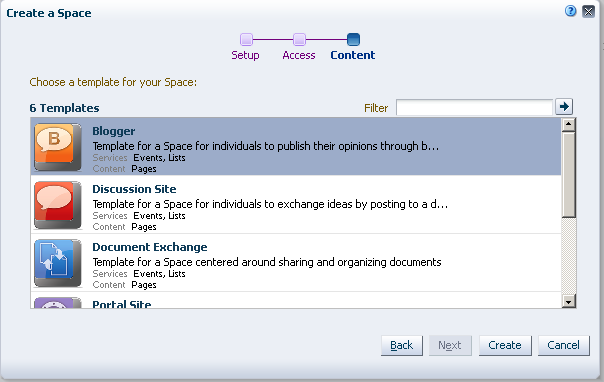
The final step is to choose the template that your spaces is targeted for. There are 6 templates available for you to choose from the option.

Hope this post helps you to know about Spaces and to create it using webcenter.


useful webcenter resources


http://www.oracle.com/pls/as111120/vbook_subject?subject=wc

http://download.oracle.com/docs/cd/E21764_01/webcenter.htm

http://yonaweb.be/

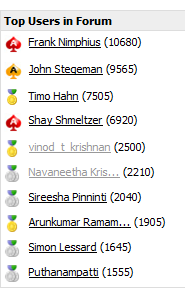
New ADF Guru…


chk here

Top 5 user.

https://forums.oracle.com/forums/forum.jspa?forumID=83&start=0

with guru status..

IE8 element not found error


Try It. Love It. Or We'll Take It Back.

We recently stuck with this error in IE8 and in other browser the application is working without any problem.

On searching for a solution we found this link

http://www.winhelponline.com/articles/122/1/Error-Element-not-found-when-attempting-to-add-a-Search-Provider-in-Internet-Explorer-7.html

The fix is to download the attachment – ie7tlbfix.reg and apply the registry fix onto the windows

This issue is discussed here as well

https://forums.oracle.com/forums/thread.jspa?messageID=4376493


select tab based on the commandlink


The example of the paneltab selection by clicking the af:commandlink example is here

The same use case can be achieved by passing a request parameter for the goLink like


<af:golink destination="/faces/index?dt=true">

and enable the panelTabbed showdetailitem accordingly..


<af:showdetailitem disclosed="#{param.dt eq 'true'}">