If you get bored with the same old splash screen for jdeveloper, then go straightaway and modify the file from
${JDEV_HOME}/jdev/bin/splash.gif
Do not change the dimension. Look at mine 🙂

Keep playing…
If you get bored with the same old splash screen for jdeveloper, then go straightaway and modify the file from
${JDEV_HOME}/jdev/bin/splash.gif
Do not change the dimension. Look at mine 🙂
Keep playing…
I was wondering where the system folder in windows resides. searched all the place and stopped until i got this
C:\Documents and Settings\{user_id}\Application Data\JDeveloper

have trindad-skins.xml in your web-inf folder and have the following tag
<skin>
 <id>dummy.desktop</id> // you are overriding the style
 <family>dummy</family>
 <extends>fusion.desktop</extends> // this should be from the trinidad-config.cml
 <render-kit-id>org.apache.myfaces.trinidad.desktop</render-kit-id>
 <style-sheet-name>skins/dummy/dummy.css</style-sheet-name>
 <bundle-name>oracle.view.resource.rich.SkinBundle</bundle-name> // your skin bundle to override the name
 </skin>
here dummy.css is used to override any visual property of the faces component defined in fusion theme
to override the label, use in the SkinBundle like (The java bundle file should be registered as a managed bean in adfc-config.xml)
package oracle.view.resource.rich;
 import java.util.ListResourceBundle;
public class SkinBundle
 extends ListResourceBundle
 {
 @Override
 public Object[] getContents()
 {
 return _CONTENTS;
 }

static private final Object[] _CONTENTS =
 {
 { "af_panelCollection.LABEL_DETACH_TABLE_DLG", "Any name for the Detachable Table" },
 { "af_panelCollection.LABEL_DETACH_TREE_TABLE_DLG", "Any name for the Detachable Tree Table" }
 };
 }
You can use JAD or any other decompiler with JDeveloper to show you the decompiled version of the source instead of the standard stub view with the following command line argument.
The property is ‘jcncmd’, and to use for instance ‘jad.exe’, you would use:
“-J-Djcncmd=D:\bin\jad.exe -b -ff -nl -p -pi99999 -space -t2”
There are two conditions: – the external decompiler must send its output to stdout – the external decompiler must accept as its last argument the full path to the Java class file to decompile. In the line above, -p forces the output to stdout.
Also you can invoke using control click by editing $JDEV_HOME\jdeveloper\jdev\bin\jdev.conf and add the following line
“AddVMOption -Djcncmd=D:\bin\jad.exe -b -ff -nl -p -pi99999 -space -t2”
To change the values for minimum and maximum Java heap, modify the corresponding parameters in $JDEV_HOME/ide/bin/ide.conf
Other parameters can be set in $JDEV_HOME/jdev/bin/jdev.conf
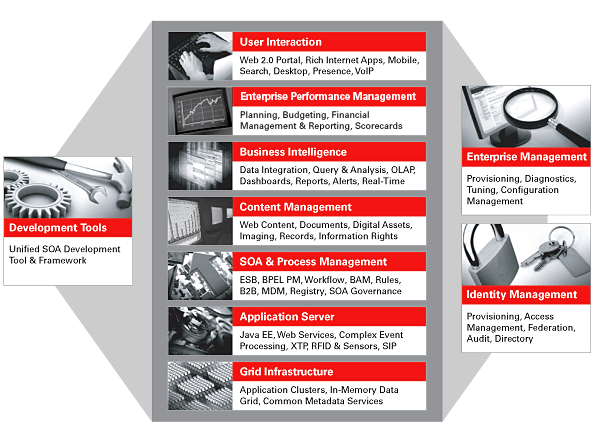
Fusion as the name describes is the collective integration of best of breed softwares to simplify business needs. The revolutionary dream of Oracle claims to change the way we see business applications.
Some of the key technologies included are
UI Technology – ADF UI, ADF DI, ADF Mobile, DVT
Model Technology – Toplink, EJB
Backend Technology – Oracle Database, Essbase
Orchestration – Oracle BPEL Process Manager, SOA
Secuirty – Oracle Platform Secuirty Services,OPSS
Server – Oracle Weblogic Server
Customization – Oracle Metadata Services MDS
Aditional Technology – Oracle Enterprise Scheduler Services ESS, Oracle Business Rules OBR, Oracle Data Integrator ODI
and many more technologies from acquired products.
Here is the way to configure hibernate to work on JDeveloper
First thing first
As you know the three main things in setting up any hibernate is to have
To make this work for JDeveloper, download the latest version of hibernate3
Refer the downloaded location in the projects library and classpath by Adding a Library(Add Library) – Create New – Add Entry
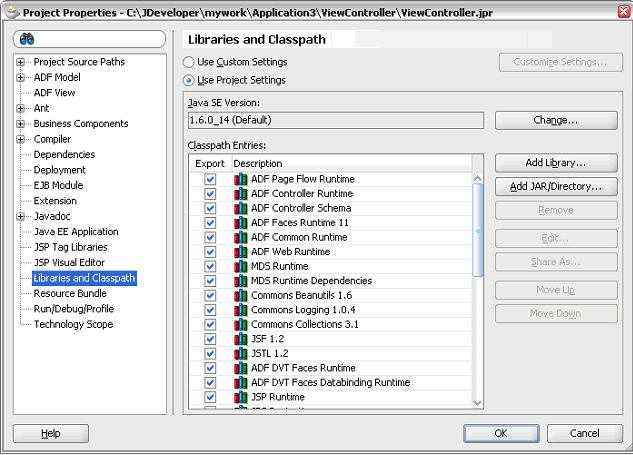
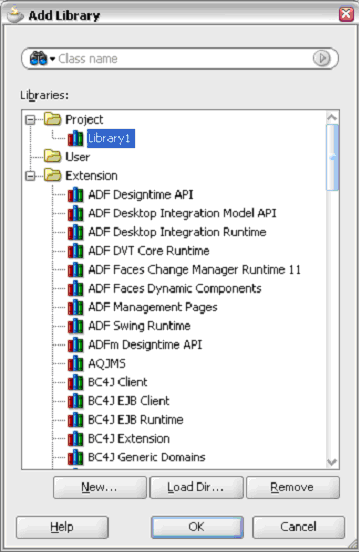
Provide the Library Name as ‘Hibernate’ (can be of your choice) and add the following libraries
Have the hibernate.cfg.xml file in your current working directory
<?xml version='1.0' encoding='utf-8'?>

<!--<span class="hiddenSpellError" pre=""-->DOCTYPE hibernate-configuration PUBLIC

"-//Hibernate/Hibernate Configuration DTD 3.0//EN"

"http://hibernate.sourceforge.net/hibernate-configuration-3.0.dtd">

<hibernate-configuration>

<session-factory>

<!-- Database connection settings -->

<property

name="connection.driver_class">oracle.jdbc.driver.OracleDriver

<property

name="connection.url">jdbc:oracle:thin:@localhost:1521:XE

<property name="connection.username">system</property>

<property name="connection.password">fusion</property>

<!-- <span class="hiddenSpellError" pre="">JDBC</span> connection pool (use the built-in) -->

<property name="connection.pool_size">1</property>

<!-- SQL dialect -->

<property

name="dialect">org.hibernate.dialect.OracleDialect</property>

<!-- Enable Hibernate's automatic session context management

-->

<property

name="current_session_context_class">thread</property>

<!-- Disable the second-level cache -->

<property

name="cache.provider_class">org.hibernate.cache.NoCacheProvider

</property>

<!-- Echo all executed SQL to <span class="hiddenSpellError" pre="to ">stdout</span> -->

<property name="show_sql">true</property>

<!-- Drop and re-create the database schema on startup -->

<property name="hbm2ddl.auto">create</property>

<mapping resource="Simple.hbm.xml"/>

</session-factory>

</hibernate-configuration>
The configuration file is for Oracle driver.. this can be changed
<property

name="connection.driver_class">oracle.jdbc.driver.OracleDriver</property>

<property

name="connection.url">jdbc:oracle:thin:@localhost:1521:XE

<property name="connection.username">system</property>

<property name="connection.password">fusion</property>
You have to specify the mapping file also
<mapping resource="Simple.hbm.xml"/>
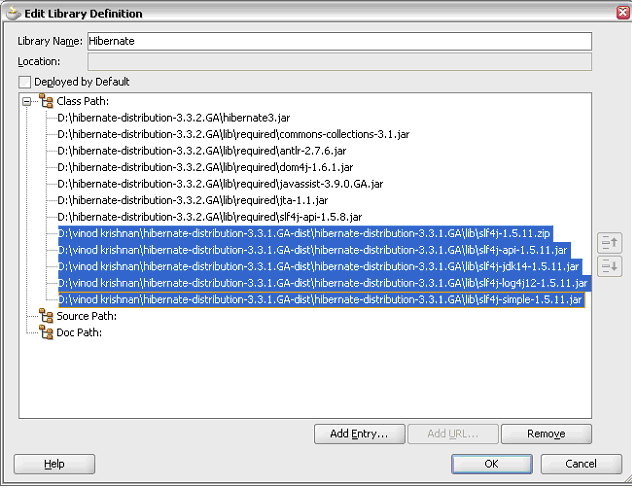
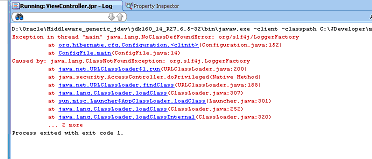
the highlighted libraries are added from slf4j to overcome
As the final step, represent the db table of yours as a simple pojo class (Simple.java) like
public class Simple {

private Long id;

private String title;

private Date date;

public Simple() {}

public Long getId() {

return id;

}

private void setId(Long id) {

this.id = id;

}

public Date getDate() {

return date;

}

public void setDate(Date date) {

this.date = date;

}

public String getTitle() {

return title;

}

public void setTitle(String title) {

this.title = title;

}

private Set participants = new HashSet();

public Set getParticipants() {

return participants;

}

public void setParticipants(Set participants) {

this.participants = participants;

}

}
where id, title and date represents the column name of the table in the db
Have a corresponding mapping file in the same qualified path (Simple.hbm.xml)
<?xml version="1.0"?>

<!--<span class="hiddenSpellError" pre=""-->DOCTYPE hibernate-mapping PUBLIC

"-//Hibernate/Hibernate Mapping DTD 3.0//EN"

"http://hibernate.sourceforge.net/hibernate-mapping-3.0.dtd">

<hibernate-mapping>

<class table="EVENTS">

<id name="id" column="EVENT_ID">

<generator/>

</id>

<property name="date" column="EVENT_DATE"/>

<property name="title"/>

</class>

</hibernate-mapping>
Have a configFile.java where you instantiate the Configuration, Session and get involved in the transaction
import org.hibernate.Session;

import org.hibernate.SessionFactory;

import org.hibernate.cfg.Configuration;

public class ConfigFile {

static Session session;

public ConfigFile() {

super();

}

public static void main(String[] args){

Configuration cfg = new Configuration().configure();

SessionFactory sessions = cfg.buildSessionFactory();

Session sess = sessions.openSession();

session = sess;

Simple s = new Simple();

s.setTitle("hi");

session.save(s);

}

}
Run the configFile.java.. that’s it. 🙂
 They point the finger at me.. again!