Category Archives: ADF UI

ChangeEventPolicy in iterator


By default the iterator will refresh when the user first enters the page. But sometimes you need to control the refresh action of the iterator for some reason.

There are three optional iterator properties Refresh, RefreshCondition,and RefreshAfter which will control the refreshing of the iterator accordingly.

ChangeEventPolicy property in the iterator controls the behavior of the refresh action. It has three properties

none – by default, iterator refreshes according to the refreshcondition specified

push – asynchronous data change in the model layer will be pushed automatically.. used in BAM and Active Data Components

ppr – this will decide on when to refreshes the components bound to the iterator. If the current row of the iterator is changed and when the ppr is occurred the iterator will get refreshed to reflect the changed data
SOA – a quick view


What is SOA?

SOA is standard based method of system development and integration

What are the benefits?

  • Reusability
  • Integration
  • Interoperability
  • Agile development
  • Scalability
  • Cost Efficient

What are all the ways to implement services?

  • Point to point approach
  • Vendor specific implementation
  • CORBA
  • Web services
  • SCA-style implementation

What are Services?

  • Building blocks of SOA
  • Interface and message structure definitions
  • Standard protocol for interoperability

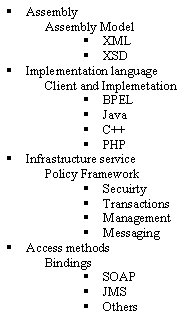
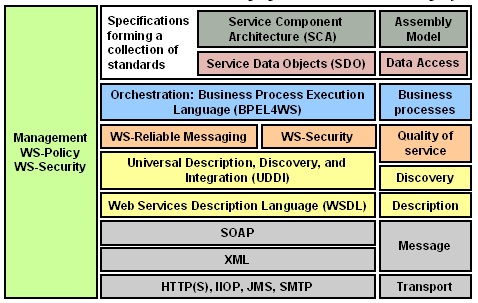
What are SOA standards?


What is SCA [Service Component Architecture]?

SCA provides a programming model for building applications using SOA

What are the difference between SOA and SCA?

  • SOA is an approach or implementation style and SCA uses SOA to build a composite application
  • SOA is architectural style but SCA is assembly model and defines/design

What are the elements of SCA?

What is SDO [Service Data Object]?

  • Representation of data source in XML format and specifes methods to create, delete and modify data
  • Simplify and unify the way in which applications handles the data

What is EDN [Event Driven Network]?

  • To handle asynchronous messaging arising from a business event
  • Supports publish and subscribe model
  • Aligns with Event driven Architecture [EDA]


Right Align af:column footer


How to right align text in the af:column footer?

<f:facet name="footer">
 <trh:tableLayout width="100%">
 <trh:rowLayout width="100%">
 <trh:cellFormat width="100%" halign="end">
 <af:outputText value="outputText6"/>
 </trh:cellFormat>
 </trh:rowLayout>
 </trh:tableLayout>
 </f:facet>

How to get reference to currentRow for af:table


to get the current row, using the TableIterator as the executable


#{bindings.TableIterator.rangeStart+bindings.TableIterator.currentRowIndexInRange+1}

How to check pending changes in the page when browser back button is clicked


set the following property in the af:document tag of your page

<af:document id="d1" uncommittedDataWarning="on">

uncommittedDataWarning - Specifies whether users should be warned about uncommitted data when navigating off the page or region. Setting this property to ‘on’ will enable the warnings.
we can also call

ViewPortContext.isDataDirty();

to check for any uncommitted data

Adding custom message in ADF UI


The complete steps are given here

http://download.oracle.com/docs/cd/E12839_01/web.1111/b31974/bcadvgen.htm#BABEFGCI

also download the sample from here

Getting the value of Saved search – programatic way


QueryModel qm = (QueryModel)evaluateEL("#{bindings.SearchViewCriteriaQuery.queryModel}");
 for(int indexCount=0; indexCount
 {
 QueryDescriptor qd = qm.getUserQueries().get(indexCount);
 if(qd!=null){
 String queryDescriptorName = qd.getName();
 System.out.println(queryDesctiptorName);
 m = qd.getUIHints();
 isDefault = (Boolean) m.get(QueryDescriptor.UIHINT_DEFAULT);
 System.out.println(isDefault);
 isRunAutomatically = (Boolean) m.get(QueryDescriptor.UIHINT_AUTO_EXECUTE);
 System.out.println(isRunAutomatically);
 if (Boolean.TRUE.equals(isDefault) && Boolean.TRUE.equals(isRunAutomatically){
 break();
 }
 else{
 queryDescriptorName = null;
 }
 System.out.println(isDefault);
 }

Snippet to check if the transaction is dirty


We can use the following code snippet to check if the transaction is dirty or not

BindingContext bctx = oracle.adf.controller.binding.BindingUtils.getBindingContext();
if (bctx.findDataControlFrame(bctx.getCurrentDataControlFrame()).isTransactionDirty()) {
 //show the timestamp
 }
 else{
 //don't show
 }

Show dialog when a page is fully loaded


1. Add popup and outputText component at the end of your page (make sure popup is before outputText in the page structure)

2. Create bean binding for popup as well as outputText.

3. In the getter of outputText, launch popup programatically.

4. Set visible=false for outputText

Easiest way to get the current binding from the bean


use the following snippet to get the current binding

BindingContainer bindings =  BindingContext.getCurrent().getCurrentBindingsEntry();
 AttributeBinding at = (AttributeBinding)bindings.getControlBinding("Period");
 at.getInputValue();

The above mentioned code is useful only in case of retrieving values of any attribute binding in the page definition file. To retrieve specific information use it like

//For search binding use it like
FacesCtrlSearchBinding fc =
(FacesCtrlSearchBinding)bindings.findExecutableBinding("PeriodQuery");
or
FacesCtrlSearchBinding fc =
(FacesCtrlSearchBinding)bindings.get("PeriodQuery");

//For LOV binding use it like
FacesCtrlLOVBinding fc = (FacesCtrlLOVBinding)bindings.get("PeriodLOV");

some of the useful methods that can also be used for retrieving binding is

private BindingContainer getBindings() {
BindingContainer bindings =
(BindingContainer)fc.getApplication().evaluateExpressionGet(fc, "#{bindings}",
 BindingContainer.class);
return (bindings == null) ? null : bindings;
 }

to retrieve the bindings  or executable you use it like

//to retireve the tree/table bindings
FacesCtrlHierBinding fc = (FacesCtrlHierBinding)bindings.get("Period");

//to retireve the tree/table iterator
DCIteratorBinding dc = (DCIteratorBinding)bindings.get("PeriodIterator");