Category Archives: ADF Faces

How to in Jdeveloper ADF Tutorials – Parameters for Jdeveloper ADF


Ever wonder what are this entries that gets added to the adf url in the addressbar like

afrWindowId=null&afrWindowMode=0&_adf.ctrl-state=qkx3a0o59

These are all the parameters for adf that to maintain the user session

_afrLoop – This is a unique identifier which is used to determine if the current window is new or not. This is used by ADF Faces Javascript. This entry is used as a token for the Loop Script

_afrWindowMode – This is a unique identifier which is used to determine if the current window is new or a dialog. This is used by ADF Faces intself to identify the mode

_afrWindowID – unique identifier assigned by the WindowIdProvider for ADF Faces to identify the current borwser window on the client and server For adf applications, ADF contoller supplies the WindowIdProvider

_adf.ctrl-state – This is the token provided by ADF controller to identify the current user state. This token is used to retrieve the user state within the task flow.

jsessionid – This is a cookie provided by the Weblogic Application server to uniquely identify the HTTP Session. This is passed as a token intially and stored in the cookie later

af:autosuggestBehavior – intro


This component in adf is used to provide a declarative way of providing suggestions for adf input components
the three main attributes are
suggestItems – mapped to a bean which returns List of SelectItems.
maxSuggestedItems – number of suggestedItems. -1 will fetch everything from the server. if the number is limited then a more link is displayed to fetch remaining items from the server
smartList – this list is added to show intial result. then the entire result from the server is fetched if no operation is done by the user

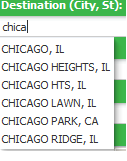
problem: I have a destination inputText which takes city/state combination. I want to implement an autosuggestbehavior for the inputText. When I enter more than three character the suggestion box should appear which City/States.

1) create an af:inputText, the value of the inputText is mapped to a managedBean to store the value that is entered by the user

<af:inputText label="Destination" id="end"
contentStyle="width: 133px;margin-left:5px;"
value="#{mapBean.dest}"/>

//managedbean code
private String dest;
public void setDest(String dest) {
this.dest = dest;
}

public String getDest() {
return dest;
}

2) now add an af:autosuggestbehavior tag to the inputText. This takes two attribute values. suggestItems and maxSuggestItems. provide maxSuggestItems as ‘5’ to display 5 values. suggestItems is bounded to the managedbean with a method ‘destination’ which returns a List of SelectItems.

<af:inputText label="Destination" id="end"
value="#{mapBean.dest}">
<af:autoSuggestBehavior suggestItems="#{mapBean.destination}"
maxSuggestedItems="5"/>
</af:inputText>

//code
public List destination(FacesContext facesContext,
AutoSuggestUIHints autoSuggestUIHints) {
//create suggestion list
List<SelectItem> items = new ArrayList<SelectItem>();
// the list should activate after three character
if(autoSuggestUIHints.getSubmittedValue().length() >= 3){
//get the binding from the pagedef
DCIteratorBinding bindings = getIteratorBinding("CityStateIterator");

OperationBinding operation = null;
String value = autoSuggestUIHints.getSubmittedValue();

if(value.contains(",")){
//executing the operation binding that will execute a viewcrtieria from ViewImpl
operation = bindings.getBindingContainer().getOperationBinding("searchByCityState");
//bind variable for city and state
String city = value.substring(0, value.indexOf(","));
String state = value.substring(value.indexOf(","), value.length());
operation.getParamsMap().put("city", city);
operation.getParamsMap().put("state", state.replace(", ", ""));
//execute the view criteria
operation.execute();
}

if (operation.getResult() != null) {
RowSet result = (RowSet) operation.getResult(); // cast to the expected result type
//the result is stored in the list
items = populateSuggestionList(items, result);
}
}
//show suggestions
return items;
}
//populate the values in a List of SelectItems
private List<SelectItem> populateSuggestionList(List<SelectItem> items,
RowSet vo) {
//populate the suggestion items
RowSet rs = vo.getRowSet();
while (rs.hasNext()) {
Row rw = rs.next();
items.add(new SelectItem(rw.getAttribute("CITY").toString().trim() + ", " + rw.getAttribute("STATE").toString().trim(),
((String)rw.getAttribute("CITY")).trim() + ", " +
((String)rw.getAttribute("STATE")).trim()));
}

return items;
}

output:

to learn more you can refer these links
http://www.oracle.com/technetwork/developer-tools/adf/learnmore/62-autosuggestbehavior-177811.pdf
http://www.baigzeeshan.com/2010/09/using-afautosuggestbehavior-in-oracle.html

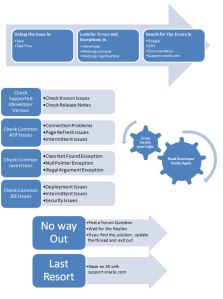
ADF Application Troubleshooting Flowchart – Explained


Initial Stage

Debugging the Issue:

Debugging the problem is the important step in finding the problem in ADF Application. If you are able to debug the application flow then there is a possible chance of pointing out the problem in the first place. Debugging help us to understand where and when the problem arises.

In ADF Application you can debug the issue by placing the breakpoints in Java class file and also in Task Flows. To know more about debugging follow this link

If we are able to identify the problem and fix it then its good. otherwise note down the problem and move to next step

Look for Errors:

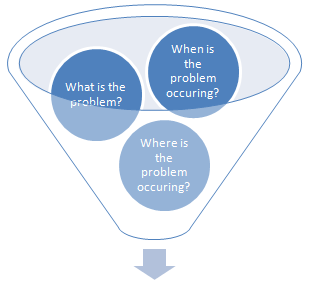
After debugging the issues we are sure that the outcome will result in

  • What is the problem?
  • Where is the problem occurring?
  • When is the problem occurring?

Most of the time we have the exception thrown to the user or in the console. Its easy foe advanced user to identify the  cause of the issue when the exception or the error is thrown. Also the exceptions that occur will be self explanatory but its hard for newbie to spot the root cause.

Its always advised to find the exception or error for the clear understanding of the problem. So we have to find a way to get these exceptions thrown. These are the qualified places to look for errors and exceptions

  • JDeveloper Console – For integrated server
  • Weblogic Console – if its a standalone deployment

This link will help you to find the errors and also some standard practice to look for exceptions by preparing the application to log the application events using a Logger file.

After seeing the Exceptions

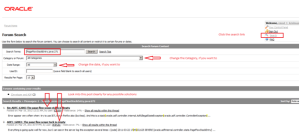
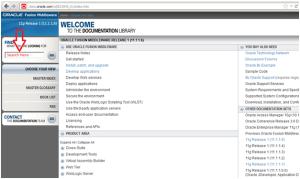
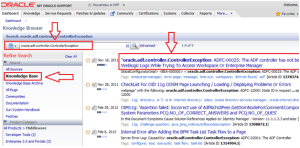
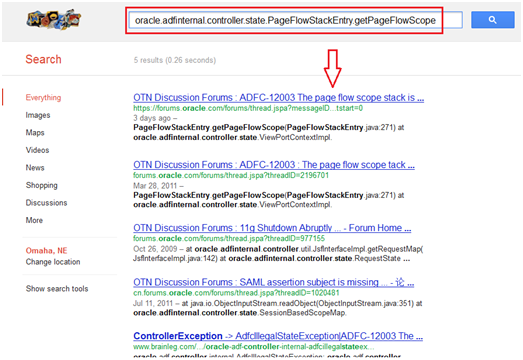
Search for Errors online

By this time you would have got the exception or the error in your hand. So don’t waste time start searching for the error in

  • To Search in Google efficiently follow this link
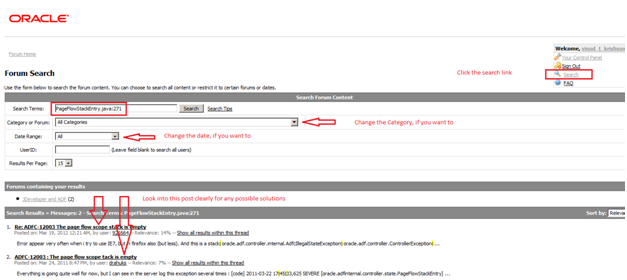
  • OTN Forum link is here
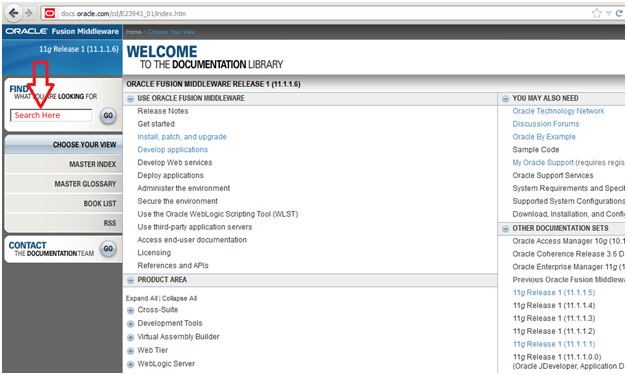
  • Documentation (11.1.1.6) link is here
  • Oracle Support link is here

Eg. If this is the error that you are getting


oracle.adf.controller.internal.AdfcIllegalStateException: oracle.adf.controller.ControllerException: ADFC-12003: The page flow scope stack is empty.
 at oracle.adfinternal.controller.state.PageFlowStackEntry.getPageFlowScope(PageFlowStackEntry.java:271)
 at oracle.adfinternal.controller.state.ViewPortContextImpl.getCurrentStateInstance(ViewPortContextImpl.java:594)
 at oracle.adfinternal.controller.state.RequestState.setCurrentViewPortContext(RequestState.java:200)
 at oracle.adfinternal.controller.state.ControllerState.setRequestState(ControllerState.java:948)
 at oracle.adfinternal.controller.state.ControllerState.synchronizeStatePart1(ControllerState.java:360)
 at oracle.adfinternal.controller.application.SyncNavigationStateListener.beforePhase(SyncNavigationStateListener.java:127)
 at oracle.adfinternal.controller.lifecycle.ADFLifecycleImpl$PagePhaseListenerWrapper.beforePhase(ADFLifecycleImpl.java:551)
 at oracle.adfinternal.controller.lifecycle.LifecycleImpl.internalDispatchBeforeEvent(LifecycleImpl.java:100)
 at oracle.adfinternal.controller.lifecycle.LifecycleImpl.dispatchBeforePagePhaseEvent(LifecycleImpl.java:147)
 at oracle.adfinternal.controller.faces.lifecycle.ADFPhaseListener$PhaseInvokerImpl.dispatchBeforePagePhaseEvent(ADFPhaseListener.java:112)
 at oracle.adfinternal.controller.faces.lifecycle.ADFPhaseListener.beforePhase(ADFPhaseListener.java:59)
 ...

Options to search

  1. oracle.adf.controller.internal.AdfcIllegalStateException (common search term)
  2. oracle.adf.controller.ControllerException (common search term)
  3. ADFC-12003: The page flow scope stack is empty (common search term)
  4. ADFC-12003  – you are widening the scope of the search if the above search term is not helping you
  5. oracle.adfinternal.controller.state.PageFlowStackEntry.getPageFlowScope – this will help you to identify when this problem arises
  6. PageFlowStackEntry.java:271 – strike the hammer at the point

Note: If you want to find issues similar to this in otn then give like ‘ADFC-12003 + OTN

Analysis Stage

You will come to this stage if you are not success with the above approach to identify the issue.

Are you trying some new Feature?

Is this a Connection Problem?

  • Check the connection, and make sure if you are able to connect to the DB properly.
  • Make sure that you have configured the Data Source properly.
  • Is the Databindings.cpx points to the correct application module configuration

Is it a common Java Issue?

  • Class path issue – Check if the libraries are there in the class path and if you have added the libraries to the project.
  • Did you add the correct libraries to the project
  • make sure that you ‘Deploy by Default‘ the libaries that you add
  • Common Exceptions – NullPointerException, ArithmeticException, NumberFormatingException etc
  • If these errors are shown inside the framework then check if you are doing what is expected and you are sure to check how it works.

Is this a common JEE Issue?

  • Deployment issue – this can be related to configurations in web.xml, weblogic.xml or weblogic-application.xml. Check if this can be solved using the parameters, filters or servlet mapping in web.xml
  • Session related issue – This can be again related to web.xml and session handling
  • Transaction issue – configurations related to adfc-config.xml

Configuration Issue?

  • All configuration parameters are here

Page Refresh Issue?

  • Check iterator refresh condition property
  • Check the changeeventpolicy in iterator
  • is the partialsubmit or the autosubmit is working as expected
  • cross check with the immediate property
  • Check the partial triggers property

Security Issue?

  • May be related to jazn-data.xml, is the system-data.xml getting updated with the User and Roles
  • the configurations are done in web.xml, weblogic.xml
  • Check security settings in weblogic server.
  • Check security setting for the folders also, sometimes the server needs full permission for some updates. This may also cause some problem

Intermittent Issue?

  • This may be related to Clustering. Cross check with clustering of ADF Application
  • adf-config.xml has some property for clustering. check that

Memory Issue?

  • Increase the Heap size for the application and try
  • make your application more performance to overcome any memory issues

Data Issue?

  • Check if the DB data is proper
  • Run the query in the back end to make sure that you get the proper result

Change not reflecting?

  • Do a clean build and try to run again. make sure you generate the classes again
  • remove drs folder in system folder or remove the DefaultDomain folder or remove the complete system folder and try from scratch

Not sure about the problem?

  • Cross check our logic,never assume that your logic is correct, try to alter the logic ,ask your peer to review the logic (others will have an extra eye on the problem and the approach)
  • Read the Documentation again to check how the component works and make sure that you completely understand it

Note: Most of the issues listed above are common issues, you will get all related issues when you search online or in Oracle Forums. I believe that Only 5% of the issues can be considered as never experienced by others. So most of the issues that the user experience will be already discussed in the future. So do search the Oracle forums or Google to get your issues solved.

Submission Stage

Post a Forum Question

  • This stage is like you are asking for help from the experts who has some expertise in the area.
  • Wait for the answers, if you are not getting an answer ask for it again one or two times
  • If someone post for your question then try to validate that. Don’t ignore if someone who is not an expert replied to our post. Its better to try all possible ways.
  • If you get an answer, try that and update the post about your findings even if the issue is fixed. This will help some other person who is facing similar issue like you

Raise for help from Oracle

If you have tried all possible options above then you have to wait for Oracle to help you.

  • Raise an SR

f:convertnumber for decimal numbers


I was working on to filter the decimal value using the QBE feature in the af:table but was facing an issue with the conversion and filtering the values

as you all know that we use the custom filter QBE to filter custom types other than String using the snippet


<af:column>

....

<f:facet name="filter">
 <af:inputText label="2" id="it2" value="#{vs.filterCriteria.id}">
 <f:convertNumber groupingUsed="false" integerOnly="true"/>
 inputText>
 </f:facet>

...

I thought of filtering the decimal values using the option available in af:convertNumber


<af:column>

....

<f:facet name="filter">
 <af:inputText label="2" id="it2" value="#{vs.filterCriteria.id}">
 <f:convertNumber groupingUsed="false" maxFractionDigits="2" patter="#.##" minFractionDigits="1" maxIntegerDigits="1"/>
 </af:inputText>
 </f:facet>

...

But the above options didn’t work as expected.

Finally I found the way to filter the double values using convertor=”javax.faces.Double”


<af:column>

....

<f:facet name="filter">
 <af:inputText label="2" id="it2" value="#{vs.filterCriteria.id}" convertor="javax.faces.Double"/>
 </af:inputText>
 </f:facet>

...

Display iterated list in horizontal fashion


Recently I had a challenge of showing the list in a horizontal fashion in two columns which I had thought would be easy to implement using af:iterator and af:panelGroupLayout. But when I actually tried it, the horizontal display of the iterated list becomes a challenge.
I tried a couple of options to display close to the requirement but was not actually reaching there.
Finally I got the solution by using

panelFormLayout id="pfl1" rows="1" maxColumns="2">
forEach items="#{List}" var="row" step="2" begin="0">
..
forEach>
<af:forEach items="#{List}" var="row" step="2" begin="1">
..
</af:forEach>
</af:panelFormLayout>

The step and the begin attribute is the key here along with the maxColumns and rows.

Attempt to validate an already invalid RegionSite


was facing this issue and couldn’t find a proper place to look into then I got to know that this issue is surely related to the view..

After serious debugging found that this issue is mainly because of the usage of a taskflow as a region but the taskflow is not having a default activity..

The default activity somehow got removed and setting it back into the place made my day.


Attempt to validate an already invalid RegionSite:
  <_handleException> ADF_FACES-60098:Faces lifecycle receives unhandled exceptions in phase RENDER_RESPONSE 6
 java.lang.IllegalStateException: Attempt to validate an already invalid RegionSite:

Adding custom message in ADF UI


The complete steps are given here

http://download.oracle.com/docs/cd/E12839_01/web.1111/b31974/bcadvgen.htm#BABEFGCI

also download the sample from here

Getting the value of Saved search – programatic way


QueryModel qm = (QueryModel)evaluateEL("#{bindings.SearchViewCriteriaQuery.queryModel}");
 for(int indexCount=0; indexCount
 {
 QueryDescriptor qd = qm.getUserQueries().get(indexCount);
 if(qd!=null){
 String queryDescriptorName = qd.getName();
 System.out.println(queryDesctiptorName);
 m = qd.getUIHints();
 isDefault = (Boolean) m.get(QueryDescriptor.UIHINT_DEFAULT);
 System.out.println(isDefault);
 isRunAutomatically = (Boolean) m.get(QueryDescriptor.UIHINT_AUTO_EXECUTE);
 System.out.println(isRunAutomatically);
 if (Boolean.TRUE.equals(isDefault) && Boolean.TRUE.equals(isRunAutomatically){
 break();
 }
 else{
 queryDescriptorName = null;
 }
 System.out.println(isDefault);
 }

Snippet to check if the transaction is dirty


We can use the following code snippet to check if the transaction is dirty or not

BindingContext bctx = oracle.adf.controller.binding.BindingUtils.getBindingContext();
if (bctx.findDataControlFrame(bctx.getCurrentDataControlFrame()).isTransactionDirty()) {
 //show the timestamp
 }
 else{
 //don't show
 }

Show dialog when a page is fully loaded


1. Add popup and outputText component at the end of your page (make sure popup is before outputText in the page structure)

2. Create bean binding for popup as well as outputText.

3. In the getter of outputText, launch popup programatically.

4. Set visible=false for outputText