Author Archives: vtkrishn

Unknown's avatar

About vtkrishn

Vinod Krishnan has over 12 years experience in the Information Technology industry and a multifaceted career in positions such as Senior Consultant, Senior Applications Engineer, Software Engineer and Solution Architect for MNC’s like (Oracle, Capgemini, Keane). His many years of experience have exposed him to a wide range of Oracle Technologies that includes java, J2EE, Weblogic, Fusion Middleware, SOA and Webcenter. For the last five years, Vinod is actively involved in large implementations of next generation enterprise applications utilizing Oracle’s JDeveloper, Application Development Framework (ADF) technologies. He holds a B.Tech. in Information Technology from Anna University of Chennai, India.

Magic.. Magic..


Ever wonder how files are identified correctly as jpeg, gif or even class file for that matter by the OS.

Its all magic.. 🙂

Magic numbers are those which are prefixed at the start of the file in ASCII code to identify the file format.

Some of the common magic numbers are

Class byte code starts with hex - CAFEBABE
GIF image files have 'GIF89a' (47 49 46 38 39 61) or 'GIF87a' (47 49 46 38 37 61)
JPEG image files begin with FF D8 and end with FF D9
PNG image files begin with "\211 P N G \r \n 32 \n" (89 50 4E 47 0D 0A 1A 0A)
ZIP files begin with 'PK' (50 4B)
PDF files start with '%PDF' (25 50 44 46)

Singleton pattern revisited


Singleton pattern

Definition: At any point of time we ensure that there is only object created for the class

Example:
participant classes:

  • Singleton.java
  • SingletonClient.java(client)

Diagram:

Singleton.java

  • This class includes a static member variable singleton with private scope
  • the constructor is private so that no one can instantiate it
  • we have a getCurrentInstance() method to instantiate the class. If the instance is already available then the instance is returned to the caller otherwise it is newly created
public class Singleton {

 private static Singleton singleton = null;

 private Singleton(){

 }

 public static synchronized Singleton getCurrentInstance(){
 if(singleton == null){
 return new Singleton();
 }
 else{
 return singleton;
 }
 }

 public void sayHello(){
 System.out.println("Hello");
 }
}

SingletonClient.java

use getCurrentInstance() method to get the instance of Singleton class and use it.

 public class SingletonClient {

 public static void main(String[] args) {

 Singleton singleton =  Singleton.getCurrentInstance();
 singleton.sayHello();
 }
}
 

contract:

cannot instatiate more than once.
getCurrentInstance() return only one instance at any point of time

Implementing Prototype pattern


Prototype pattern

Definition: the pattern is used to create a clone avoiding another creation. We clone the object if the cost of creating the object is expensive than cloning it.

Example:
participant classes:

  • Vinod.java
  • Rinku.java
  • Prototype.java
  • PrototpyeClient.java (client)

Diagram:


Prototype.java

This is an interface class defining signature for doClone() method. The return type is of Prototype type. This throws CloneNotSupportedException.

 public interface Prototype {
 public Prototype doClone() throws CloneNotSupportedException;
}

Vinod.java & Rinku.java

These are simple classes describing Vinod’s and Rinku’s characteristics. They have their attributes and their respective accessors defined in the class

These two classes implement the Prototype interface
doClone() method is implemented returning a new clone of the respective class

//Vinod.java
 public class Vinod implements Prototype,Cloneable{
 String name;
 String age;
 String sex;

 public String getName() {
 return "Vinod";
 }
 public String getAge() {
 return "25";
 }
 public String getSex() {
 return "Male";
 }
 @Override
 public Prototype doClone() throws CloneNotSupportedException {
 return (Prototype) this.clone();

 }

}

//Rinku.java

public class Rinku implements Prototype,Cloneable{
 String name;
 String age;
 String sex;

 public String getName() {
 return "Rinku";
 }
 public String getAge() {
 return "22";
 }
 public String getSex() {
 return "Female";
 }
 @Override
 public Prototype doClone() throws CloneNotSupportedException {
 return (Prototype) this.clone();

 }
}

PrototypeClient.java

Instantiating the objects and cloning the same

public class PrototypeClient {

 public static void main(String[] args) throws CloneNotSupportedException {

 Vinod vinod = new Vinod();
 Vinod vinod2 = (Vinod)vinod.doClone();

 System.out.println(vinod.hashCode() != vinod2.hashCode());
 System.out.println(vinod.getClass() == vinod2.getClass());

 }
}

contract:

x.clone() != x
x.clone().getClass() == x.getClass()

How to iterate the showDetailItem inside the panelTabbed component using af:forEach


Here is the code

       private List items;
       private ArrayList list = new ArrayList();

        public Bean(){
            list.add(new SelectItem("1"));
            list.add(new SelectItem("2"));
        }

         public List getItems() {
             return list;
        }
    
<panelTabbed id="pt1">
 <forEach var="row" items="#{Bean.items}">
 <showDetailItem text="showDetailItem #{row.label}" id="sdi1" />
 </af:forEach>
 </af:panelTabbed>
    

and it renders like

How to hide the viewcriteria from the af:query panel


If you want to hide the view criteria, then here is the easy way
The code is written in the setter of the af:query binding

public void setQuery_binding(RichQuery query_binding) {

 this.query_binding = query_binding;

 DCBindingContainer bindings = (DCBindingContainer)this.getBindings();
 DCIteratorBinding iter =
 bindings.findIteratorBinding("<TableIterator>");

 ViewObjectImpl voimpl = (ViewObjectImpl)iter.getViewObject();
 ViewCriteria vc =  voimpl.getViewCriteriaManager().getViewCriteria("");
 vc.setProperty(ViewCriteriaHints.CRITERIA_SHOW_IN_LIST, ViewCriteriaHints.CRITERIA_HINT_FALSE);

 }
  • getting the handle to the iterator
  • getting handle to the ViewCriteriaManager, and then getting handle to the specific view criteria that we wanted to hide
  • modifying the ViewCriteriaHints.CRITERIA_SHOW_IN_LIST property to false

note: helper method – getBindings()

 private BindingContainer getBindings() {
 if (this.bindings == null) {
 FacesContext fc = FacesContext.getCurrentInstance();
 this.bindings =
 (BindingContainer)fc.getApplication().evaluateExpressionGet(fc,
 "#{bindings}",
 BindingContainer.class);
 }
 return this.bindings;
 }

Getting the value of Saved search in programatic way


This code can be added to the setter of the component from where you want to access the saved search of the af:query panel

QueryModel qm = (QueryModel)evaluateEL("#{bindings.<searchRegionFromThePageDef>.queryModel}");
for(int indexCount=0; indexCount<qm.getUserQueries().size();indexCount++)
{
 QueryDescriptor qd = qm.getUserQueries().get(indexCount);
 if(qd!=null){
 String queryDescriptorName = qd.getName();
 System.out.println(queryDesctiptorName);
 m = qd.getUIHints();
 isDefault = (Boolean) m.get(QueryDescriptor.UIHINT_DEFAULT);
 isRunAutomatically = (Boolean) m.get(QueryDescriptor.UIHINT_AUTO_EXECUTE);

 if (Boolean.TRUE.equals(isDefault) && Boolean.TRUE.equals(isRunAutomatically){
 //code goes here
 }
 else{
 //else code
 }
 }
}

quick walk through..

  • Getting the handle to QueryModel
  • Iterating through the userQueries. ie. the Saved Searches
  • Get handle to the QueryDescriptor
  • get handle to UIHints from the QueryDescriptor
  • check for QueryDescriptor.UIHINT_DEFAULT and QueryDescriptor.UIHINT_AUTO_EXECUTE and implement the logic based on the value obtained.

Explicit validation for af:input components


Here is a simple way to get around with the red box validation that used to appear on af:input Components upon some validation

<af:inputText value="#{row.bindings.<attributeValue>.inputValue}"
 label="#{bindings.<tableBinding>.hints.<attributeValue>.label}"
 required="#{bindings.<tableBinding>.hints.<attributeValue>.mandatory}"
 columns="#{bindings.<tableBinding>.hints.<attributeValue>.displayWidth}"
 maximumLength="#{bindings.<tableBinding>.hints.<attributeValue>.precision}"
 shortDesc="#{bindings.<tableBinding>.hints.<attributeValue>.tooltip}"
 id="it3" validate="#{MyBean.validate}">

and in the MyBean class we have it like

public void validate(FacesContext facesContext, UIComponent uiComponent, Object value) {
        FacesMessage message = new FacesMessage();
        message.setDetail("Some Errror message");
        message.setSummary("Value Error message");
        message.setSeverity(FacesMessage.SEVERITY_ERROR);
        throw new ValidatorException(message);
}

what are we doing here..

  • Getting the handle to the FacesMessage by explicitly instantiating it
  • Set the Detail,Summary and Severity for the message
  • Throwing the message as a ValidatorException

ADF Library


How normal jar library is different from ADF Library?

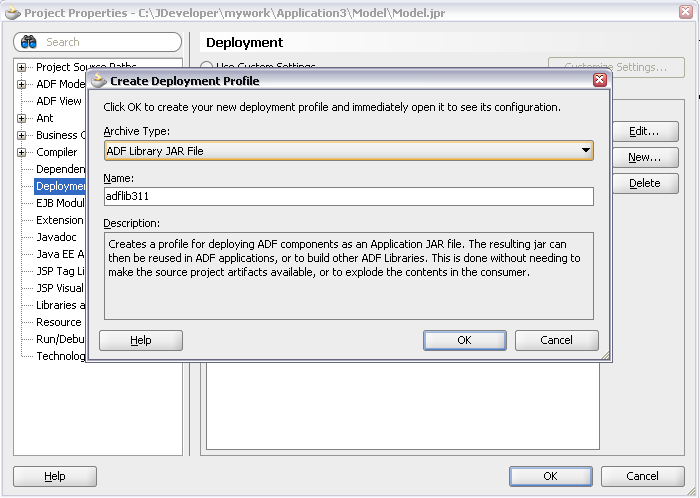
Whenever you create a deployment profile for the model project in ADF you wil select the ADF Library type rather an ordinary library type (java jar type)

Both act as a library archive supporting jar and zip files

What is the difference then?

  • ADF library differ in a way that it behaves. It has the uniqueness of automatically pulling in the dependent jar files that is referred by any of the files and written in to the manifest files. The dependent libraries that are needed at runtime is pulled n by Jdeveloper as secondary imports.
  • The library exposes the meta data files likes task flows allowing the user to drag and drop in their files as dependent files which normal jar will not expose and support. The dropped taskflow will be added as a region in the page.

closer look at the FacesServlet instance


This is always ignored as a default servlet that gets generated in the web.xml, but do we know the actual usage of this servlet?

All the JSF applications should include a mapping to this servlet in the deployment Descriptor. The usage of this servlet is that it

  • accepts all the incoming request
  • passes them to the lifecycle for processing
  • intializes the resources

it is usually defined in the web.xml file as

<servlet>
 <display-name>FacesServlet</display-name>
 <servlet-name>FacesServlet</servlet-name>
 <servlet-class>javax.faces.webapp.FacesServlet
 </servlet-class>
 <load-on-startup>1</load-on-startup>
 </servlet>

with corresponding mapping as well

<servlet-mapping>
 <servlet-name>FacesServlet</servlet-name>
 <url-pattern>/faces/*</url-pattern>
 </servlet-mapping>

the servlet includes servlet lifecycle methods to initialize and process the request

init(ServletConfig)FacesContextFactory,LifeCycleFactory is identified and the lifeCycle reference is obtained with the default lifecycle id
service()the pathInfo is manipulated from WEB-INF and META-INF folder from the request, FacesContext is obtained, lifecycle is executed and rendered, later the context is released
destroy()all the instances are destroyed.. technically speaking nullified

Ways to setup Querymode programatically


How to set the query mode for the af:query component programatically?

The query component provides two ways of searching. BASIC and ADVANCED mode.
Basic mode renders the query panel with the viewcriteria defined and allows the user to search based on the query criteria
Advanced mode helps the user to provide advanced options for the user to search based on the operators. It also provides the user to add more fields to the query criteria.

public Boolean setAdvancedMode(){
String expression = "#{bindings.<searchregionbindingfrompagedef>.queryDescriptor}";
FacesContext facesContext = getFacesContext();
Application app = facesContext.getApplication();
ExpressionFactory elFactory = app.getExpressionFactory();
ELContext elContext = facesContext.getELContext();
ValueExpression valueExp =
elFactory.createValueExpression(elContext, expression,
Object.class);
QueryDescriptor descriptor =
(QueryDescriptor)valueExp.getValue(elContext)
;
descriptor.changeMode(QueryDescriptor.QueryMode.ADVANCED);
return true;
}

lets drill down deeply into the code to check what are we doing

String expression = "#{bindings.<searchregionbindingfrompagedef>.queryDescriptor}";
  • getting the expression for the query binding from the pagedef and storing it in a string
FacesContext facesContext = getFacesContext();
Application app = facesContext.getApplication();
ExpressionFactory elFactory = app.getExpressionFactory();
ELContext elContext = facesContext.getELContext();
  • getting the Facescontext reference from FacesContext.getCurrentInstance();
  • getting the application from the facesContext
  • getting the expresionFactory for the application
  • getting the elContext from the FacesContext
ValueExpression valueExp =
elFactory.createValueExpression(elContext, expression,
Object.class);

create a value expression by passing the elcontext and the expression where Object type is expected

QueryDescriptor descriptor =
(QueryDescriptor)valueExp.getValue(elContext);
descriptor.changeMode(QueryDescriptor.QueryMode.ADVANCED);

The value from the valueExpression object is casted to the QueryDescriptor object
As we got the reference to the QueryDescriptor, we call the changeMode method to change the mode to QueryDescriptor.ADVANCED