Author Archives: vtkrishn

Unknown's avatar

About vtkrishn

Vinod Krishnan has over 12 years experience in the Information Technology industry and a multifaceted career in positions such as Senior Consultant, Senior Applications Engineer, Software Engineer and Solution Architect for MNC’s like (Oracle, Capgemini, Keane). His many years of experience have exposed him to a wide range of Oracle Technologies that includes java, J2EE, Weblogic, Fusion Middleware, SOA and Webcenter. For the last five years, Vinod is actively involved in large implementations of next generation enterprise applications utilizing Oracle’s JDeveloper, Application Development Framework (ADF) technologies. He holds a B.Tech. in Information Technology from Anna University of Chennai, India.

Differentiate services and sid in connection string


This might be a basic information for some experts out there but I felt its worth mentioning it here

how will u differentiate between services and the SID to connect to Oracle using JDBC in the connection string

for SID: it goes like
jdbc:oracle:thin:@localhost:1521:XE

for Services you specify like
jdbc:oracle:thin:@localhost:1521/XE

 Class.forName("oracle.jdbc.driver.OracleDriver");
 conn =
 DriverManager.getConnection(jdbc:oracle:thin:@localhost:1521/XE,system,tiger);
 Statement stmt = conn.createStatement();
 ResultSet rset = stmt.executeQuery(query);

oracle.fabric.common.FabricInvocationException


Bump….
I got this error yesterday when I tried to deploy a dummy soa composite

Error Message: {http://schemas.oracle.com/bpel/extension}remoteFault
Fault ID    default/Project1!3.0*ad3d0394-9602-4482-9429-fc45d624bb5b/ProcessHello/3-BpInv0-BpSeq0.3-3
Fault Time    Sep 3, 2010 1:07:55 PM
Non Recoverable System Fault :
<bpelFault><faultType> <message>0</message></faultType>
<remoteFault xmlns="http://schemas.oracle.com/bpel/extension">
<part name="summary">
<summary>oracle.fabric.common.FabricInvocationException</summary>
</part>
<part name="detail"><detail>null</detail></part>
<part name="code"><code>null</code></part>
</remoteFault></bpelFault>

for the above error the solution is the deploy the soa composite along with the deployment plan

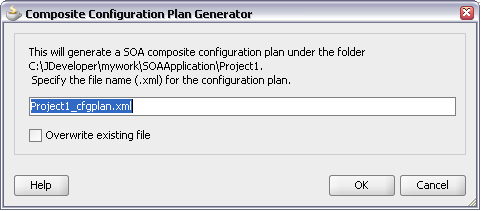
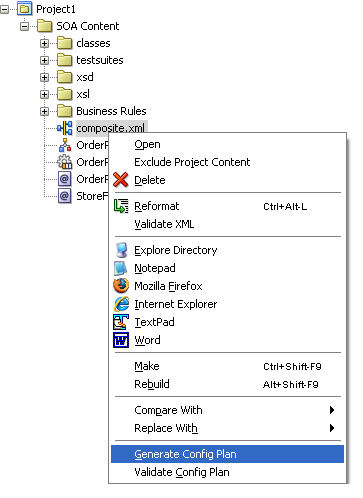
right-click the composite and click on generate

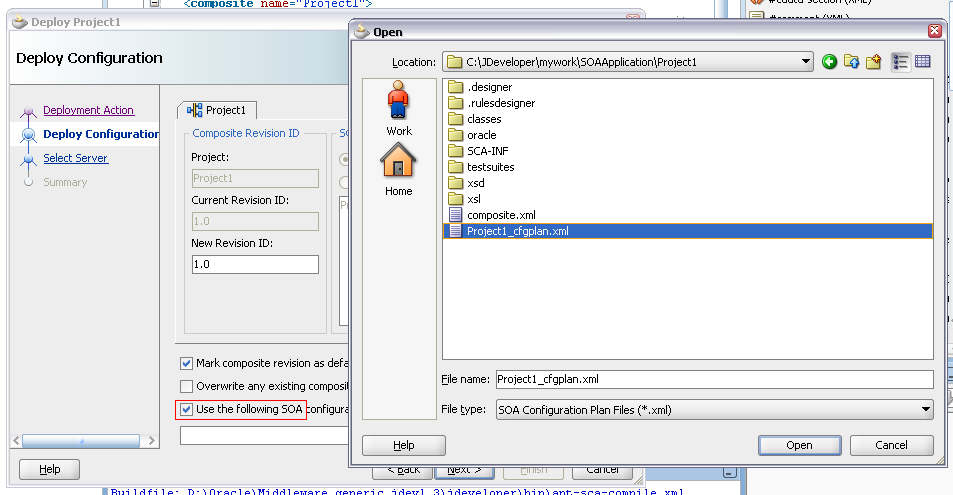
when u deploy the soa composite you will have to select the
‘Use the SOA configuration option’ and locate the file

The sample config plan will be like

<?xml version="1.0" encoding="UTF-8"?>
<SOAConfigPlan xmlns:jca="http://platform.integration.oracle/blocks/adapter/fw/metadata" xmlns:wsp="http://schemas.xmlsoap.org/ws/2004/09/policy" xmlns:orawsp="http://schemas.oracle.com/ws/2006/01/policy" xmlns:edl="http://schemas.oracle.com/events/edl" xmlns="http://schemas.oracle.com/soa/configplan">
 <composite name="Project1">
 <!--Add search and replace rules for the import section of a composite
 Example:
 <searchReplace>
 <search>http://my-dev-server</search>
 <replace>http://my-test-server</replace>
 <searchReplace>
 <searchReplace>
 <search>8888</search>
 <replace>8889</replace>
 <searchReplace>-->
 <import>
 <searchReplace>
 <search/>
 <replace/>
 </searchReplace>
 </import>
 <service name="orderprocessor_client_ep">
 <binding type="ws">
 <attribute name="port">
 <replace>http://xmlns.oracle.com/SOAApplication_jws/Project1/OrderProcessor#wsdl.endpoint(orderprocessor_client_ep/OrderProcessor_pt)</replace>
 </attribute>
 </binding>
 <callback>
 <binding type="ws">
 <attribute name="port">
 <replace>http://xmlns.oracle.com/SOAApplication_jws/Project1/OrderProcessor#wsdl.endpoint(orderprocessor_client_ep/OrderProcessorCallback_pt)</replace>
 </attribute>
 </binding>
 </callback>
 </service>
 <!--Add search and replace rules for the component properties
 For components and service/reference bindings, you can add policy references.
 Example:
 <component name="*">
 <wsp:PolicyReference orawsp:category="management" orawsp:status="enabled" URI="oracle/log_policy"/>
 </component>-->
 <component name="OrderProcessor">
 <property name="activationAgent.LoadData.className">
 oracle.tip.adapter.fw.agent.jca.JCAActivationAgent
 </property>
 <property name="activationAgent.LoadData.portType">
 <replace>execute_ptt</replace>
 </property>
 </component>
 <reference name="StoreFrontService">
 <binding type="ws"/>
 </reference>
 </composite>
 <!--To configure monitor.config:
 <property name="enabled"><replace>true</replace></property>
 <property name="dataObjectsFolder"><searchReplace><search>mydev</search><replace>myproduction</replace></searchReplace></property>

 sample properties to configure for adapter:
 medmq1

 To add search and replace rules for wsdls, xsd and jca files
 Example:
 <searchReplace>
 <search>http://my-dev-server</search>
 <replace>http://my-test-server</replace>
 <searchReplace>
 <searchReplace>
 <search>8888</search>
 <replace>8889</replace>
 <searchReplace>
 -->
 <wsdlAndSchema name="OrderProcessor.wsdl|StoreFront.wsdl|xsd/BPELProcess1.xsd|xsd/OrderProcessor.xsd|xsd/singleString.xsd|xsd/StoreFront.xsd|xsd/StoreFrontProcessor.xsd">
 <searchReplace>
 <search/>
 <replace/>
 </searchReplace>
 </wsdlAndSchema>
</SOAConfigPlan>

Adding custom message in ADF UI


The complete steps are given here

http://download.oracle.com/docs/cd/E12839_01/web.1111/b31974/bcadvgen.htm#BABEFGCI

also download the sample from here

Commands used to install XE for LINUX


Download the file from here

go to the installation folder of the rpm file

login as a root

root# rpm -ivh oracle-xe-univ-10.2.0.1-1.0.i386.rpm

to remove the previous installation use

root# rpm -e oracle-xe-univ-10.2.0.1-1.0.i386

root# /etc/init.d/oracle-xe configure
------------------------------------------------------------------------------

[root@indl144224 Desktop]# rpm -ivh oracle-xe-univ-10.2.0.1-1.0.i386.rpm

Preparing...                ########################################### [100%]

1:oracle-xe-univ         ########################################### [100%]

Executing Post-install steps...

You must run '/etc/init.d/oracle-xe configure' as the root user to

configure the database.

[root@indl144224 Desktop]# /etc/init.d/oracle-xe configure

------------------------------------------------------------------------------

user is prompted to configure http port, listener port, and the password for SYs and SYSTEM user

[its better to change to avoid any error in the future]

Oracle Database 10g Express Edition Configuration

-------------------------------------------------

This will configure on-boot properties of Oracle Database 10g Express

Edition.  The following questions will determine whether the database should

be starting upon system boot, the ports it will use, and the passwords that

will be used for database accounts.  Press <Enter> to accept the defaults.

Ctrl-C will abort.

Specify the HTTP port that will be used for Oracle Application Express [8080]:8081

Specify a port that will be used for the database listener [1521]:1522

Specify a password to be used for database accounts.  Note that the same

password will be used for SYS and SYSTEM.  Oracle recommends the use of

different passwords for each database account.  This can be done after

initial configuration:

Confirm the password:

Do you want Oracle Database 10g Express Edition to be started on boot (y/n) [y]:n

Starting Oracle Net Listener...Done

Configuring Database...Done

Starting Oracle Database 10g Express Edition Instance...Done

Installation Completed Successfully.

To access the Database Home Page go to "http://127.0.0.1:8081/apex"

------------------------------------------------------------------------------

export $ORACLE_HOME and $ORACLE_SID

------------------------------------------------------------------------------

[root@indl144224 Desktop]# export ORACLE_HOME=/usr/lib/oracle/xe/

app/     oradata/

[root@indl144224 Desktop]# export ORACLE_HOME=/usr/lib/oracle/xe/app/oracle/product/10.2.0/server

[root@indl144224 Desktop]# export ORACLE_SID=XE

[root@indl144224 Desktop]# cd /usr/lib/oracle/xe/app/oracle/product/10.2.0/server/bin/

------------------------------------------------------------------------------

Check the tns lsitener status

------------------------------------------------------------------------------

[root@indl144224 bin]# ./lsnrctl

LSNRCTL for Linux: Version 10.2.0.1.0 - Production on 30-AUG-2010 17:53:57

Copyright (c) 1991, 2005, Oracle.  All rights reserved.

Welcome to LSNRCTL, type "help" for information.

LSNRCTL> status

Connecting to (DESCRIPTION=(ADDRESS=(PROTOCOL=IPC)(KEY=EXTPROC_FOR_XE)))

STATUS of the LISTENER

------------------------

Alias                     LISTENER

Version                   TNSLSNR for Linux: Version 10.2.0.1.0 - Production

Start Date                30-AUG-2010 17:40:21

Uptime                    0 days 0 hr. 13 min. 39 sec

Trace Level               off

Security                  ON: Local OS Authentication

SNMP                      OFF

Default Service           XE

Listener Parameter File   /usr/lib/oracle/xe/app/oracle/product/10.2.0/server/network/admin/listener.ora

Listener Log File         /usr/lib/oracle/xe/app/oracle/product/10.2.0/server/network/log/listener.log

Listening Endpoints Summary...

(DESCRIPTION=(ADDRESS=(PROTOCOL=ipc)(KEY=EXTPROC_FOR_XE)))

(DESCRIPTION=(ADDRESS=(PROTOCOL=tcp)(HOST=indl144224.idc.oracle.com)(PORT=1522)))

(DESCRIPTION=(ADDRESS=(PROTOCOL=tcp)(HOST=127.0.0.1)(PORT=8081))(Presentation=HTTP)(Session=RAW))

Services Summary...

Service "PLSExtProc" has 1 instance(s).

Instance "PLSExtProc", status UNKNOWN, has 1 handler(s) for this service...

Service "XE" has 1 instance(s).

Instance "XE", status READY, has 1 handler(s) for this service...

Service "XEXDB" has 1 instance(s).

Instance "XE", status READY, has 1 handler(s) for this service...

Service "XE_XPT" has 1 instance(s).

Instance "XE", status READY, has 1 handler(s) for this service...

The command completed successfully

LSNRCTL> exit

Getting the value of Saved search – programatic way


QueryModel qm = (QueryModel)evaluateEL("#{bindings.SearchViewCriteriaQuery.queryModel}");
 for(int indexCount=0; indexCount
 {
 QueryDescriptor qd = qm.getUserQueries().get(indexCount);
 if(qd!=null){
 String queryDescriptorName = qd.getName();
 System.out.println(queryDesctiptorName);
 m = qd.getUIHints();
 isDefault = (Boolean) m.get(QueryDescriptor.UIHINT_DEFAULT);
 System.out.println(isDefault);
 isRunAutomatically = (Boolean) m.get(QueryDescriptor.UIHINT_AUTO_EXECUTE);
 System.out.println(isRunAutomatically);
 if (Boolean.TRUE.equals(isDefault) && Boolean.TRUE.equals(isRunAutomatically){
 break();
 }
 else{
 queryDescriptorName = null;
 }
 System.out.println(isDefault);
 }

Snippet to check if the transaction is dirty


We can use the following code snippet to check if the transaction is dirty or not

BindingContext bctx = oracle.adf.controller.binding.BindingUtils.getBindingContext();
if (bctx.findDataControlFrame(bctx.getCurrentDataControlFrame()).isTransactionDirty()) {
 //show the timestamp
 }
 else{
 //don't show
 }

Show dialog when a page is fully loaded


1. Add popup and outputText component at the end of your page (make sure popup is before outputText in the page structure)

2. Create bean binding for popup as well as outputText.

3. In the getter of outputText, launch popup programatically.

4. Set visible=false for outputText

Thoughts on Java that works


Disclaimer: This is just to get an idea of the implementation, please do not copy the source code

The problem reads like

SALES TAXES
Basic sales tax is applicable at a rate of 10% on all goods, except books,
food, and medical products that are exempt. Import duty is an additional
sales tax applicable on all imported goods at a rate of 5%, with no
exemptions.
When I purchase items I receive a receipt which lists the name of all the
items and their price (including tax), finishing with the total cost of the
items, and the total amounts of sales taxes paid.  The rounding rules for
sales tax are that for a tax rate of n%, a shelf price of p contains
(np/100 rounded up to the nearest 0.05) amount of sales tax.
Write an application that prints out the receipt details for these shopping
baskets…

Find the complete solved solution here

MARS ROVERS
A squad of robotic rovers are to be landed by NASA on a plateau on Mars.
This plateau, which is curiously rectangular, must be navigated by the
rovers so that their on-board cameras can get a complete view of the
surrounding terrain to send back to Earth.

A rover’s position and location is represented by a combination of x and y
co-ordinates and a letter representing one of the four cardinal compass
points. The plateau is divided up into a grid to simplify navigation. An
example position might be 0, 0, N, which means the rover is in the bottom
left corner and facing North.

In order to control a rover, NASA sends a simple string of letters. The
possible letters are ‘L’, ‘R’ and ‘M’. ‘L’ and ‘R’ makes the rover spin 90
degrees left or right respectively, without moving from its current spot.
‘M’ means move forward one grid point, and maintain the same heading.

Assume that the square directly North from (x, y) is (x, y+1).

Find the complete solved solution here

How to change the default text title of Detached table/treetable


have trindad-skins.xml in your web-inf folder and have the following tag

<skin>
 <id>dummy.desktop</id> // you are overriding the style
 <family>dummy</family>
 <extends>fusion.desktop</extends> // this should be from the trinidad-config.cml
 <render-kit-id>org.apache.myfaces.trinidad.desktop</render-kit-id>
 <style-sheet-name>skins/dummy/dummy.css</style-sheet-name>
 <bundle-name>oracle.view.resource.rich.SkinBundle</bundle-name> // your skin bundle to override the name
 </skin>

here dummy.css is used to override any visual property of the faces component defined in fusion theme
to override the label, use in the SkinBundle like (The java bundle file should be registered as a managed bean in adfc-config.xml)

package oracle.view.resource.rich;
 import java.util.ListResourceBundle;
public class SkinBundle
 extends ListResourceBundle
 {
 @Override
 public Object[] getContents()
 {
 return _CONTENTS;
 }

static private final Object[] _CONTENTS =
 {
 { "af_panelCollection.LABEL_DETACH_TABLE_DLG", "Any name for the Detachable Table" },
 { "af_panelCollection.LABEL_DETACH_TREE_TABLE_DLG", "Any name for the Detachable Tree Table" }
 };
 }

Decompiler for Jdeveloper


You can use JAD or any other decompiler with JDeveloper to show you the decompiled version of the source instead of the standard stub view with the following command line argument.

The property is ‘jcncmd’, and to use for instance ‘jad.exe’, you would use:

“-J-Djcncmd=D:\bin\jad.exe -b -ff -nl -p -pi99999 -space -t2”

There are two conditions: – the external decompiler must send its output to stdout – the external decompiler must accept as its last argument the full path to the Java class file to decompile. In the line above, -p forces the output to stdout.

Also you can invoke using control click by editing $JDEV_HOME\jdeveloper\jdev\bin\jdev.conf and add the following line

“AddVMOption -Djcncmd=D:\bin\jad.exe -b -ff -nl -p -pi99999 -space -t2”