When you connect to ucm from jdeveloper if you face problem in connecting then its worth to check the ip filter of the ucm connection in em console.
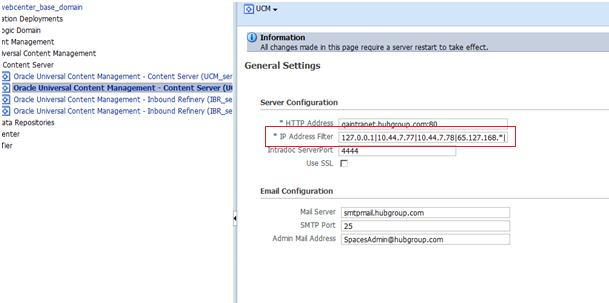
When you connect to ucm from jdeveloper if you face problem in connecting then its worth to check the ip filter of the ucm connection in em console.
Here is the snippet to connect to UCM from java
// create the IDC Client Manager manager
IdcClientManager manager = new IdcClientManager();

// build a client that will communicate using the HTTP protocol
IdcClient idcClient;

try {
//context with ucm username and password
IdcContext user = new IdcContext ("webadmin", "passw0rd");
//ucm link
idcClient = manager.createClient("idc://ucmwebcenterqa01.group.com:4444");

// get the binder
DataBinder binder = idcClient.createBinder();

// populate the binder with the parameters
binder.putLocal ("IdcService", "GET_FILE");
binder.putLocal("dDocName", "UCM_CLUSTER1001204");
binder.putLocal("RevisionSelectionMethod", "Latest");

try {
ServiceResponse response = idcClient.sendRequest (user, binder);

// get the response as a string
String responseString = response.getResponseAsString ();
//dispaly the content of the file
System.out.println ("" + responseString);

} catch (IdcClientException e) {
e.printStackTrace();
} catch (IOException e) {
e.printStackTrace();
}
} catch (IdcClientException e) {
e.printStackTrace();
}
}
add the following entry in setDomainEnv.sh as an extra java properties
EXTRA_JAVA_PROPERTIES="-Xmanagement:port=7091,ssl=false,authenticate=false,autodiscovery=true ${EXTRA_JAVA_PROPERTIES}"
export EXTRA_JAVA_PROPERTIES
The above entry is to enable the remote agent and make sure that the property is set while starting the weblogic server
Then try to create a new connection
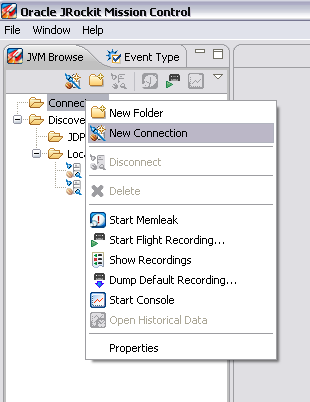
and then add the entries to connect to the remote weblogic server
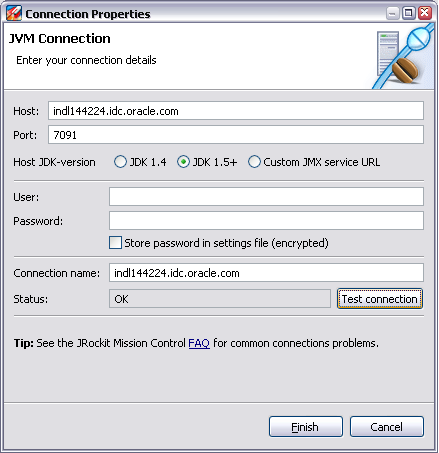
Test the connection and wait for OK and then press finish
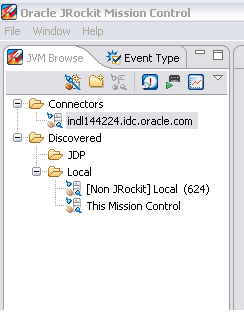
A new JVM connection is established.. Now you can proceed with the profiling and monitoring of the server
This might be a basic information for some experts out there but I felt its worth mentioning it here
how will u differentiate between services and the SID to connect to Oracle using JDBC in the connection string
for SID: it goes like
jdbc:oracle:thin:@localhost:1521:XE
for Services you specify like
jdbc:oracle:thin:@localhost:1521/XE
 Class.forName("oracle.jdbc.driver.OracleDriver");
 conn =
 DriverManager.getConnection(jdbc:oracle:thin:@localhost:1521/XE,system,tiger);
 Statement stmt = conn.createStatement();
 ResultSet rset = stmt.executeQuery(query);
 They point the finger at me.. again!