Tag Archives: ADF

ADF JavaScript Partitioning


Most of the performance issue at the client side for the ADF application is related to large number of client side scripting files getting download which increases the download time and relatively degrading the performance of the application. Breaking up the JavaScript into small chunks will result in modularity but will increase the round trip.

To resolve this ADF Faces Framework comes up with a concept of partitioning of the huge JavaScript at the client side based on the components used in the pages. That means only limited number of scripts required for the page is loaded at the client which will increase the performance drastically.

ADF Faces groups the components JavaScript files into two groups namely partitions and features. These two groups are defined separately in two configuration files i.e. adf-js-features.xml and adf-js-partitions.xml.

The default files are location at

C:\oracle\Middleware\oracle_common\modules\oracle.adf.view_11.1.1\ adf-richclient-impl-11.jar\

If the application is loaded without using an explicit partitions then adf will use the configuration settings defined in the above specified files and does the partition.
By default, the partitioning is enabled for performance which can be disabled using the initial parameter in web.xml

<context-param>
<param-name> oracle.adf.view.rich.libraryPartitioning.ENABLED</param-name>
<param-value>false</param-value>
</context-param>

Or

<context-param>
 oracle.adfinternal.view.rich.libraryPartitioning.ENABLED
</param-name>
<param-value>false</param-value>
</context-param>

Or

<context-param>
<param-name>oracle.adf.view.rich.libraryPartitioning.DISABLED</param-name>
<param-value>true</param-value>
</context-param>

Or

<context-param>
<param-name>oracle.adfinternal.view.rich.libraryPartitioning.DISABLED</param-name>
<param-value>true</param-value>
</context-param>

Now we will see how to create these files
•    Create adf-js-partitions.xml in public_html/WEB-INF folder of your application
•    Create adf-js-features.xml in src/META-INF folder of your application
•    The skeleton of these files looks like

adf-js-partitions.xml

<?xml version="1.0" encoding="utf-8"?>
xmlns="http://xmlns.oracle.com/adf/faces/partition">
<partition>
<partition-name>dnd</partition-name>
<feature>AdfDropTarget</feature>
</partition>
</partitions>

<partitions> – root tag to define partitions, all partitions are defined inside this
<partition> – define the partition, any number of partition is allowed
<partition-name> – name of the partion. For example the javascript will be loaded as dnd-11.1.1.4.js
<feature> – hook reference to the particular feature that defines to load the javascript for the component

adf-js-features.xml

<?xml version="1.0" encoding="utf-8"?>
xmlns="http://xmlns.oracle.com/adf/faces/feature">
<feature>
<feature-name>AdfDropTarget</feature-name>
oracle/adf/view/js/dnd/AdfBasicDropTarget.js
<feature-dependency>AdfDragAndDrop</feature-dependency>
</feature>
<feature>
<feature-name>AdfDragAndDrop</feature-name>
oracle/adfinternal/view/js/laf/dhtml/rich/AdfDhtmlDnDContext.js
</feature>
</features>

<features> – root tag for the features, all features are defined inside this
<feature> – define the feature, any number of feature is allowed
<feature-name> – name of the feature that has to be referenced from the partition file
<feature-class> – javascript class for the component
<feature-dependency> – name of the feature which is extended by the javascript class

Sample:

When you don’t have these files in place then the loaded scripts are
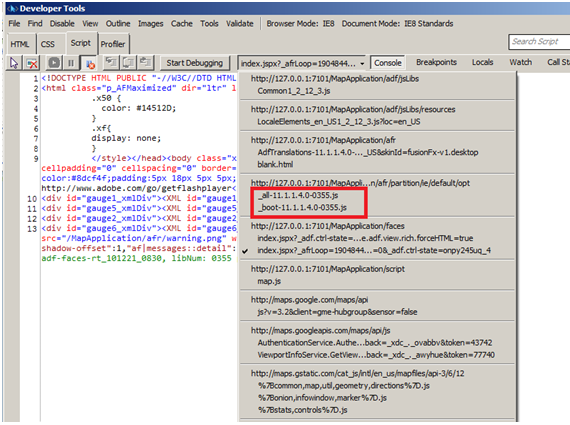
When you replicate the default content in your configuration files then the partition will be

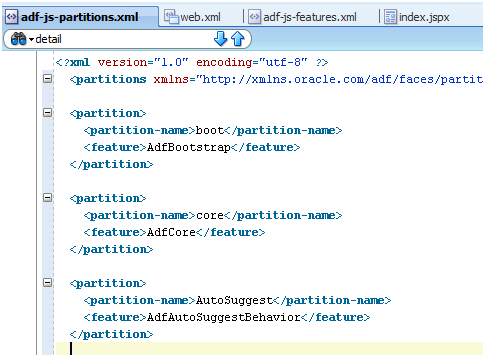
Let’s have the partitions which defines only two partition forcomponent. It’s better to have AdfBootStrap and AdfCore as part of the partitions as these are the basic components and JavaScript to render some of the key components. You are free to research on these components to come up with your own core and booting features. You can get the base AdfBootStrap and AdfCore partitions and features configurations from

The partition file with the configuration and hook looks like
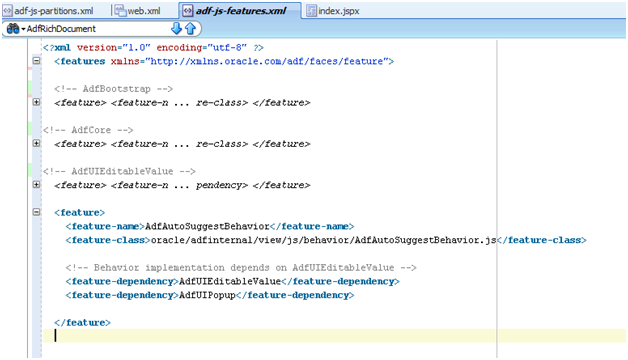
And the corresponding features are defined as
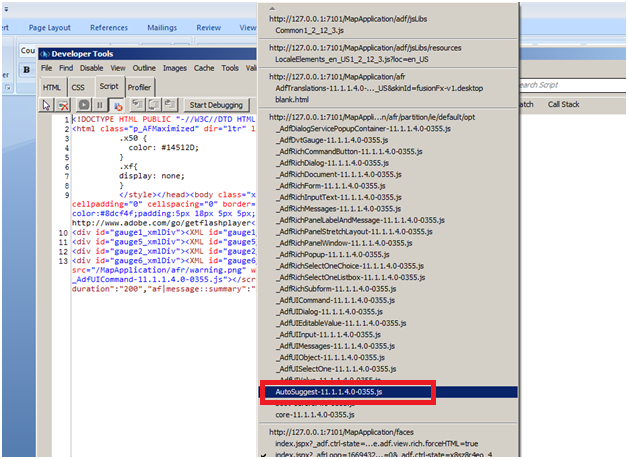
And when you run your page in internet explored 8 with Developer Tools on (F12) you can see in the script section that our partition is available as a separate script
Troubleshooting:

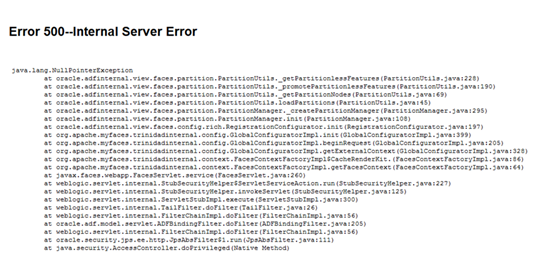
If we refer to an invalid feature in the partition then we will get

References:

http://docs.oracle.com/cd/E24382_01/web.1112/e16181/af_arch.htm#CHDDEAJH
http://docs.oracle.com/cd/E12839_01/apirefs.1111/e12046/oracle/adf/view/js/component/rich/input/package-summary.html
http://docs.oracle.com/cd/E25054_01/web.1111/b31973/ap_config.htm#BABCJIDJ
http://adfcodebits.blogspot.com/2012/01/bit-34-using-javascript-partitioning.html

You can download the pdf file of this from here
Referring custom libraries in jdev 10.1.3.4


I recently happened to work on jdeveloper 10.1.3.4 and was given a task of bringing up the server. The project was using the custom libraries which the embedded oc4j was complaining that it could not find saying

Caused by: oracle.oc4j.sql.config.DataSourceConfigException: Unable to create : com.ibm.as400.access.AS400JDBCDriver
 at oracle.oc4j.sql.config.DataSourceConfigUtils.createConnectionFactory(DataSourceConfigUtils.java:283)
 at oracle.oc4j.sql.DataSourceConnectionPoolImpl.<init>(DataSourceConnectionPoolImpl.java:108)
 at oracle.oc4j.sql.spi.ResourceAdapterImpl.createDataSourceConnectionPool(ResourceAdapterImpl.java:99)
 … 13 more

This was very challenging for me because this is the first time I ran an ADF application on Jdeveloper 10g. I searched on the forum with this error and could easily find that the fix is to copy the library to

..\jdevstudio10134\j2ee\home\applib

This is just for information as this could be helpful for newbie who is still working with Jdeveloper 10g

Attempt to validate an already invalid RegionSite


was facing this issue and couldn’t find a proper place to look into then I got to know that this issue is surely related to the view..

After serious debugging found that this issue is mainly because of the usage of a taskflow as a region but the taskflow is not having a default activity..

The default activity somehow got removed and setting it back into the place made my day.


Attempt to validate an already invalid RegionSite:
  <_handleException> ADF_FACES-60098:Faces lifecycle receives unhandled exceptions in phase RENDER_RESPONSE 6
 java.lang.IllegalStateException: Attempt to validate an already invalid RegionSite:

New ADF Guru…


chk here

Top 5 user.

https://forums.oracle.com/forums/forum.jspa?forumID=83&start=0

with guru status..

Achieved!!


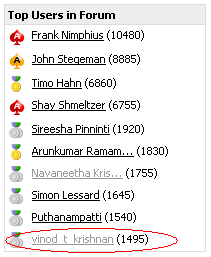
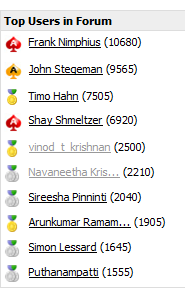
At last made an entry in Jdeveloper and ADF forum’s Top users list.. 10th now.. will soon climb up..

http://forums.oracle.com/forums/forum.jspa?forumID=83&start=0

jdevloper not taking the latest changes – what to do?


Sometime when you do the changes and run the application the latest changes are not updated while running the application.

The culprit is the system folder.

{user_home}\system11.1.1.4.37.57.75\o.j2ee\drs\

has the exploded war file which will have the classes that is old. deleting the classes from the exploded directory would definitely fix the issue.

af:selectonechoice not getting updated


Today i had an interesting problem at work. The issue is that the user selects the value from a selectonechoice and moves to the next page and when he returns back to the same old page the selectonechoice is not updated with the value that is selected previously.

the selectonechoice is not bounded to any of the bindings and we manually create the list using the managed bean. here is the base snippet which resembles the problem


selectOneChoice simple="true" value="#{Bean.list.itemNo}" id="soc1" unselectedLabel="Please Select">
 selectItems value="#{Bean.listItems}"/>
 </af:selectOneChoice>

while debugging the value the value is all available but somehow the value is not shown in the selectonechoice. The value is again moves to the “Please Select” option specified in the unselectedLabel when the user moves back to the original page.

couple of things i tried which failed
1)binding to the bean and getting the value

2) having the value as “#{Bean.list[‘itemNo’]}”

finally I got to see the following warning in the log saying

13-Jul-2011 20:27:54 oracle.adfinternal.view.faces.renderkit.core.xhtml.SimpleSelectOneRenderer _getSelectedIndex
WARNING: Could not find selected item matching value "1" in CoreSelectOneChoice[UIXEditableFacesBeanImpl, id=soc1]

This warning gave me a hint to think the problem in a different way and leads to the solution

Actually the list that we are manipulating assigns the value on the fly like


....

List<SelectItem> items = new Arraylist();

...

//inside the method

items.add(new SelectItem(code.getItemlabel(), code.getItemValue()));

....
 

the above code has to rewritten as shown to solve the above mentioned issue


//inside the method

SelectItem item = new SelectIem();

item.setLabel(code.getItemlabel());

item.setValue(code.getItemValue()); //here the value should be an Integer value
//if the value is a String then this has to be like
//item.setValue(Integer.parseInt(code.getItemValue()));
items.add(item);

....
 

jdeveloper 11g release 2 is out


jdeveloper 11g release 2 is out

http://blogs.oracle.com/Didier/entry/jdeveloper_adf_11g_release_2

get handle to the next and previous view of the train model


Add the following jstl function library to the jsp:root tag

xmlns:fn=http://java.sun.com/jsp/jstl/functions

and proceed with

text="goto page# #{fn:substringAfter(controllerContext.currentViewPort.taskFlowContext.trainModel.next ,'@')}"
text="goto page# #{fn:substringAfter(controllerContext.currentViewPort.taskFlowContext.trainModel.previous ,'@')}"

some of the values that you can get related to trainModel previous and next actions are

#{controllerContext.currentViewPort.taskFlowContext.trainModel.goNext}
#{controllerContext.currentViewPort.taskFlowContext.trainModel.goPrevious}

Note: to get the display name from the trainstop you have to manually have the binding for next and previous strings added to the bean and evaluate the text manually like

public class Bean {
    TrainModel train;
    TrainStopModel trainStopModel;
String next;
  String previous;
    public Bean() {
      PageFlowStack stack = StateUtils.getCurrentViewPort().getPageFlowStack();
          if (stack.size() > 0)
          {
            train = stack.peek().getTrainModel();
          }
    }
  public static Object evaluateEL(String el) {
      FacesContext facesContext = FacesContext.getCurrentInstance();
      ELContext elContext = facesContext.getELContext();
      ExpressionFactory expressionFactory =
          facesContext.getApplication().getExpressionFactory();
      ValueExpression exp =
          expressionFactory.createValueExpression(elContext, el,
                                                  Object.class);

      return exp.getValue(elContext);
  }
    public void setNext(String next) {
        this.next = next;
    }

    public String getNext() {

      trainStopModel = train.getNextTrainStop(train.getCurrentTrainStop());
      this.next  = trainStopModel.getTextAndAccessKey();
        return next;
    }

    public void setPrevious(String previous) {
      this.previous = previous;
   }

    public String getPrevious() {
        if(train != null){
      trainStopModel = train.getPreviousTrainStop(train.getCurrentTrainStop());
          this.previous  = trainStopModel.getActivityId().getLocalActivityId();
        }
        return previous;
    }
   }

oracle.jbo.InvalidOperException: JBO-25011


if you get the following error when you set Access Mode“=”Range Paging” to avoid all the records to be fetched and cached in ADF BC

oracle.jbo.InvalidOperException: JBO-25011: Rowset _LOCAL_VIEW_USAGE_model_EmployeesView_DepartmentsView1_0 is forward only

The “ListRangeSize” property of the List of Value is always set to “-1”  contradicting that

  • you are using the “Range Paging” “Access Mode”, you fetches a limited number of records for the View Object
  • you are using the “ListRangeSize” = -1 fetches ALL the records for the List Of Values

so to avoid the above error increase the ListRangeSize property