Most of the performance issue at the client side for the ADF application is related to large number of client side scripting files getting download which increases the download time and relatively degrading the performance of the application. Breaking up the JavaScript into small chunks will result in modularity but will increase the round trip.
To resolve this ADF Faces Framework comes up with a concept of partitioning of the huge JavaScript at the client side based on the components used in the pages. That means only limited number of scripts required for the page is loaded at the client which will increase the performance drastically.
ADF Faces groups the components JavaScript files into two groups namely partitions and features. These two groups are defined separately in two configuration files i.e. adf-js-features.xml and adf-js-partitions.xml.
The default files are location at
C:\oracle\Middleware\oracle_common\modules\oracle.adf.view_11.1.1\ adf-richclient-impl-11.jar\
If the application is loaded without using an explicit partitions then adf will use the configuration settings defined in the above specified files and does the partition.
By default, the partitioning is enabled for performance which can be disabled using the initial parameter in web.xml
<context-param>
<param-name> oracle.adf.view.rich.libraryPartitioning.ENABLED</param-name>
<param-value>false</param-value>
</context-param>
Or
<context-param>
 oracle.adfinternal.view.rich.libraryPartitioning.ENABLED
</param-name>
<param-value>false</param-value>
</context-param>
Or
<context-param>
<param-name>oracle.adf.view.rich.libraryPartitioning.DISABLED</param-name>
<param-value>true</param-value>
</context-param>
Or
<context-param>
<param-name>oracle.adfinternal.view.rich.libraryPartitioning.DISABLED</param-name>
<param-value>true</param-value>
</context-param>
Now we will see how to create these files
• Create adf-js-partitions.xml in public_html/WEB-INF folder of your application
• Create adf-js-features.xml in src/META-INF folder of your application
• The skeleton of these files looks like
adf-js-partitions.xml
<?xml version="1.0" encoding="utf-8"?>
xmlns="http://xmlns.oracle.com/adf/faces/partition">
<partition>
<partition-name>dnd</partition-name>
<feature>AdfDropTarget</feature>
</partition>
</partitions>
<partitions> – root tag to define partitions, all partitions are defined inside this
<partition> – define the partition, any number of partition is allowed
<partition-name> – name of the partion. For example the javascript will be loaded as dnd-11.1.1.4.js
<feature> – hook reference to the particular feature that defines to load the javascript for the component
adf-js-features.xml
<?xml version="1.0" encoding="utf-8"?>
xmlns="http://xmlns.oracle.com/adf/faces/feature">
<feature>
<feature-name>AdfDropTarget</feature-name>
oracle/adf/view/js/dnd/AdfBasicDropTarget.js
<feature-dependency>AdfDragAndDrop</feature-dependency>
</feature>
<feature>
<feature-name>AdfDragAndDrop</feature-name>
oracle/adfinternal/view/js/laf/dhtml/rich/AdfDhtmlDnDContext.js
</feature>
</features>
<features> – root tag for the features, all features are defined inside this
<feature> – define the feature, any number of feature is allowed
<feature-name> – name of the feature that has to be referenced from the partition file
<feature-class> – javascript class for the component
<feature-dependency> – name of the feature which is extended by the javascript class
Sample:
When you don’t have these files in place then the loaded scripts are
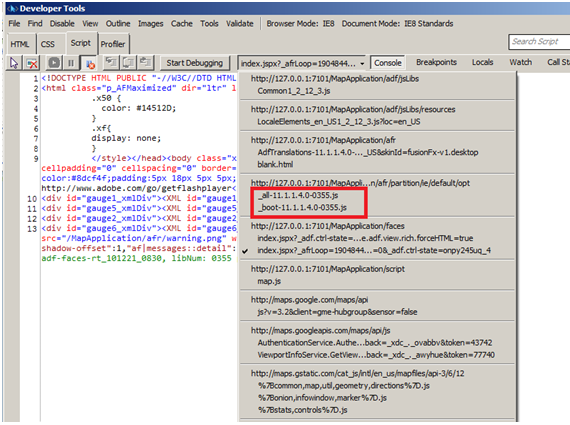
When you replicate the default content in your configuration files then the partition will be

Let’s have the partitions which defines only two partition forcomponent. It’s better to have AdfBootStrap and AdfCore as part of the partitions as these are the basic components and JavaScript to render some of the key components. You are free to research on these components to come up with your own core and booting features. You can get the base AdfBootStrap and AdfCore partitions and features configurations from

The partition file with the configuration and hook looks like
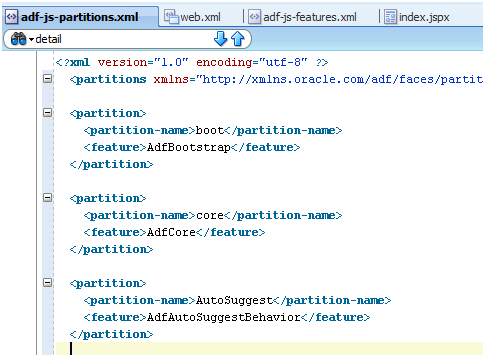
And the corresponding features are defined as
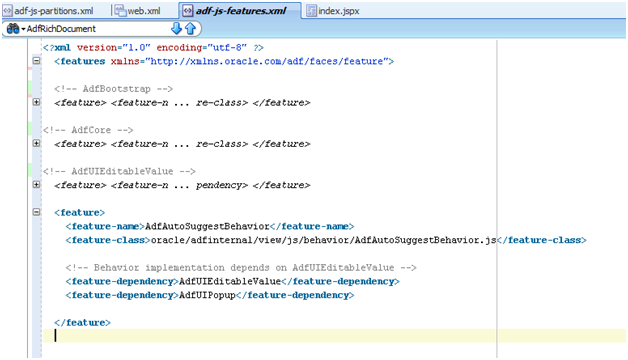
And when you run your page in internet explored 8 with Developer Tools on (F12) you can see in the script section that our partition is available as a separate script
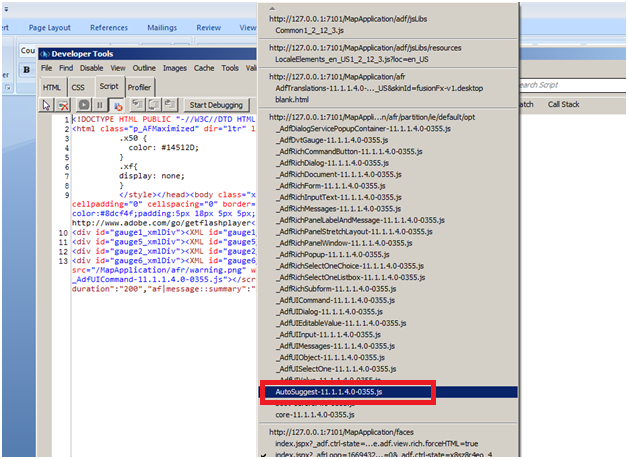
Troubleshooting:
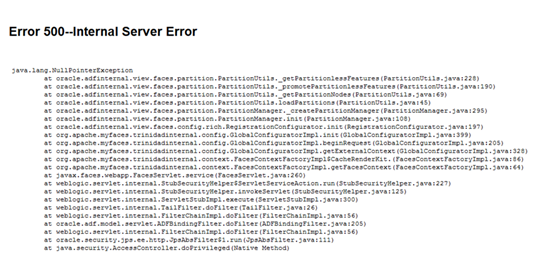
If we refer to an invalid feature in the partition then we will get

References:
http://docs.oracle.com/cd/E24382_01/web.1112/e16181/af_arch.htm#CHDDEAJH
http://docs.oracle.com/cd/E12839_01/apirefs.1111/e12046/oracle/adf/view/js/component/rich/input/package-summary.html
http://docs.oracle.com/cd/E25054_01/web.1111/b31973/ap_config.htm#BABCJIDJ
http://adfcodebits.blogspot.com/2012/01/bit-34-using-javascript-partitioning.html
You can download the pdf file of this from here
 They point the finger at me.. again!