Author Archives: vtkrishn

Unknown's avatar

About vtkrishn

Vinod Krishnan has over 12 years experience in the Information Technology industry and a multifaceted career in positions such as Senior Consultant, Senior Applications Engineer, Software Engineer and Solution Architect for MNC’s like (Oracle, Capgemini, Keane). His many years of experience have exposed him to a wide range of Oracle Technologies that includes java, J2EE, Weblogic, Fusion Middleware, SOA and Webcenter. For the last five years, Vinod is actively involved in large implementations of next generation enterprise applications utilizing Oracle’s JDeveloper, Application Development Framework (ADF) technologies. He holds a B.Tech. in Information Technology from Anna University of Chennai, India.

Know some hashcodes


Some of the hashcodes of interest’s are in java wrappers

Boolean – hashCode() – 1231 for ‘true’ and ‘1237’ for ‘false’
Integer – hashCode() – will return the primitive int value
Byte – hashCode() – primitive int value of the byte is returned as hashcode
Charater- hashCode() – primitive int value of the byte is returned as hashcode
Long – value of the following expression

(int)(this.longValue()^(this.longValue()>>>32))

Magic Numbers a glance


Ever wonder how files are identified correctly as jpeg, gif or even class file for that matter by the OS.

Its all magic.. 🙂

Magic numbers are those which are prefixed at the start of the file in ASCII code to identify the file format.

Some of the common magic numbers are

Class bytecode starts with hex CAFEBABE
GIF image files have ‘GIF89a‘ (47 49 46 38 39 61) or ‘GIF87a‘ (47 49 46 38 37 61)
JPEG image files begin with ‘FF D8‘ and end with ‘FF D9'
PNG image files begin with “\211 P N G \r \n 32 \n” (89 50 4E 47 0D 0A 1A 0A)
ZIP files begin with ‘PK‘ (50 4B)
PDF files start with ‘%PDF‘ (25 50 44 46)

Overloading and Overrriding – revisited


Overloading

is applied only within a class by simply

  1. having the same name for the method but
  2. passing different parameters list

what can happen in Overloading is that

  • the number of arguments to the method can change
  • the same name with different parameter list can be defined in the super class also

what cannot happen in Overloading is that

  • same name and same no of arguments as the compiler does the differentiation using only the method signatures that comprises of method name and the arguments passed
  • same name with different return type cannot qualify and throws compile time error as ‘the Duplicate method defined’ for the same reason as above

example

 //Allowed
 public int display(){
 System.out.println("returning int");
 return 0;
 }
 //Allowed
 public int display(int a)throws IOException{
 System.out.println("returning int with a");
 return 0;
 }

 //Allowed
 public int display(int a,int b){
 System.out.println("returning int with a and b");
 return 0;
 }

 //Allowed
 public int display(char a) throws IOException{
 System.out.println("returning int with char a");
 return 0;
 }

 //Allowed
 public int display(String a) throws IOException{
 System.out.println("returning int with char a");
 return 0;
 }

 //Not Allowed - Duplicate method
 public int display(char a) throws IOException{
 System.out.println("returning int with char a");
 return 0;
 }

 //Not Allowed - Duplicate method
 public String display(char a) throws IOException{
 System.out.println("returning int with char a");
 return "hi";
 }

use Overloading only if the method does the same logic with different parameters

Note: In a subclass, you can overload the methods inherited from the superclass. Such overloaded methods neither hide nor override the superclass methods—they are new methods, unique to the subclass

Overriding

is applied only when the sub class tends to modify the behavior of a method in the super class

  1. having the same name for the method
  2. having the same parameter list
  3. having the same return type

what can happen in Overriding is that

1. the access modifier can be less restrictive than the one in super class

  • if the superclass method is public, the overriding method must be public
  • if the superclass method is protected, the overriding method may be protected or public
  • if the superclass method is package, the overriding method may be package, protected, or public
  • if the superclass methods is private, it is not inherited and overriding is not an issue

2. the overriding method in the subclass class cannot throw any exception that is broader than the exception thrown by the super class

Solving NumberFormatException


Often we tend to parse the integer value from a String object using Integer.valueOf(strValue) or Integer.parseInt(strValue). This will work as far as we pass the string like ‘1234567’ without any grouping.. The problme arises only if we have grouping on the string which is parsed..

Bump..

parseInt() and valueOf() method throws NumberFormatException for this.

So how to resolve this,

rewrite the code and make use of parse() method in java.text.NumberFormat class

String str = "123,456";
 int i = 0;
 try {
 i = NumberFormat.getNumberInstance().parse(str).intValue();
 } catch (ParseException e) {
 e.printStackTrace();
 }
 System.out.println(i);

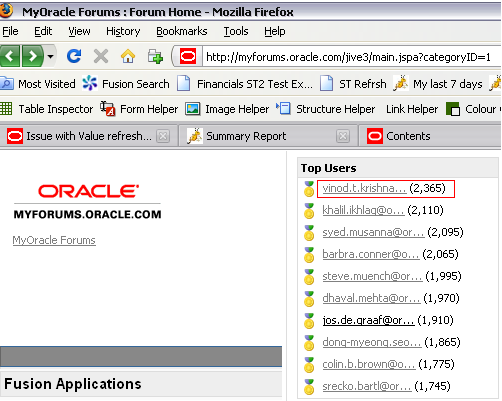
Mission Accomplished within Oracle!!


Finally.. I have reached this point.. all out of frustrations.. 🙂

They.. still point the finger at me… again

I started this from December 2009(last 6 months was awesome)

setting uniqueid for the attributes


At design time, Fusion Middleware extensions provide the ability to identify if an entity attribute needs a globally Unique ID. This is accomplished by setting Application Unique ID to true in the entity attribute’s Property Inspector

oracle.jbo.server.uniqueid.UniqueIdHelper.getUniqueId(adf.object.unwrapObject());

Increase the minimum/maximum heap size of Jdeveloper


To change the values for minimum and maximum Java heap, modify the corresponding parameters in $JDEV_HOME/ide/bin/ide.conf

Other parameters can be set in $JDEV_HOME/jdev/bin/jdev.conf

What is Fusion and what are we doing


Fusion as the name describes is the collective integration of best of breed softwares to simplify business needs. The revolutionary dream of Oracle claims to change the way we see business applications.
Some of the key technologies included are

UI Technology – ADF UI, ADF DI, ADF Mobile, DVT

Model Technology – Toplink, EJB

Backend Technology – Oracle Database, Essbase

Orchestration – Oracle BPEL Process Manager, SOA

Secuirty – Oracle Platform Secuirty Services,OPSS

Server – Oracle Weblogic Server

Customization – Oracle Metadata Services MDS

Aditional Technology – Oracle Enterprise Scheduler Services ESS, Oracle Business Rules OBR, Oracle Data Integrator ODI

and many more technologies from acquired products.

Javascript code to fire the event


The following function can be called using the af:clientListener on any event

function showMenu(event){
 var adfRichMenu = event.getSource();
 adfRichMenu.getPeer().show(null,true);

}

Difference between commandToolBarbutton and commandButton


Ever wonder what is the difference between a commandToolBarButton and the commandButton

here it goes

CommandToolBarButton – partialSubmit – Default Value: true
whether the action should be done through a partial page submit or not. The default is true for commandToolBarButton, so be sure to specify partialTriggers if content needs to be updated.

CommandButton – partialSubmit – Default Value: false
whether the action should be done through a partial page submit or not. Default is false: no partial page submit; the full page will be refreshed. When set to true, the full page will not be refreshed. To re-render specific components on your page in response to the partial page submit, you have to tell ADF Faces. The easiest way to do this is with the partialTriggers attribute.