If you are getting the following exception while activating the server

then make sure that you do the following setting as well to go past.

If you are getting the following exception while activating the server
then make sure that you do the following setting as well to go past.
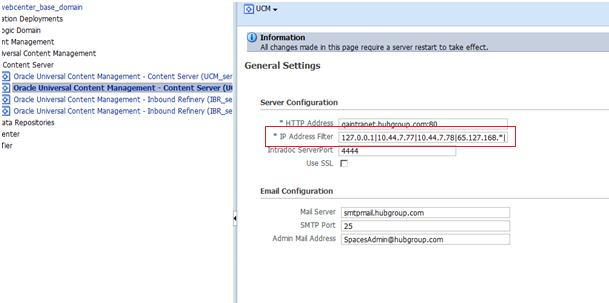
When you connect to ucm from jdeveloper if you face problem in connecting then its worth to check the ip filter of the ucm connection in em console.
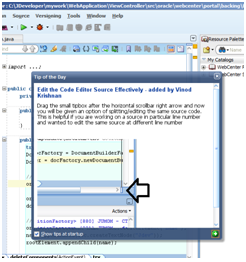
Have your own Tip in jdeveloper
if you want to add your own tip to Jdeveloper then follow
close Jdeveloper
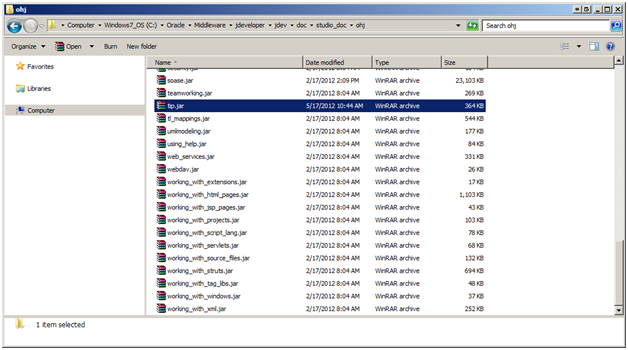
1) go this location – ${MIDDLEWARE_HOME}\jdeveloper\jdev\doc\studio_doc\ohj\tip.jar
2) create a html file – tip_11_0460.html (just increase the number for eg : tip_11_0470.html)
3) create an image file in images folder if you want to refer this in your html tip – tip_11_0470.gif
4) have your html registered in – tip_map.smp
 <map>
 <mapID target="tip_11_0470_html" url="tip_11_0470.html"/>
 </map>
open Jdeveloper
BindingContext bctx = BindingContext.getCurrent();

DCBindingContainer binding= (DCBindingContainer) bctx.getCurrentBindingsEntry();

DCTaskFlowBinding tf = (DCTaskFlowBinding) binding.findExecutableBinding("taskflow1");
If you happen to get the JDBC Connection error when you run the Application Module then make sure to check the adf-config.xml property jbo.SQLBuilder which should point to the correct database.
Also check the jbo.sql92.driverclass property for the AM Configuration to refer the class relevant to the DB
 They point the finger at me.. again!