Jdeveloper 11.1.2.3 is out with ADF Essentials – ADF Free to develop and Deploy.. 🙂
http://www.oracle.com/technetwork/developer-tools/jdev/documentation/index.html
Jdeveloper 11.1.2.3 is out with ADF Essentials – ADF Free to develop and Deploy.. 🙂
http://www.oracle.com/technetwork/developer-tools/jdev/documentation/index.html
I am happy to announce that two of the assignment that I have worked, had gone live.. 🙂
Nevada Business Portal – https://www.nvsilverflume.gov/
Hub Group – http://www.hubgroup.com/map-shipping-routes/
Scenario:
How to have a Time format restriction for the adf inputText component?
Solution:
To have the time format restriction to restrict the time for upto 23:59 we will have a regex pattern for the af:inputText
<af:inputText label="" id="time" simple="true" value="" contentStyle="width:30px;" maximumLength="5">
<af:validateRegExp pattern"([01][0-9]|2[0-3]):[0-5][0-9]" messageDetailNoMatch="Time Format must match HH:MM" hint="Time Format: HH:MM"/>
</af:inputText>
IFelix joins the club with Mr.Saravanan
Added to this entry
https://vtkrishn.com/2012/03/23/stop-blog-theft/
I found another person who is seriously copying blogs from my blogs
Blog date Thursday, March 10, 2011
http://adf-lk.blogspot.com/2011/03/adf-client-side-validations-with_10.html
Stealing date Wednesday, March 28, 2012
http://ifelix.blogspot.com/2012/03/adf-client-side-validations-with.html
Blog date July 19, 2011
https://vtkrishn.com/2011/07/19/jdevloper-not-taking-the-latest-changes-what-to-do/
Stealing date January 8, 2012
http://ifelix.blogspot.com/2012/01/jdevloper-not-taking-latest-changes.html
So this guy, also joins the club
Scenario:
How to calculate the datefield by considering another datefield that’s entered in by the user.
If you have entered a datefield “Today” as 12/04/2012
Now the requirement is to calculate another datefield’s date as 12/04/2012 + 30 days?
Solution:
<af:inputDate label="Date 1" id="id1" value="#{bean.date1}" autoSubmit="true"/>
<af:inputDate label="Date 2" id="id2" value="#{bean.date2}" partialTriggers="id1"/>
in the bean for the date fields. have getter and setter
in the getter of the date2 field have the following code
private Date date1;
private Date date2;

public void setDate1(Date date1) {
this.date1 = date1;
}

public Date getDate1() {
return date1;
}

public void setDate2(Date date2) {
this.date2 = date2;
}

public Date getDate2() {
if(date1 != null){
Calendar cal =Calendar.getInstance();
cal.setTime(date1);
cal.add(Calendar.DATE, 30);
date2 = cal.getTime();
}
return date2;
}

The source code is downloaded from here, for Jdeveloper 11.1.2.2.0
Scenario:
How to make a panellist that reads data from a database and according to the number of records in the database creates new row in the panellist?
Solution:
<af:iterator id="i3" value="#{emp.collectionModel}" var="row"> //emp.collectionModel is your collection
          <af:panelList id="pl1">
            <af:outputText value="#{row.empName}" id="ot3"/> // empName is the attribute to show
          </af:panelList>
        </af:iterator>
Imagine that you have a ViewObject added to the Application Module and you want to add this view instance as a selectonechoice for the base VO in your UI.
Setup:
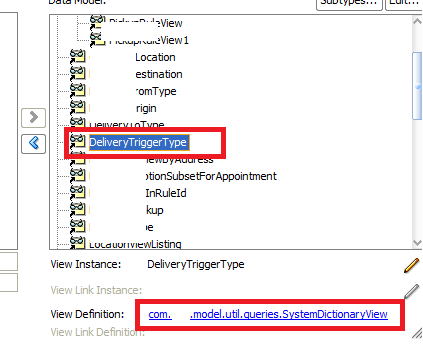
Lets have a setup as ‘DeliveryRuleView’ VO as a base datasource and for the column ‘CapTrgTyp’ you are going to add a LOV list of values coming from ‘DeliveryTriggerType’ VO
The following screenshot will show a VO ‘SystemDictionaryView’ added to the AM as a View Instance ‘DeliveryTriggerType’. The ‘SysemDictinaryView’ will list the values based on the ‘Subcategory’ provided during runtime.
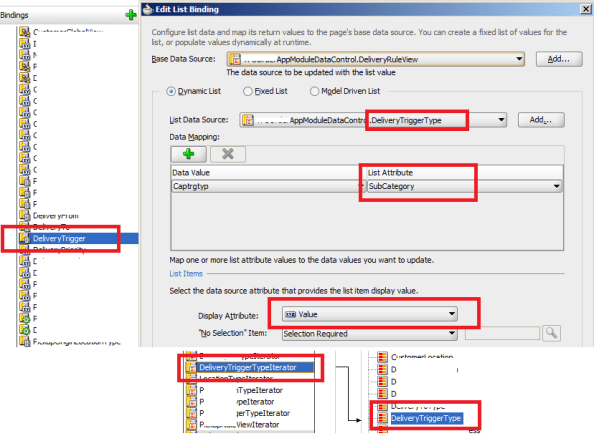
To Map this to a select one choice in the UI. You will have to have the list binding created as shown in the screenshot.
in the jsff page you will have the selectonechoice code as
<af:selectOneChoice label="Trigger" id="deliveryTrigger" value="#{pageFlowScope.backing_bean.deliveryTrigger}" required="true" autoSubmit="true">
<f:selectItems id="si131" value="#{bindings.DeliveryTrigger.items}"/>
selectOneChoice>
When you look closely, the value of the selectonechoice is mapped to the deliveryTrigger value in the managed bean and we have the selectItems bounded to the pagedef list bindings as ‘#{bindings.DeliveryTrigger.items}’
Create Operation
So during Creation of a record in ‘DeliveryRuleView’ the list will be populated from ‘DeliveryTriggerType’ instance. The user selects the option in the list and presses the save button.
Since selectonechoice stores only the index value, the value that is stored will point to the index value within the selectonechoice. for e.g if the user select’s choice ‘Third Option in the list'(underlying SubCategory as ‘THIRD_VALUE’) then the value for deliverTrigger will store as 2 as the index starts from 0.
So how to map this to the correct selection?.
Have an actionlistner for the save button and have the following code that computes the correct selection for the select one choice
What this method does:
private String getListValueFromIndex(int index, String iteratorName) {
BindingContainer bindings = BindingContext.getCurrent().getCurrentBindingsEntry()

DCIteratorBinding dciterContainer =
(DCIteratorBinding)bindings.get(iteratorName);

Row ri = dciterContainer.getRowAtRangeIndex(index);
String val = (String)ri.getAttribute("SubCategory");
return val;
}
The value returned will have the underlying subCategory value(‘THIRD_VALUE’) corresponding to the value selected in the UI as ”Third Option in the list”. Then the value can be saved to the ‘Captrgtyp’ column of the DB for ‘DeliveryRuleView’
Edit Operation
During the Edit operation of the record, we have to fetch the corresponding value for the selected record and populate for ‘Captrgtyp’ attribute in the selectonechoice.
What this method does:
private Integer getListValueIndex(Row row, String iteratorName, String attribName) {
int i = 0;
BindingContainer bindings = BindingContext.getCurrent().getCurrentBindingsEntry()

DCIteratorBinding dciterContainer =
(DCIteratorBinding)bindings.get(iteratorName);

RowSetIterator rs = dciterContainer.getRowSetIterator();
Row ri = rs.first();
for(int index = 0;index < rs.getRowCount(); index ++){
String temp = (String)ri.getAttribute("SubCategory");
String ar = (String)row.getAttribute(attribName);
if(ar != null && temp.equals(ar.toString().trim())){
i = index;
}
ri = rs.next();
}

return i;
}
Sometimes the value of the inputText component is not refreshed and the value that was previously entered will still persist within the component. To overcome this issue. we have to use the resetValue() method to reset the component value and display the components intial state
What it does:
private void resetInputText(String id) {
RichInputText input = (RichInputText)JSFUtils.findComponentInRoot(id);
input.setSubmittedValue(null);
input.resetValue();
AdfFacesContext.getCurrentInstance().addPartialTarget(input);
}
Usage:
This method is used to reset the inputText component value’s in a popup, af:formlayout, af:table.
This is a useful handy code to get the selected rows for the table.
What it does:
This method takes the table id as the parameter
private List getSelectedList(String tableName) {
RichTable rt = (RichTable)JSFUtils.findComponentInRoot(tableName);
RowKeySet keySet = rt.getSelectedRowKeys();
Iterator iter = keySet.iterator();
iter = keySet.iterator();
List list = new ArrayList();
while (iter.hasNext()) {
list.add(iter.next());
}
return list;
}
Usage:
This method is used to check if any rows are selected for the particular table. The method returns the rowkeys of the rows selected if there are any rows selected for the table
Ever wonder what are this entries that gets added to the adf url in the addressbar like
afrWindowId=null&afrWindowMode=0&_adf.ctrl-state=qkx3a0o59
These are all the parameters for adf that to maintain the user session
_afrLoop – This is a unique identifier which is used to determine if the current window is new or not. This is used by ADF Faces Javascript. This entry is used as a token for the Loop Script
_afrWindowMode – This is a unique identifier which is used to determine if the current window is new or a dialog. This is used by ADF Faces intself to identify the mode
_afrWindowID – unique identifier assigned by the WindowIdProvider for ADF Faces to identify the current borwser window on the client and server For adf applications, ADF contoller supplies the WindowIdProvider
_adf.ctrl-state – This is the token provided by ADF controller to identify the current user state. This token is used to retrieve the user state within the task flow.
jsessionid – This is a cookie provided by the Weblogic Application server to uniquely identify the HTTP Session. This is passed as a token intially and stored in the cookie later
 They point the finger at me.. again!