ADF Resources and Learning


ADF Resources to learn
https://blogs.oracle.com/shay/entry/how_do_i_start_learning_oracle_adf_and_jdeveloper
also
http://download.oracle.com/tutorials/jtcd3/ecourse_adf_part1/html/temp_frameset/index.htm
http://www.oracle.com/technetwork/indexes/samplecode/index.html
http://docs.oracle.com/cd/E18941_01/tutorials/toc.htm
http://www.oracle.com/technetwork/developer-tools/jdev/overview/index.html

Stop Blog Theft !!!


This is to inform that Mr. Saravanan of http://jdeveloperandadf.blogspot.com is stealing many blog contents without prior permission of the original authors. I am the victim along with others.

So I believe that all his blogs are stolen from some other blogs..

Blog date May 4, 2010
https://vtkrishn.com/2010/05/04/how-normal-jar-library-is-different-from-adf-library/
Stealing date Sunday, May 15, 2011
http://jdeveloperandadf.blogspot.com/2011/05/how-normal-jar-library-is-different.html#comment-form

http://www.techartifact.com/blogs/2011/08/oracle-adf-interview-question-part-2.html
Stealing date Tuesday, February 15, 2011
http://jdeveloperandadf.blogspot.com/2011/02/oracle-adf-interview-questions-and.html

Blog date Tuesday, March 29, 2011
http://shidharth.blogspot.com/2011/03/floating-footer-page-layout-in-adf.html
Stealing date Sunday, April 3, 2011
http://jdeveloperandadf.blogspot.com/2011/04/floating-footer-page-layout-in-adf.html

Blog date Wednesday, February 24, 2010
http://sameh-nassar.blogspot.com/2010/02/javascript-functions-sample.html
Stealing date Thursday, March 3, 2011
http://jdeveloperandadf.blogspot.com/2011/03/javascript-with-adf-faces-samples.html

(In this the link that he mention’s goes to Andrejus’s Blog – caught red handed)
Blog date Sunday, February 13, 2011
http://andrejusb.blogspot.com/2011/02/adf-region-communication-region-refresh.html
Stealing date Saturday, March 5, 2011
http://jdeveloperandadf.blogspot.com/2011/03/adf-region-communication-region-refresh.html

So BEWARE of this guy..

Nic tool to keep multiple terminal sessions – Pedorosa


Recently I got to know this tool from my colleague to keep track of multiple terminal sessions under a single view.

For example, imagine you are working on multiple server session and you want to keep track of the session or the server running. search for the log files, tailing log outputs then we will open n number of putty terminals to connect to the server or telnet multiple windows. But how will this be organized under one single window?

That where the software Pedorasa come into picture.

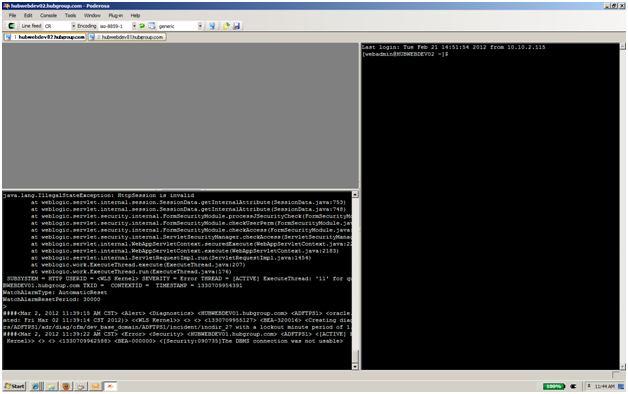
The screenshot of the sample is

you can download this free tool from here

f:convertnumber for decimal numbers


I was working on to filter the decimal value using the QBE feature in the af:table but was facing an issue with the conversion and filtering the values

as you all know that we use the custom filter QBE to filter custom types other than String using the snippet


<af:column>

....

<f:facet name="filter">
 <af:inputText label="2" id="it2" value="#{vs.filterCriteria.id}">
 <f:convertNumber groupingUsed="false" integerOnly="true"/>
 inputText>
 </f:facet>

...

I thought of filtering the decimal values using the option available in af:convertNumber


<af:column>

....

<f:facet name="filter">
 <af:inputText label="2" id="it2" value="#{vs.filterCriteria.id}">
 <f:convertNumber groupingUsed="false" maxFractionDigits="2" patter="#.##" minFractionDigits="1" maxIntegerDigits="1"/>
 </af:inputText>
 </f:facet>

...

But the above options didn’t work as expected.

Finally I found the way to filter the double values using convertor=”javax.faces.Double”


<af:column>

....

<f:facet name="filter">
 <af:inputText label="2" id="it2" value="#{vs.filterCriteria.id}" convertor="javax.faces.Double"/>
 </af:inputText>
 </f:facet>

...

ADF Visual Design


ADF Visio Stencil to mockup ADF Pages

https://blogs.oracle.com/jdeveloperpm/entry/adf_faces_stencils_for_visio_available_on_samplecode

Started my New Video Blog


I am happy to say that I have started a new Video blog at

http://middlewareknight.blogspot.com/

JPS-01520: Cannot initialize identity store


oracle.security.jps.service.idstore.IdentityStoreException: JPS-01520: Cannot initialize identity store.

<IdentityStoreUtil> <getIdentityStoreFactory> Cannot initialize identity store.
<PageUtils> <getUserName> Failed to get user name

If you happen to get the error while running the weblogic server then the possible cause can be to add the entry in config.xml (\Users\username\AppData\JDeveloper\system11.1.1.5.37.60.13\DefaultDomain\config\config.xml)

<listen-address>localhost</listen-address>

that is the localhost is missing.

related forum is

https://forums.oracle.com/forums/thread.jspa?threadID=2177694

Jdeveloper Design Time issue fix


In Jdeveloper 11.1.2 we often see that the designer is going off and looks clumsy without the ‘WYSIWYG’ feature during the design time. The jspx or jsff designer in Jdeveloper will show as

To fix this we directly go and delete this directory o.j2ee.jsplib in

C:\Documents and Settings\ USER_NAME\ApplicationData \JDeveloper\system11.1.2.0.38.60.17

Thanks to the blogger

For other version, if the file or folder does not exist then go to o.j2ee and delete or move – jsp-faces-tags-cache.xml and jsp-libraries.xml. Also delete .wlLib folder if it exists. If nothing works delete the system folder.

also make sure that the ‘Execute Tags in JSP Visual Editor’ is checked for adf components

updates from a collegue
If you have a class reference in your application folder that cannot be loaded this problem might occur

possible fixes

change

oracle.adf.view.rich.security.FRAME_BUSTING
<param-value>differentDomain</param-value>

To:

<param-name>org.apache.myfaces.trinidad.security.FRAME_BUSTING</param-name>
<param-value>differentOrigin</param-value>

or

change the class .adf/META-INF/services/oracle.adf.view.rich.context.ExceptionHandler
or rename this file oracle.adf.view.rich.context.ExceptionHandler

Jdeveloper 11.1.1.6 released


Jdeveloper 11.1.1.6 released..

http://www.oracle.com/technetwork/developer-tools/jdev/index-088099.html

ADF JavaScript Partitioning


Most of the performance issue at the client side for the ADF application is related to large number of client side scripting files getting download which increases the download time and relatively degrading the performance of the application. Breaking up the JavaScript into small chunks will result in modularity but will increase the round trip.

To resolve this ADF Faces Framework comes up with a concept of partitioning of the huge JavaScript at the client side based on the components used in the pages. That means only limited number of scripts required for the page is loaded at the client which will increase the performance drastically.

ADF Faces groups the components JavaScript files into two groups namely partitions and features. These two groups are defined separately in two configuration files i.e. adf-js-features.xml and adf-js-partitions.xml.

The default files are location at

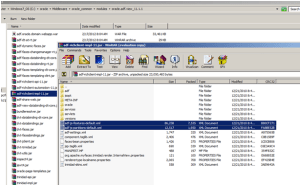
C:\oracle\Middleware\oracle_common\modules\oracle.adf.view_11.1.1\ adf-richclient-impl-11.jar\

If the application is loaded without using an explicit partitions then adf will use the configuration settings defined in the above specified files and does the partition.
By default, the partitioning is enabled for performance which can be disabled using the initial parameter in web.xml

<context-param>
<param-name> oracle.adf.view.rich.libraryPartitioning.ENABLED</param-name>
<param-value>false</param-value>
</context-param>

Or

<context-param>
 oracle.adfinternal.view.rich.libraryPartitioning.ENABLED
</param-name>
<param-value>false</param-value>
</context-param>

Or

<context-param>
<param-name>oracle.adf.view.rich.libraryPartitioning.DISABLED</param-name>
<param-value>true</param-value>
</context-param>

Or

<context-param>
<param-name>oracle.adfinternal.view.rich.libraryPartitioning.DISABLED</param-name>
<param-value>true</param-value>
</context-param>

Now we will see how to create these files
•    Create adf-js-partitions.xml in public_html/WEB-INF folder of your application
•    Create adf-js-features.xml in src/META-INF folder of your application
•    The skeleton of these files looks like

adf-js-partitions.xml

<?xml version="1.0" encoding="utf-8"?>
xmlns="http://xmlns.oracle.com/adf/faces/partition">
<partition>
<partition-name>dnd</partition-name>
<feature>AdfDropTarget</feature>
</partition>
</partitions>

<partitions> – root tag to define partitions, all partitions are defined inside this
<partition> – define the partition, any number of partition is allowed
<partition-name> – name of the partion. For example the javascript will be loaded as dnd-11.1.1.4.js
<feature> – hook reference to the particular feature that defines to load the javascript for the component

adf-js-features.xml

<?xml version="1.0" encoding="utf-8"?>
xmlns="http://xmlns.oracle.com/adf/faces/feature">
<feature>
<feature-name>AdfDropTarget</feature-name>
oracle/adf/view/js/dnd/AdfBasicDropTarget.js
<feature-dependency>AdfDragAndDrop</feature-dependency>
</feature>
<feature>
<feature-name>AdfDragAndDrop</feature-name>
oracle/adfinternal/view/js/laf/dhtml/rich/AdfDhtmlDnDContext.js
</feature>
</features>

<features> – root tag for the features, all features are defined inside this
<feature> – define the feature, any number of feature is allowed
<feature-name> – name of the feature that has to be referenced from the partition file
<feature-class> – javascript class for the component
<feature-dependency> – name of the feature which is extended by the javascript class

Sample:

When you don’t have these files in place then the loaded scripts are
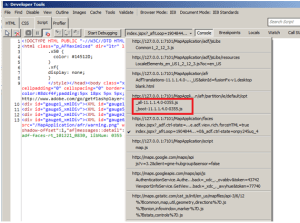
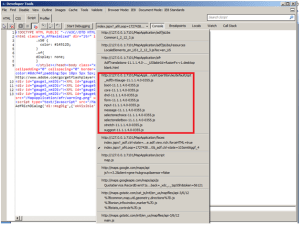
When you replicate the default content in your configuration files then the partition will be
Let’s have the partitions which defines only two partition forcomponent. It’s better to have AdfBootStrap and AdfCore as part of the partitions as these are the basic components and JavaScript to render some of the key components. You are free to research on these components to come up with your own core and booting features. You can get the base AdfBootStrap and AdfCore partitions and features configurations from
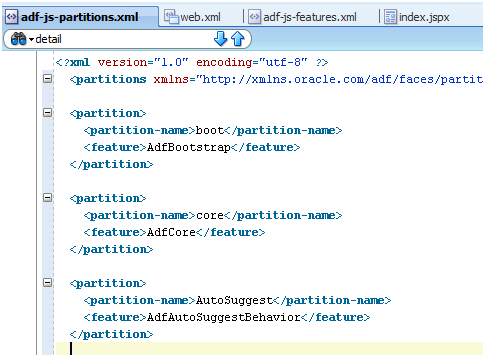
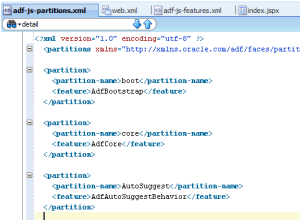
The partition file with the configuration and hook looks like
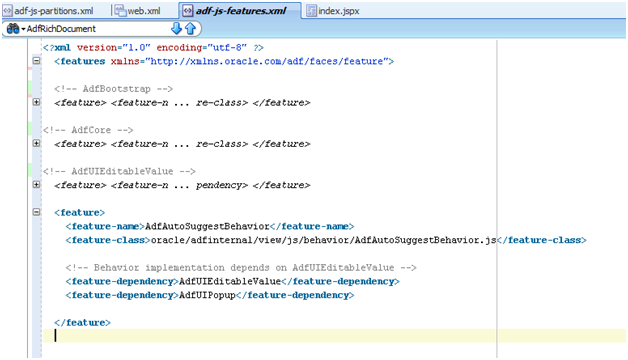
And the corresponding features are defined as
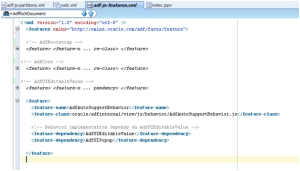
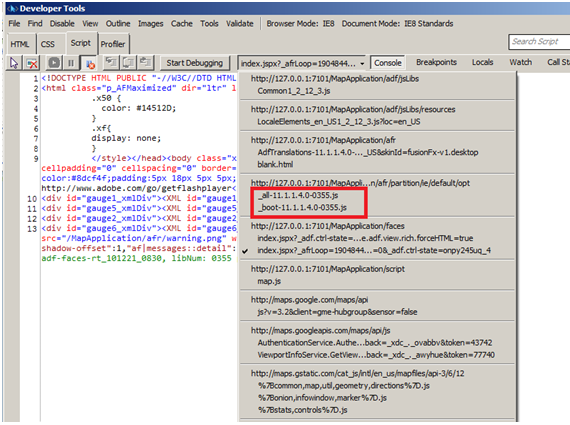
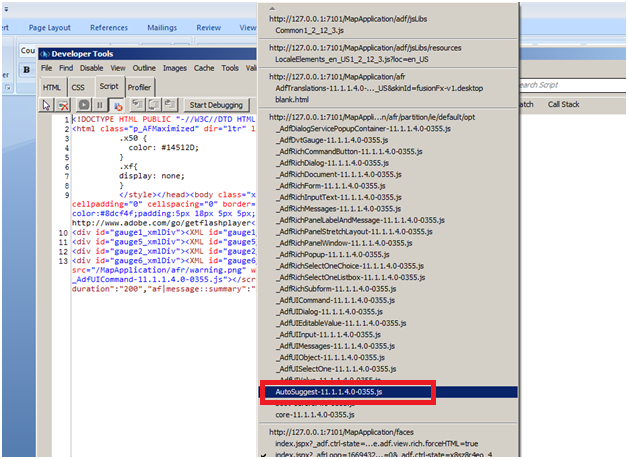
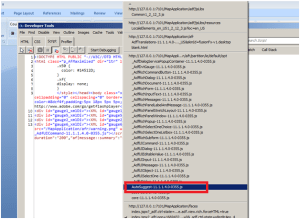
And when you run your page in internet explored 8 with Developer Tools on (F12) you can see in the script section that our partition is available as a separate script
Troubleshooting:

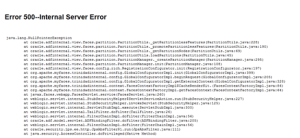
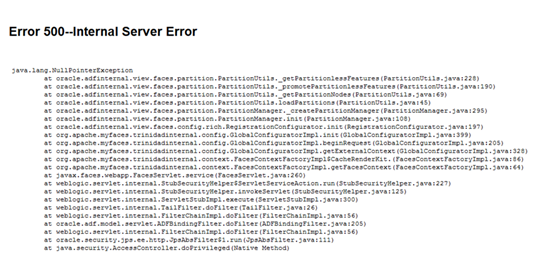
If we refer to an invalid feature in the partition then we will get

References:

http://docs.oracle.com/cd/E24382_01/web.1112/e16181/af_arch.htm#CHDDEAJH
http://docs.oracle.com/cd/E12839_01/apirefs.1111/e12046/oracle/adf/view/js/component/rich/input/package-summary.html
http://docs.oracle.com/cd/E25054_01/web.1111/b31973/ap_config.htm#BABCJIDJ
http://adfcodebits.blogspot.com/2012/01/bit-34-using-javascript-partitioning.html

You can download the pdf file of this from here