How To in Jdeveloper ADF Tutorials – creates new row in af:panelist


Scenario:

How to make a panellist that reads data from a database and according to the number of records in the database creates new row in the panellist?

Solution:


<af:iterator id="i3" value="#{emp.collectionModel}" var="row"> //emp.collectionModel is your collection
          <af:panelList id="pl1">
            <af:outputText value="#{row.empName}" id="ot3"/> // empName is the attribute to show
          </af:panelList>
        </af:iterator>

How To in Jdeveloper ADF Tutorials – set and get SelectOneChoice values


Imagine that you have a ViewObject added to the Application Module and you want to add this view instance as a selectonechoice for the base VO in your UI.

Setup:

Lets have a setup as ‘DeliveryRuleView’ VO as a base datasource and for the column ‘CapTrgTyp’ you are going to add a LOV list of values coming from ‘DeliveryTriggerType’ VO

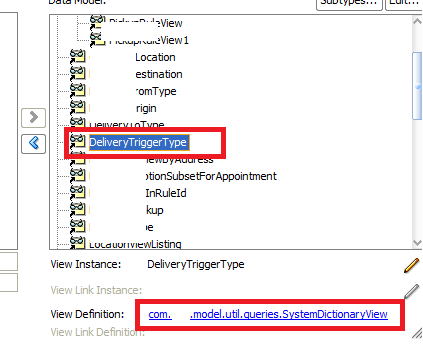
The following screenshot will show a VO ‘SystemDictionaryView’ added to the AM as a View Instance ‘DeliveryTriggerType’. The ‘SysemDictinaryView’ will list the values based on the ‘Subcategory’ provided during runtime.
To Map this to a select one choice in the UI. You will have to have the list binding created as shown in the screenshot.
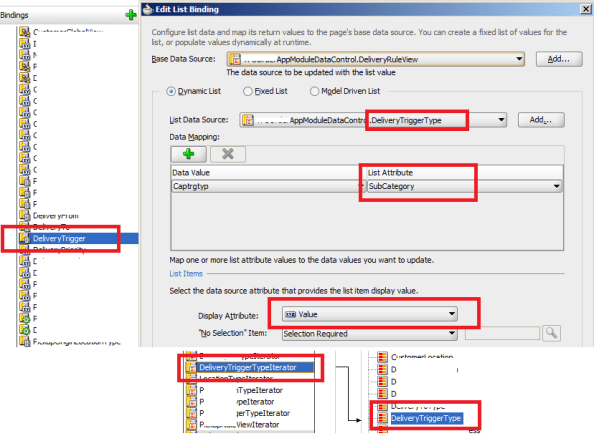
  • The Base Data Source is selected as ‘DeliveryRuleView’ and the List Data Source is selected as ‘DeleiveryTriggerType’.
  • The Data Mpping is done against the ‘CaptrgType’ from ‘DeliveryRuleView’ and the ‘SubCategory’ attribute from the ‘DeliveryTriggerType’.
  • The List Binding will have another attribute ‘Value’ as a Display Attribute. The binding is named as Deliverytrigger’
  • Have an iterator defined for the ‘DeliveryTriggerType’ View instance from AM and name it as ‘DeliveryTriggerTypeIterator’

in the jsff page you will have the selectonechoice code as


<af:selectOneChoice label="Trigger" id="deliveryTrigger" value="#{pageFlowScope.backing_bean.deliveryTrigger}" required="true" autoSubmit="true">
<f:selectItems id="si131" value="#{bindings.DeliveryTrigger.items}"/>
selectOneChoice>

When you look closely, the value of the selectonechoice is mapped to the deliveryTrigger value in the managed bean and we have the selectItems bounded to the pagedef list bindings as ‘#{bindings.DeliveryTrigger.items}’

Create Operation

So during Creation of a record in ‘DeliveryRuleView’ the list will be populated from ‘DeliveryTriggerType’ instance. The user selects the option in the list and presses the save button.

Since selectonechoice stores only the index value, the value that is stored will point to the index value within the selectonechoice. for e.g if the user select’s choice ‘Third Option in the list'(underlying SubCategory as ‘THIRD_VALUE’) then the value for deliverTrigger will store as 2 as the index starts from 0.

So how to map this to the correct selection?.

Have an actionlistner for the save button and have the following code that computes the correct selection for the select one choice

What this method does:

  • Get the iterator binding corresponding to the iterator name passed through ‘iteratorName’, in our case this will be ‘DeliveryTriggerTypeIterator’
  • Get the Row corresponding to the index passed , this will be ‘deliveryTrigger’ which holds the index value of the selectonechoice
  • Get the ‘SubCategory’ value from the corresponding row and return it.

private String getListValueFromIndex(int index, String iteratorName) {
BindingContainer bindings = BindingContext.getCurrent().getCurrentBindingsEntry()

DCIteratorBinding dciterContainer =
(DCIteratorBinding)bindings.get(iteratorName);

Row ri = dciterContainer.getRowAtRangeIndex(index);
String val = (String)ri.getAttribute("SubCategory");
return val;
}

The value returned will have the underlying subCategory value(‘THIRD_VALUE’) corresponding to the value selected in the UI as ”Third Option in the list”. Then the value can be saved to the ‘Captrgtyp’ column of the DB for ‘DeliveryRuleView’

Edit Operation

During the Edit operation of the record, we have to fetch the corresponding value for the selected record and populate for ‘Captrgtyp’ attribute in the selectonechoice.

What this method does:

  • The currentRow and the ‘Captrgtyp’ is passed as attribName to the method
  • Get the iterator binding corresponding to the iterator name passed through ‘iteratorName’, in our case this will be ‘DeliveryTriggerTypeIterator’
  • Get the RowSetIterator from the iiterator binding
  • Iterate over the record and check if the value is equal to the value of the ‘SubCategory’ from the rowSetIterator
  • If it’s equlal then save the index value to a variable ‘i’
  • Finally return the value ‘i’ which corresponds to corresct value in the selectonechoice

private Integer getListValueIndex(Row row, String iteratorName, String attribName) {
int i = 0;
BindingContainer bindings = BindingContext.getCurrent().getCurrentBindingsEntry()

DCIteratorBinding dciterContainer =
(DCIteratorBinding)bindings.get(iteratorName);

RowSetIterator rs = dciterContainer.getRowSetIterator();
Row ri = rs.first();
for(int index = 0;index < rs.getRowCount(); index ++){
String temp = (String)ri.getAttribute("SubCategory");
String ar = (String)row.getAttribute(attribName);
if(ar != null && temp.equals(ar.toString().trim())){
i = index;
}
ri = rs.next();
}

return i;
}

How To in Jdeveloper ADF Tutorials- reset the inputText component values


Sometimes the value of the inputText component is not refreshed and the value that was previously entered will still persist within the component. To overcome this issue. we have to use the resetValue() method to reset the component value and display the components intial state

What it does:

  • Get handle to the inputText component using the JSFUtils find component method with the inputText id passed as a parameter
  • set the submitted value of the inputText as null
  • reset’s the input component value
  • refresh the component
private void resetInputText(String id) { 
RichInputText input = (RichInputText)JSFUtils.findComponentInRoot(id); 
input.setSubmittedValue(null); 
input.resetValue(); 
AdfFacesContext.getCurrentInstance().addPartialTarget(input); 
}

Usage:

This method is used to reset the inputText component value’s in a popup, af:formlayout, af:table.

How To in Jdeveloper ADF Tutorials – get the selected table rows


This is a useful handy code to get the selected rows for the table.

What it does:

  • Get handle to the table using the JSFUtils find component method with the table id passed as a parameter
  • Get the selectedRowKeys for the table
  • Iterate through the rowkeys
  • Get the rowkey from the iterator
  • Add the rowkeys into a list
  • return the list to the caller

This method takes the table id as the parameter


private List getSelectedList(String tableName) {
RichTable rt = (RichTable)JSFUtils.findComponentInRoot(tableName);
RowKeySet keySet = rt.getSelectedRowKeys();
Iterator iter = keySet.iterator();
iter = keySet.iterator();
List list = new ArrayList();
while (iter.hasNext()) {
list.add(iter.next());
}
return list;
}

Usage:

This method is used to check if any rows are selected for the particular table. The method returns the rowkeys of the rows selected if there are any rows selected for the table

How to in Jdeveloper ADF Tutorials – Parameters for Jdeveloper ADF


Ever wonder what are this entries that gets added to the adf url in the addressbar like

afrWindowId=null&afrWindowMode=0&_adf.ctrl-state=qkx3a0o59

These are all the parameters for adf that to maintain the user session

_afrLoop – This is a unique identifier which is used to determine if the current window is new or not. This is used by ADF Faces Javascript. This entry is used as a token for the Loop Script

_afrWindowMode – This is a unique identifier which is used to determine if the current window is new or a dialog. This is used by ADF Faces intself to identify the mode

_afrWindowID – unique identifier assigned by the WindowIdProvider for ADF Faces to identify the current borwser window on the client and server For adf applications, ADF contoller supplies the WindowIdProvider

_adf.ctrl-state – This is the token provided by ADF controller to identify the current user state. This token is used to retrieve the user state within the task flow.

jsessionid – This is a cookie provided by the Weblogic Application server to uniquely identify the HTTP Session. This is passed as a token intially and stored in the cookie later

How to in Weblogic Tutorials – Weblogic Deploment exception


If you are getting the following exception while activating the server

then make sure that you do the following setting as well to go past.

Class Not Found exception while deploying the application


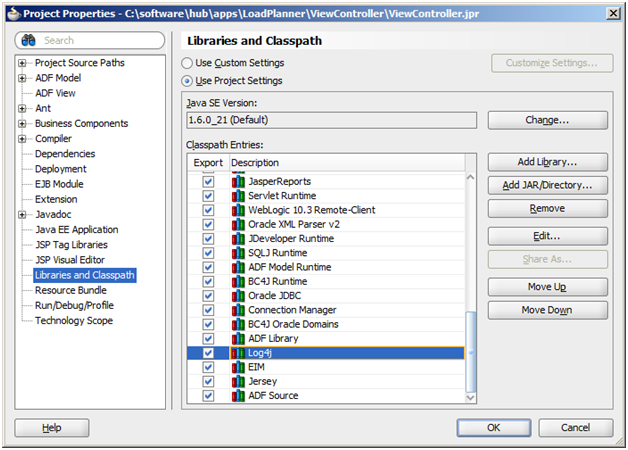
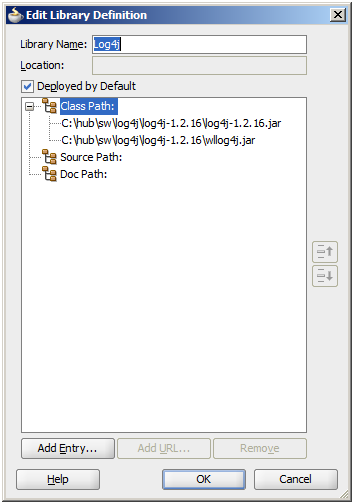
If you are getting class not found exception for a particular library upon deploying the application then check If the ‘Deploy by default’ option is checked for the library in your application.

If the library is referred in the Weblogic-application.xml then make sure that the library has to be deployed to the server. This will be referred in you Weblogic-application.xml as

<library-ref>
<library-name>adf.oracle.domain</library-name>
</library-ref>

fusion middleware doc


link to get the hosted fusion middleware doc

http://docs.oracle.com/cd/E23104_01/download_readme.htm

af:autosuggestBehavior – intro


This component in adf is used to provide a declarative way of providing suggestions for adf input components
the three main attributes are
suggestItems – mapped to a bean which returns List of SelectItems.
maxSuggestedItems – number of suggestedItems. -1 will fetch everything from the server. if the number is limited then a more link is displayed to fetch remaining items from the server
smartList – this list is added to show intial result. then the entire result from the server is fetched if no operation is done by the user

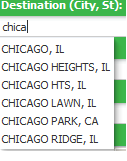
problem: I have a destination inputText which takes city/state combination. I want to implement an autosuggestbehavior for the inputText. When I enter more than three character the suggestion box should appear which City/States.

1) create an af:inputText, the value of the inputText is mapped to a managedBean to store the value that is entered by the user

<af:inputText label="Destination" id="end"
contentStyle="width: 133px;margin-left:5px;"
value="#{mapBean.dest}"/>

//managedbean code
private String dest;
public void setDest(String dest) {
this.dest = dest;
}

public String getDest() {
return dest;
}

2) now add an af:autosuggestbehavior tag to the inputText. This takes two attribute values. suggestItems and maxSuggestItems. provide maxSuggestItems as ‘5’ to display 5 values. suggestItems is bounded to the managedbean with a method ‘destination’ which returns a List of SelectItems.

<af:inputText label="Destination" id="end"
value="#{mapBean.dest}">
<af:autoSuggestBehavior suggestItems="#{mapBean.destination}"
maxSuggestedItems="5"/>
</af:inputText>

//code
public List destination(FacesContext facesContext,
AutoSuggestUIHints autoSuggestUIHints) {
//create suggestion list
List<SelectItem> items = new ArrayList<SelectItem>();
// the list should activate after three character
if(autoSuggestUIHints.getSubmittedValue().length() >= 3){
//get the binding from the pagedef
DCIteratorBinding bindings = getIteratorBinding("CityStateIterator");

OperationBinding operation = null;
String value = autoSuggestUIHints.getSubmittedValue();

if(value.contains(",")){
//executing the operation binding that will execute a viewcrtieria from ViewImpl
operation = bindings.getBindingContainer().getOperationBinding("searchByCityState");
//bind variable for city and state
String city = value.substring(0, value.indexOf(","));
String state = value.substring(value.indexOf(","), value.length());
operation.getParamsMap().put("city", city);
operation.getParamsMap().put("state", state.replace(", ", ""));
//execute the view criteria
operation.execute();
}

if (operation.getResult() != null) {
RowSet result = (RowSet) operation.getResult(); // cast to the expected result type
//the result is stored in the list
items = populateSuggestionList(items, result);
}
}
//show suggestions
return items;
}
//populate the values in a List of SelectItems
private List<SelectItem> populateSuggestionList(List<SelectItem> items,
RowSet vo) {
//populate the suggestion items
RowSet rs = vo.getRowSet();
while (rs.hasNext()) {
Row rw = rs.next();
items.add(new SelectItem(rw.getAttribute("CITY").toString().trim() + ", " + rw.getAttribute("STATE").toString().trim(),
((String)rw.getAttribute("CITY")).trim() + ", " +
((String)rw.getAttribute("STATE")).trim()));
}

return items;
}

output:

to learn more you can refer these links
http://www.oracle.com/technetwork/developer-tools/adf/learnmore/62-autosuggestbehavior-177811.pdf
http://www.baigzeeshan.com/2010/09/using-afautosuggestbehavior-in-oracle.html

How to in Jdeveloper ADF Tutorials – UCM connection from Jdeveloper


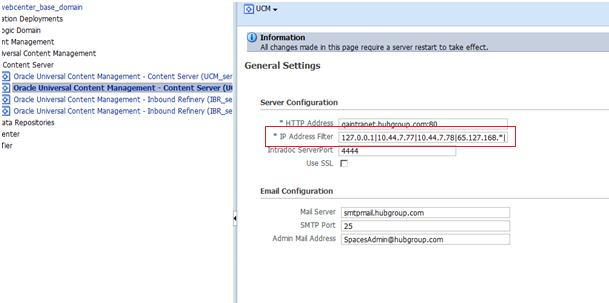
When you connect to ucm from jdeveloper if you face problem in connecting then its worth to check the ip filter of the ucm connection in em console.