Category Archives: How to

How to in Jdeveloper ADF Tutorials – Parameters for Jdeveloper ADF


Ever wonder what are this entries that gets added to the adf url in the addressbar like

afrWindowId=null&afrWindowMode=0&_adf.ctrl-state=qkx3a0o59

These are all the parameters for adf that to maintain the user session

_afrLoop – This is a unique identifier which is used to determine if the current window is new or not. This is used by ADF Faces Javascript. This entry is used as a token for the Loop Script

_afrWindowMode – This is a unique identifier which is used to determine if the current window is new or a dialog. This is used by ADF Faces intself to identify the mode

_afrWindowID – unique identifier assigned by the WindowIdProvider for ADF Faces to identify the current borwser window on the client and server For adf applications, ADF contoller supplies the WindowIdProvider

_adf.ctrl-state – This is the token provided by ADF controller to identify the current user state. This token is used to retrieve the user state within the task flow.

jsessionid – This is a cookie provided by the Weblogic Application server to uniquely identify the HTTP Session. This is passed as a token intially and stored in the cookie later
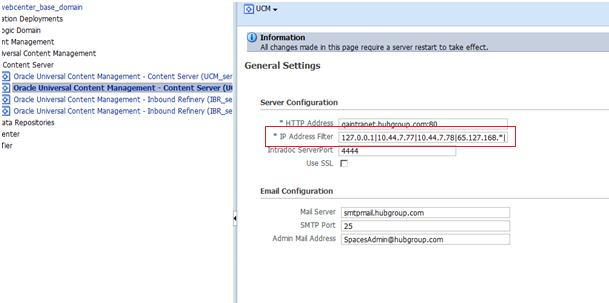
How to in Jdeveloper ADF Tutorials – UCM connection from Jdeveloper


When you connect to ucm from jdeveloper if you face problem in connecting then its worth to check the ip filter of the ucm connection in em console.

How to in Jdeveloper ADF Tutorials- Add your own Tip


Have your own Tip in jdeveloper

if you want to add your own tip to Jdeveloper then follow

close Jdeveloper
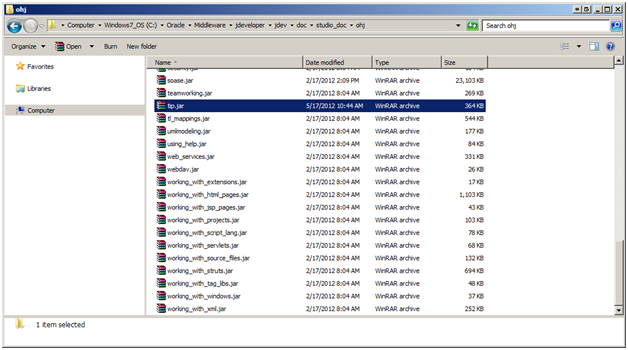
1) go this location – ${MIDDLEWARE_HOME}\jdeveloper\jdev\doc\studio_doc\ohj\tip.jar


2) create a html file – tip_11_0460.html (just increase the number for eg : tip_11_0470.html)
3) create an image file in images folder if you want to refer this in your html tip – tip_11_0470.gif
4) have your html registered in – tip_map.smp

 <map>
 <mapID target="tip_11_0470_html" url="tip_11_0470.html"/>
 </map>

open Jdeveloper

How to in Jdeveloper ADF Tutorials- Get the taskflowBinding in the code


BindingContext bctx = BindingContext.getCurrent();

DCBindingContainer binding= (DCBindingContainer) bctx.getCurrentBindingsEntry();

DCTaskFlowBinding tf = (DCTaskFlowBinding) binding.findExecutableBinding("taskflow1");

How to in Jdeveloper ADF Tutorials- Solve No JDBC Connection Error


If you happen to get the JDBC Connection error when you run the Application Module then make sure to check the adf-config.xml property jbo.SQLBuilder which should point to the correct database.

Also check the jbo.sql92.driverclass property for the AM Configuration to refer the class relevant to the DB

JPS-01520: Cannot initialize identity store


oracle.security.jps.service.idstore.IdentityStoreException: JPS-01520: Cannot initialize identity store.

<IdentityStoreUtil> <getIdentityStoreFactory> Cannot initialize identity store.
<PageUtils> <getUserName> Failed to get user name

If you happen to get the error while running the weblogic server then the possible cause can be to add the entry in config.xml (\Users\username\AppData\JDeveloper\system11.1.1.5.37.60.13\DefaultDomain\config\config.xml)

<listen-address>localhost</listen-address>

that is the localhost is missing.

related forum is

https://forums.oracle.com/forums/thread.jspa?threadID=2177694

Referring custom libraries in jdev 10.1.3.4


I recently happened to work on jdeveloper 10.1.3.4 and was given a task of bringing up the server. The project was using the custom libraries which the embedded oc4j was complaining that it could not find saying

Caused by: oracle.oc4j.sql.config.DataSourceConfigException: Unable to create : com.ibm.as400.access.AS400JDBCDriver
 at oracle.oc4j.sql.config.DataSourceConfigUtils.createConnectionFactory(DataSourceConfigUtils.java:283)
 at oracle.oc4j.sql.DataSourceConnectionPoolImpl.<init>(DataSourceConnectionPoolImpl.java:108)
 at oracle.oc4j.sql.spi.ResourceAdapterImpl.createDataSourceConnectionPool(ResourceAdapterImpl.java:99)
 … 13 more

This was very challenging for me because this is the first time I ran an ADF application on Jdeveloper 10g. I searched on the forum with this error and could easily find that the fix is to copy the library to

..\jdevstudio10134\j2ee\home\applib

This is just for information as this could be helpful for newbie who is still working with Jdeveloper 10g

Ojdeploy – how to include taskflow related files to include


When you build trough ojdeploy the task flow related files like page-template.xml, task-flow-registry.xml are not added in the deployed adf library.

to include that we have remove the entry in the ojdeploy snippet

<ora:parameter name="nocompile" value="true"/>

more information is here

http://one-size-doesnt-fit-all.blogspot.com/2010/11/using-ojdeploy-and-ant-for-creating-adf.html


oracle.jbo.InvalidObjNameException: JBO-25005


oracle.jbo.InvalidObjNameException: JBO-25005: Object name oracle_jbo_uicli_binding_JUIteratorBinding_281 of type Iterator Binding Definition is invalid.
 

the issue is with the filter order in the web.xml as explained in the bug 9880967

the correct order of the JspFilter and ApplSessionFilter in the web.xml is as follows

 <filter-mapping>
 <filter-name>JpsFilter</filter-name>
 <servlet-name>Faces Servlet</servlet-name>
 <dispatcher>FORWARD</dispatcher>
 <dispatcher>REQUEST</dispatcher>
 <dispatcher>INCLUDE</dispatcher>
 </filter-mapping>
 <filter-mapping>
 <filter-name>ApplSessionFilter</filter-name>
 <servlet-name>Faces Servlet</servlet-name>
 <dispatcher>FORWARD</dispatcher>
 <dispatcher>REQUEST</dispatcher>
 </filter-mapping>