link to get the hosted fusion middleware doc
fusion middleware doc
Leave a reply
link to get the hosted fusion middleware doc
This component in adf is used to provide a declarative way of providing suggestions for adf input components
the three main attributes are
suggestItems – mapped to a bean which returns List of SelectItems.
maxSuggestedItems – number of suggestedItems. -1 will fetch everything from the server. if the number is limited then a more link is displayed to fetch remaining items from the server
smartList – this list is added to show intial result. then the entire result from the server is fetched if no operation is done by the user
problem: I have a destination inputText which takes city/state combination. I want to implement an autosuggestbehavior for the inputText. When I enter more than three character the suggestion box should appear which City/States.
1) create an af:inputText, the value of the inputText is mapped to a managedBean to store the value that is entered by the user
<af:inputText label="Destination" id="end"
contentStyle="width: 133px;margin-left:5px;"
value="#{mapBean.dest}"/>

//managedbean code
private String dest;
public void setDest(String dest) {
this.dest = dest;
}

public String getDest() {
return dest;
}
2) now add an af:autosuggestbehavior tag to the inputText. This takes two attribute values. suggestItems and maxSuggestItems. provide maxSuggestItems as ‘5’ to display 5 values. suggestItems is bounded to the managedbean with a method ‘destination’ which returns a List of SelectItems.
<af:inputText label="Destination" id="end"
value="#{mapBean.dest}">
<af:autoSuggestBehavior suggestItems="#{mapBean.destination}"
maxSuggestedItems="5"/>
</af:inputText>

//code
public List destination(FacesContext facesContext,
AutoSuggestUIHints autoSuggestUIHints) {
//create suggestion list
List<SelectItem> items = new ArrayList<SelectItem>();
// the list should activate after three character
if(autoSuggestUIHints.getSubmittedValue().length() >= 3){
//get the binding from the pagedef
DCIteratorBinding bindings = getIteratorBinding("CityStateIterator");

OperationBinding operation = null;
String value = autoSuggestUIHints.getSubmittedValue();

if(value.contains(",")){
//executing the operation binding that will execute a viewcrtieria from ViewImpl
operation = bindings.getBindingContainer().getOperationBinding("searchByCityState");
//bind variable for city and state
String city = value.substring(0, value.indexOf(","));
String state = value.substring(value.indexOf(","), value.length());
operation.getParamsMap().put("city", city);
operation.getParamsMap().put("state", state.replace(", ", ""));
//execute the view criteria
operation.execute();
}

if (operation.getResult() != null) {
RowSet result = (RowSet) operation.getResult(); // cast to the expected result type
//the result is stored in the list
items = populateSuggestionList(items, result);
}
}
//show suggestions
return items;
}
//populate the values in a List of SelectItems
private List<SelectItem> populateSuggestionList(List<SelectItem> items,
RowSet vo) {
//populate the suggestion items
RowSet rs = vo.getRowSet();
while (rs.hasNext()) {
Row rw = rs.next();
items.add(new SelectItem(rw.getAttribute("CITY").toString().trim() + ", " + rw.getAttribute("STATE").toString().trim(),
((String)rw.getAttribute("CITY")).trim() + ", " +
((String)rw.getAttribute("STATE")).trim()));
}

return items;
}
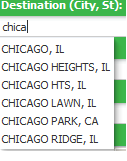
output:
to learn more you can refer these links
http://www.oracle.com/technetwork/developer-tools/adf/learnmore/62-autosuggestbehavior-177811.pdf
http://www.baigzeeshan.com/2010/09/using-afautosuggestbehavior-in-oracle.html
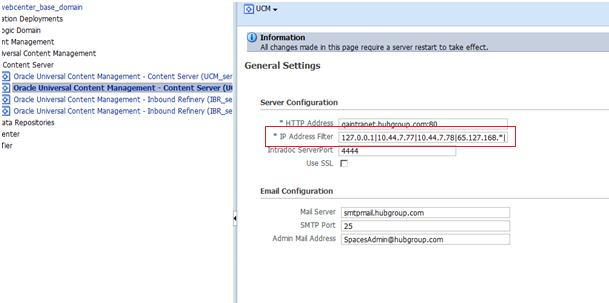
When you connect to ucm from jdeveloper if you face problem in connecting then its worth to check the ip filter of the ucm connection in em console.
official support of ADF for Android is from 11.1.1.7. This is discussed in this forum.
https://forums.oracle.com/forums/thread.jspa?threadID=2414335&tstart=0
Java code in jsp source files is not allowed in ojsp.next mode
when I got this error searched over the net and found this link
but this changes didn’t help me much. Finally removed all the entries from web.xml to resolve this.
Here is the snippet to connect to UCM from java
// create the IDC Client Manager manager
IdcClientManager manager = new IdcClientManager();

// build a client that will communicate using the HTTP protocol
IdcClient idcClient;

try {
//context with ucm username and password
IdcContext user = new IdcContext ("webadmin", "passw0rd");
//ucm link
idcClient = manager.createClient("idc://ucmwebcenterqa01.group.com:4444");

// get the binder
DataBinder binder = idcClient.createBinder();

// populate the binder with the parameters
binder.putLocal ("IdcService", "GET_FILE");
binder.putLocal("dDocName", "UCM_CLUSTER1001204");
binder.putLocal("RevisionSelectionMethod", "Latest");

try {
ServiceResponse response = idcClient.sendRequest (user, binder);

// get the response as a string
String responseString = response.getResponseAsString ();
//dispaly the content of the file
System.out.println ("" + responseString);

} catch (IdcClientException e) {
e.printStackTrace();
} catch (IOException e) {
e.printStackTrace();
}
} catch (IdcClientException e) {
e.printStackTrace();
}
}
Have your own Tip in jdeveloper
if you want to add your own tip to Jdeveloper then follow
close Jdeveloper
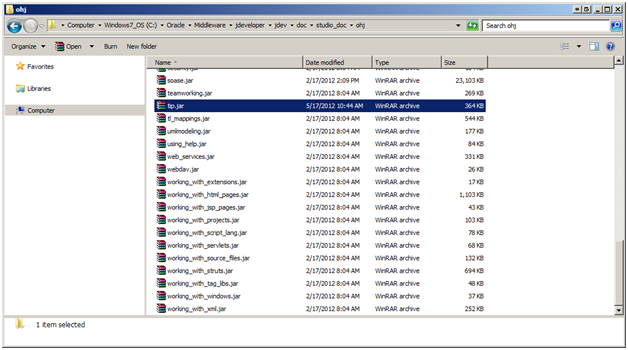
1) go this location – ${MIDDLEWARE_HOME}\jdeveloper\jdev\doc\studio_doc\ohj\tip.jar
2) create a html file – tip_11_0460.html (just increase the number for eg : tip_11_0470.html)
3) create an image file in images folder if you want to refer this in your html tip – tip_11_0470.gif
4) have your html registered in – tip_map.smp
 <map>
 <mapID target="tip_11_0470_html" url="tip_11_0470.html"/>
 </map>
open Jdeveloper
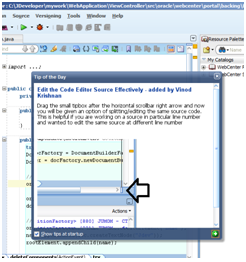
When you ever get this error
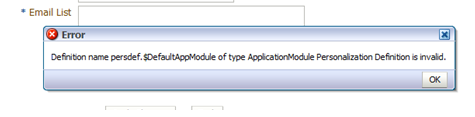
Then go to adf-config.xml and then remove the mdsC:adf-mds-config entry completely.
The content of the tag goes like this
<mdsC:adf-mds-config version="11.1.1.000">

<mds-config xmlns="http://xmlns.oracle.com/mds/config">

<persistence-config>

<metadata-namespaces>

persdef/"

metadata-store-usage="WebCenterFileMetadataStore"/>

</metadata-namespaces>

<metadata-store-usages>

<metadata-store-usage id="WebCenterFileMetadataStore"

default-cust-store="true" deploy-target="true">

<metadata-store class-name="oracle.mds.dt.persistence.stores.file.SrcControlFileMetadataStore">

<property name="metadata-path" value="../../mds"/>

</metadata-store>

</metadata-store-usage>

</metadata-store-usages>

</persistence-config>

<cust-config>

<match>

<customization-class name="oracle.adf.share.config.SiteCC"/>

</match>

</cust-config>

<cache-config>

<max-size-kb>100000</max-size-kb>

</cache-config>

</mds-config>

<!--<span class="hiddenSpellError" pre=""-->mdsC:adf-mds-config>
BindingContext bctx = BindingContext.getCurrent();

DCBindingContainer binding= (DCBindingContainer) bctx.getCurrentBindingsEntry();

DCTaskFlowBinding tf = (DCTaskFlowBinding) binding.findExecutableBinding("taskflow1");
If you happen to get the JDBC Connection error when you run the Application Module then make sure to check the adf-config.xml property jbo.SQLBuilder which should point to the correct database.
Also check the jbo.sql92.driverclass property for the AM Configuration to refer the class relevant to the DB
 They point the finger at me.. again!