Adding the web service data control library to the project will kick this error out
solving ws/common/contextProvider error
1 Reply

Adding the web service data control library to the project will kick this error out
There are two types of development in ADF development using jdeveloper. ui-first approach and data-first approach.
ui-first approach – design the UI first and then the data
data-first approach – design the data first and then design the UI accordingly.
In the first approach, we are sure that its very hard to design a real-time web application without some data. For this purpose adf provides a placeholder datacontrol using which we can design the page accordingly. The placeholder datacontrol is a simulation of actual data control in realtime scenario and we have full options to design the page without the actual data using this.
To start with,
In the Application Navigator, right-click the project and choose New
In the New Gallery, expand Business Tier, select Data Controls and then Placeholder Data Control, and click OK

Enter the values for place holder name, Directory name, Description and click ok

Datacontrol.dcx, adfm.xml, placeHolder.xml file gets created

Now, right-click the created datacontrol in the panel and select ‘Create Placeholder data type‘

create the attributes and click ok

The created datacontrol is exposed in the panel like a normal datacontrol

The attributes that are exposed can be dragged and dropped to the page as usual

Following code will help you to scroll to a specific row in a af:table on page load.
//Code to scroll to a specific row
this.tableBinding.setRowIndex(rowIndex);
RowKeySet ps = this.tableBinding.getSelectedRowKeys();
ps.clear();
ps.add(this.tableBinding.getRowKey());
AdfFacesContext.getCurrentInstance().addPartialTarget(this.tableBinding);
Also set the displayRow=selected for the table
Whenever you create a deployment profile for the model project in ADF you will select the ADF Library type rather an ordinary library type (java jar type)
Both act as a library archive supporting jar and zip files
What is the difference then?
If you face issues like
java.lang.ClassNotFoundException: oracle.ecsf.util.contextFactory
then the solution is to add ECSF(Enterprise Core Solutions Framework) library to the project. There are two libraries that will make an impact
When a table has AutoHeightRows set to a value greater than 0 (eg 10),
clicking on the expand icon (+) in the row header does not display the
detailStamp area of the table
We have to set the AutoHeightRows to a value greater than 0 because if we
leave it as -1, a blank white area is displayed in the table
Do you know the fix for this?
simple fix was to add this attribute to the table:
rowDisclosureListener=#{FixAutoHeightRows.pprTable}
Here
FixAutoHeightRows is the bean bounded to the page
pprTable is the table binding or the binding for the component that is surrounding the table
Here is the way to configure hibernate to work on JDeveloper
First thing first
As you know the three main things in setting up any hibernate is to have
To make this work for JDeveloper, download the latest version of hibernate3
Refer the downloaded location in the projects library and classpath by Adding a Library(Add Library) – Create New – Add Entry
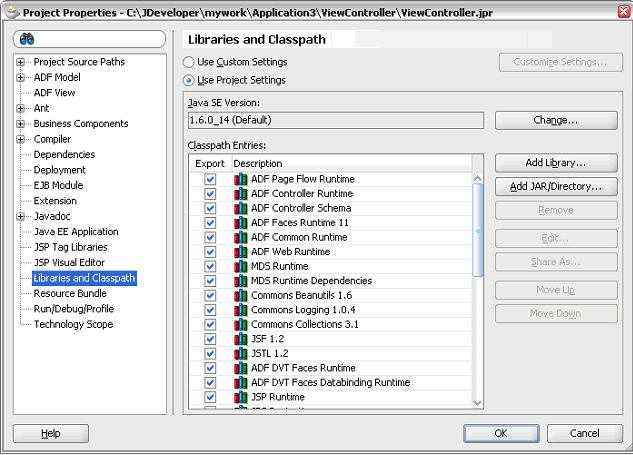
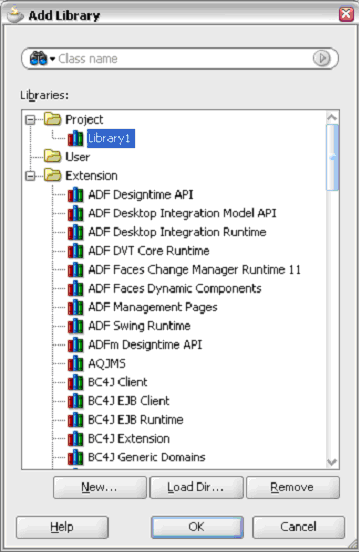
Provide the Library Name as ‘Hibernate’ (can be of your choice) and add the following libraries
Have the hibernate.cfg.xml file in your current working directory
<?xml version='1.0' encoding='utf-8'?>

<!--<span class="hiddenSpellError" pre=""-->DOCTYPE hibernate-configuration PUBLIC

"-//Hibernate/Hibernate Configuration DTD 3.0//EN"

"http://hibernate.sourceforge.net/hibernate-configuration-3.0.dtd">

<hibernate-configuration>

<session-factory>

<!-- Database connection settings -->

<property

name="connection.driver_class">oracle.jdbc.driver.OracleDriver

<property

name="connection.url">jdbc:oracle:thin:@localhost:1521:XE

<property name="connection.username">system</property>

<property name="connection.password">fusion</property>

<!-- <span class="hiddenSpellError" pre="">JDBC</span> connection pool (use the built-in) -->

<property name="connection.pool_size">1</property>

<!-- SQL dialect -->

<property

name="dialect">org.hibernate.dialect.OracleDialect</property>

<!-- Enable Hibernate's automatic session context management

-->

<property

name="current_session_context_class">thread</property>

<!-- Disable the second-level cache -->

<property

name="cache.provider_class">org.hibernate.cache.NoCacheProvider

</property>

<!-- Echo all executed SQL to <span class="hiddenSpellError" pre="to ">stdout</span> -->

<property name="show_sql">true</property>

<!-- Drop and re-create the database schema on startup -->

<property name="hbm2ddl.auto">create</property>

<mapping resource="Simple.hbm.xml"/>

</session-factory>

</hibernate-configuration>
The configuration file is for Oracle driver.. this can be changed
<property

name="connection.driver_class">oracle.jdbc.driver.OracleDriver</property>

<property

name="connection.url">jdbc:oracle:thin:@localhost:1521:XE

<property name="connection.username">system</property>

<property name="connection.password">fusion</property>
You have to specify the mapping file also
<mapping resource="Simple.hbm.xml"/>
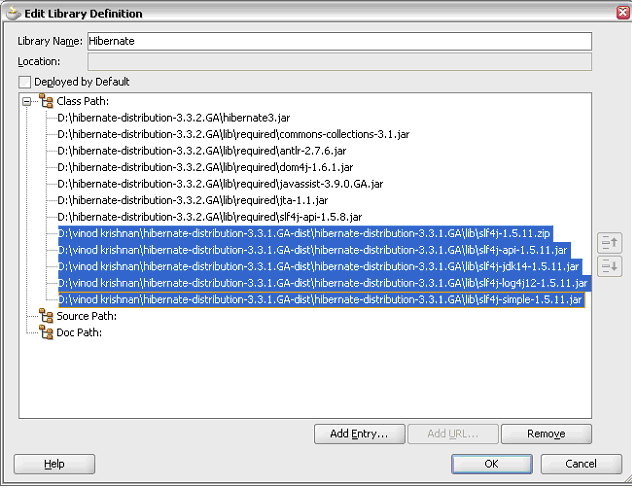
the highlighted libraries are added from slf4j to overcome
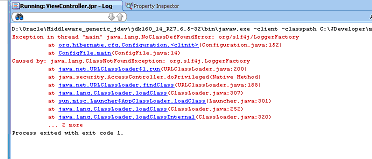
As the final step, represent the db table of yours as a simple pojo class (Simple.java) like
public class Simple {

private Long id;

private String title;

private Date date;

public Simple() {}

public Long getId() {

return id;

}

private void setId(Long id) {

this.id = id;

}

public Date getDate() {

return date;

}

public void setDate(Date date) {

this.date = date;

}

public String getTitle() {

return title;

}

public void setTitle(String title) {

this.title = title;

}

private Set participants = new HashSet();

public Set getParticipants() {

return participants;

}

public void setParticipants(Set participants) {

this.participants = participants;

}

}
where id, title and date represents the column name of the table in the db
Have a corresponding mapping file in the same qualified path (Simple.hbm.xml)
<?xml version="1.0"?>

<!--<span class="hiddenSpellError" pre=""-->DOCTYPE hibernate-mapping PUBLIC

"-//Hibernate/Hibernate Mapping DTD 3.0//EN"

"http://hibernate.sourceforge.net/hibernate-mapping-3.0.dtd">

<hibernate-mapping>

<class table="EVENTS">

<id name="id" column="EVENT_ID">

<generator/>

</id>

<property name="date" column="EVENT_DATE"/>

<property name="title"/>

</class>

</hibernate-mapping>
Have a configFile.java where you instantiate the Configuration, Session and get involved in the transaction
import org.hibernate.Session;

import org.hibernate.SessionFactory;

import org.hibernate.cfg.Configuration;

public class ConfigFile {

static Session session;

public ConfigFile() {

super();

}

public static void main(String[] args){

Configuration cfg = new Configuration().configure();

SessionFactory sessions = cfg.buildSessionFactory();

Session sess = sessions.openSession();

session = sess;

Simple s = new Simple();

s.setTitle("hi");

session.save(s);

}

}
Run the configFile.java.. that’s it. 🙂
Here is the tutorial on how to invoke a method before the page loads in ADF. Let’s assume that you have a method in the application module, which will have to be invoked before the page load.  For this, you have to expose this method as a client method using the client interface option for the application module. Click the edit icon and you will see your method listed in the Available list. Shuttle the method to Selected list and press ‘ok’.
  After shuttling the method you will see that the method gets added to the client interface.
  The method that we added will be exposed to the view layer through the application module data control. You have to refresh the data control to see your method.
  Now to get the binding for our method we have to add a method action binding to the page definition file and select the method that is exposed in the data control. We select our method from the Operation and click ‘ok’.
  After that we have to create an invokeAction in the Executables section to invoke the method action. We select our method from the list for the Binds and select Refresh as ‘always’.

now the method action binding and the invoke action is added to the page definition file.By default the invokeAction binding is added as a last executable. But we want to invoke the action on page load, so we move the invoke action to the first place to execute initially before any other executable. This can be done by dragging the invokeAction to the first place.  Now whenever you run your page you will see the control goes to the method automatically.


download the sample project from this location
the hashCode() method in the Object class has some specific contract with the equals() method.. Do you know that?
let’s see why these methods are there in the Object class
hashCode() – the hash code method is used to return the hash code value for the object, this is an excerpt from the Javadoc.
This method will be used to compute or locate the object in the memory. If the object is moved to a different location during garbage collection, the hash code remains the same to locate the object. This is implemented in Object class by mapping the memory address to an integer.
The below code in Object class maps to a native implementation of the above statement
public native int hashCode();
Common Misconceptions
some of the implementation of this in JDK can be got from some-interesting-hashcode-values
equals() – This method is used to compare the objects.
This is method has to be used for non-null objects. Some common properties for equals() method are
public boolean equals(Object obj) {
 return (this == obj);
 }
Now, what is the contract between these two methods?
its customary to override hashCode() method whenever equals() method is overridden.
lets have an example of the implementation of the equals() and hashCode() method
 @Override
 public boolean equals(Object obj) {
 // TODO Auto-generated method stub

 if (obj instanceof hashEqualsText) {
 return true;
 }
 return false;
 }
<pre>
the equals method checks if the object is an instance of the another object and returns the output and hashCode method is made to return 1 as the hash code value
 @Override
 public int hashCode() {
 // TODO Auto-generated method stub
 return 1; //some value
 }
find the complete analysis of the hashCode() and equals() method contract
 public class hashEqualsText{

 public static void main(String[] args) throws CloneNotSupportedException {

 hashEqualsText x = new hashEqualsText();
 hashEqualsText y = x;
 hashEqualsText z = new hashEqualsText();

 Object object = new Object();

 String str = "vinod";
 String strSame = "vinod";
 String strDifferent = "vinodAndOthers";

 Boolean bool = true;
 Boolean boolSame = true;
 Boolean boolDifferent = false;

 Integer intt = 123456789;
 Integer inttSame = 123456789;
 Integer inttDifferent = 2222222;

 Long longg = 12121212121212122L;
 Long longgSame = 12121212121212122L;
 Long longgDifferent = 11111111111111111L;

 Character chr = 'a';
 Character chrSame = 'a';
 Character chrDifferent = 'z';

 //hashCode contract
 System.out.println("-----------------hashCode contract-----------------");

 System.out.println("Overrided hashCode of x::"+x.hashCode()+" - Original hashCode of x::" +System.identityHashCode(x));
 System.out.println("Overrided hashCode of y::"+y.hashCode()+" - Original hashCode of y::" +System.identityHashCode(y));
 System.out.println("Overrided hashCode of z::"+z.hashCode()+" - Original hashCode of z::" +System.identityHashCode(z));

 //equals contract
 System.out.println("-----------------equals contract-----------------");

 System.out.println("reflexive - x.equals(x) should return true :: "+x.equals(y));
 System.out.println("symmetric - x and y, x.equals(y)  should return true if and only if y.equals(x) returns true :: "+x.equals(y) + "< -- >"+y.equals(x));
 System.out.println("transitive - x, y, and z, if x.equals(y) returns true and y.equals(z) returns true, then x.equals(z) should return true :: "+x.equals(y)+"==="+y.equals(z)+"==>"+x.equals(z));
 System.out.println("null check - x.equals(null) should return false always:: "+ x.equals(null));

 //for objects
 System.out.println("-----------------for same Objects-----------------");

 System.out.println("x == y has the value true :: "+(x == y));
 System.out.println("x.equals(y) has the value true :: "+(x.equals(y)));
 System.out.println("x.hashCode() == y.hashCode() has the value true :: "+(x.hashCode() == y.hashCode()));

 //for different objects
 System.out.println("-----------------for different Objects-----------------");

 System.out.println("object hashcode value :: "+(object.hashCode()));
 System.out.println("x == object has the value false :: "+(x == object));
 System.out.println("x.equals(object) has the value false :: "+(x.equals(object)));
 System.out.println("x.hashCode() == object.hashCode() has the value false :: "+(x.hashCode() == object.hashCode()));

 //for same String
 System.out.println("-----------------for same String-----------------");

 System.out.println("str hashcode value :: "+(str.hashCode()));
 System.out.println("strSame hashcode value :: "+(strSame.hashCode()));
 System.out.println("str == strSame has the value true :: "+(str == strSame));
 System.out.println("str.equals(strSame) has the value true :: "+(str.equals(strSame)));
 System.out.println("str.hashCode() == strSame.hashCode() has the value true :: "+(str.hashCode() == strSame.hashCode()));

 //for different String
 System.out.println("-----------------for different String-----------------");

 System.out.println("str hashcode value :: "+(str.hashCode()));
 System.out.println("strDifferent hashcode value :: "+(strDifferent.hashCode()));
 System.out.println("str == strDifferent has the value false :: "+(str == strDifferent));
 System.out.println("str.equals(strDifferent) has the value false :: "+(str.equals(strDifferent)));
 System.out.println("str.hashCode() == strDifferent.hashCode() has the value false :: "+(str.hashCode() == strDifferent.hashCode()));

 //for same Boolean
 System.out.println("-----------------for same Boolean-----------------");

 System.out.println("bool hashcode value :: "+(bool.hashCode()));
 System.out.println("boolSame hashcode value :: "+(boolSame.hashCode()));
 System.out.println("bool == boolSame has the value true :: "+(bool == boolSame));
 System.out.println("bool.equals(boolSame) has the value true :: "+(bool.equals(boolSame)));
 System.out.println("bool.hashCode() == boolSame.hashCode() has the value true :: "+(bool.hashCode() == boolSame.hashCode()));

 //for different Boolean
 System.out.println("-----------------for different Boolean-----------------");

 System.out.println("bool hashcode value :: "+(bool.hashCode()));
 System.out.println("boolDifferent hashcode value :: "+(boolDifferent.hashCode()));
 System.out.println("bool == boolDifferent has the value false :: "+(bool == boolDifferent));
 System.out.println("bool.equals(boolDifferent) has the value false :: "+(bool.equals(boolDifferent)));
 System.out.println("bool.hashCode() == boolDifferent.hashCode() has the value false :: "+(bool.hashCode() == boolDifferent.hashCode()));

 //for same Integer
 System.out.println("-----------------for same Integer-----------------");

 System.out.println("intt hashcode value :: "+(intt.hashCode()));
 System.out.println("inttSame hashcode value :: "+(inttSame.hashCode()));
 System.out.println("intt == inttSame has the value true :: "+(intt == inttSame));
 System.out.println("intt.equals(inttSame) has the value true :: "+(intt.equals(inttSame)));
 System.out.println("intt.hashCode() == inttSame.hashCode() has the value true :: "+(intt.hashCode() == inttSame.hashCode()));

 //for different Integer
 System.out.println("-----------------for different Integer-----------------");

 System.out.println("intt hashcode value :: "+(intt.hashCode()));
 System.out.println("inttDifferent hashcode value :: "+(inttDifferent.hashCode()));
 System.out.println("intt == inttDifferent has the value false :: "+(intt == inttDifferent));
 System.out.println("intt.equals(inttDifferent) has the value false :: "+(intt.equals(inttDifferent)));
 System.out.println("intt.hashCode() == inttDifferent.hashCode() has the value false :: "+(intt.hashCode() == inttDifferent.hashCode()));

 //for same Long
 System.out.println("-----------------for same Long-----------------");

 System.out.println("longg hashcode value :: "+(longg.hashCode()));
 System.out.println("longgSame hashcode value :: "+(longgSame.hashCode()));
 System.out.println("longg == longgSame has the value true :: "+(longg == longgSame));
 System.out.println("longg.equals(longgSame) has the value true :: "+(longg.equals(inttSame)));
 System.out.println("longg.hashCode() == longgSame.hashCode() has the value true :: "+(longg.hashCode() == longgSame.hashCode()));

 //for different Long
 System.out.println("-----------------for different Long-----------------");

 System.out.println("longg hashcode value :: "+(longg.hashCode()));
 System.out.println("longgDifferent hashcode value :: "+(longgDifferent.hashCode()));
 System.out.println("longg == longgDifferent has the value false :: "+(longg == longgDifferent));
 System.out.println("longg.equals(longgDifferent) has the value false :: "+(longg.equals(longgDifferent)));
 System.out.println("longg.hashCode() == longgDifferent.hashCode() has the value false :: "+(longg.hashCode() == longgDifferent.hashCode()));

 //for same Character
 System.out.println("-----------------for same Character-----------------");

 System.out.println("chr hashcode value :: "+(chr.hashCode()));
 System.out.println("chrSame hashcode value :: "+(chrSame.hashCode()));
 System.out.println("chr == chrSame has the value true :: "+(chr == chrSame));
 System.out.println("chr.equals(chrgSame) has the value true :: "+(chr.equals(chrSame)));
 System.out.println("chr.hashCode() == chrSame.hashCode() has the value true :: "+(chr.hashCode() == chrSame.hashCode()));

 //for same Character
 System.out.println("-----------------for same Character-----------------");

 System.out.println("chr hashcode value :: "+(chr.hashCode()));
 System.out.println("chrDifferent hashcode value :: "+(chrDifferent.hashCode()));
 System.out.println("chr == chrDifferent has the value false :: "+(chr == chrDifferent));
 System.out.println("chr.equals(chrDifferent) has the value false :: "+(chr.equals(chrDifferent)));
 System.out.println("chr.hashCode() == chrDifferent.hashCode() has the value false :: "+(chr.hashCode() == chrDifferent.hashCode()));

 }

 @Override
 public boolean equals(Object obj) {
 // TODO Auto-generated method stub

 if (obj instanceof hashEqualsText) {
 return true;
 }
 return false;
 }

 @Override
 public int hashCode() {
 // TODO Auto-generated method stub
 return 1;
 }
 }
The output is as follows
-----------------hashCode contract-----------------
Overrided hashCode of x::1 - Original hashCode of x::7214088
Overrided hashCode of y::1 - Original hashCode of y::7214088
Overrided hashCode of z::1 - Original hashCode of z::15020296
-----------------equals contract-----------------
reflexive - x.equals(x) should return true :: true
symmetric - x and y, x.equals(y)  should return true if and only if y.equals(x) returns true :: true< -- >true
transitive - x, y, and z, if x.equals(y) returns true and y.equals(z) returns true, then x.equals(z) should return true :: true===true==>true
null check - x.equals(null) should return false always:: false
-----------------for same Objects-----------------
x == y has the value true :: true
x.equals(y) has the value true :: true
x.hashCode() == y.hashCode() has the value true :: true
-----------------for different Objects-----------------
object hashcode value :: 16130931
x == object has the value false :: false
x.equals(object) has the value false :: false
x.hashCode() == object.hashCode() has the value false :: false
-----------------for same String-----------------
str hashcode value :: 112212784
strSame hashcode value :: 112212784
str == strSame has the value true :: true
str.equals(strSame) has the value true :: true
str.hashCode() == strSame.hashCode() has the value true :: true
-----------------for different String-----------------
str hashcode value :: 112212784
strDifferent hashcode value :: -1181071670
str == strDifferent has the value false :: false
str.equals(strDifferent) has the value false :: false
str.hashCode() == strDifferent.hashCode() has the value false :: false
-----------------for same Boolean-----------------
bool hashcode value :: 1231
boolSame hashcode value :: 1231
bool == boolSame has the value true :: true
bool.equals(boolSame) has the value true :: true
bool.hashCode() == boolSame.hashCode() has the value true :: true
-----------------for different Boolean-----------------
bool hashcode value :: 1231
boolDifferent hashcode value :: 1237
bool == boolDifferent has the value false :: false
bool.equals(boolDifferent) has the value false :: false
bool.hashCode() == boolDifferent.hashCode() has the value false :: false
-----------------for same Integer-----------------
intt hashcode value :: 123456789
inttSame hashcode value :: 123456789
intt == inttSame has the value true :: false
intt.equals(inttSame) has the value true :: true
intt.hashCode() == inttSame.hashCode() has the value true :: true
-----------------for different Integer-----------------
intt hashcode value :: 123456789
inttDifferent hashcode value :: 2222222
intt == inttDifferent has the value false :: false
intt.equals(inttDifferent) has the value false :: false
intt.hashCode() == inttDifferent.hashCode() has the value false :: false
-----------------for same Long-----------------
longg hashcode value :: -1634700041
longgSame hashcode value :: -1634700041
longg == longgSame has the value true :: false
longg.equals(longgSame) has the value true :: false
longg.hashCode() == longgSame.hashCode() has the value true :: true
-----------------for different Long-----------------
longg hashcode value :: -1634700041
longgDifferent hashcode value :: 653330616
longg == longgDifferent has the value false :: false
longg.equals(longgDifferent) has the value false :: false
longg.hashCode() == longgDifferent.hashCode() has the value false :: false
-----------------for same Character-----------------
chr hashcode value :: 97
chrSame hashcode value :: 97
chr == chrSame has the value true :: true
chr.equals(chrgSame) has the value true :: true
chr.hashCode() == chrSame.hashCode() has the value true :: true
-----------------for same Character-----------------
chr hashcode value :: 97
chrDifferent hashcode value :: 122
chr == chrDifferent has the value false :: false
chr.equals(chrDifferent) has the value false :: false
chr.hashCode() == chrDifferent.hashCode() has the value false :: false
Some of the hashcodes of interest’s are in java wrappers
Boolean – hashCode() – 1231 for ‘true’ and ‘1237’ for ‘false’
Integer – hashCode() – will return the primitive int value
Byte – hashCode() – primitive int value of the byte is returned as hashcode
Character– hashCode() – primitive int value of the byte is returned as hashcode
Long – hashCode() – value of the following expression
(int)(this.longValue()^(this.longValue()>>>32))
to know more about this please check hashcode-contract-with-equals
 They point the finger at me.. again!