Found this useful link for all your db design related queries
Database answers
Leave a reply

Found this useful link for all your db design related queries
The following snippet will be helpful in setting up the mode of the query criteria in programmatic way.
public Boolean setAdvancedMode(){
              QueryDescriptor descriptor =
                      (QueryDescriptor)evaluateEL
                  ("#{bindings.SearchCriteriaQuery.queryDescriptor}");
              descriptor.changeMode(QueryDescriptor.QueryMode.ADVANCED);
             return true;
}

public Object evaluateEL(String el) {
        FacesContext facesContext = FacesContext.getCurrentInstance();
        ELContext elContext = facesContext.getELContext();
        ExpressionFactory expressionFactory =
            facesContext.getApplication().getExpressionFactory();
        ValueExpression exp =
            expressionFactory.createValueExpression(elContext, el,
                                                    Object.class);
       return exp.getValue(elContext);
    }
use the following snippet to get the current binding
BindingContainer bindings =  BindingContext.getCurrent().getCurrentBindingsEntry();
 AttributeBinding at = (AttributeBinding)bindings.getControlBinding("Period");
 at.getInputValue();
The above mentioned code is useful only in case of retrieving values of any attribute binding in the page definition file. To retrieve specific information use it like
//For search binding use it like
FacesCtrlSearchBinding fc =
(FacesCtrlSearchBinding)bindings.findExecutableBinding("PeriodQuery");
or
FacesCtrlSearchBinding fc =
(FacesCtrlSearchBinding)bindings.get("PeriodQuery");

//For LOV binding use it like
FacesCtrlLOVBinding fc = (FacesCtrlLOVBinding)bindings.get("PeriodLOV");
some of the useful methods that can also be used for retrieving binding is
private BindingContainer getBindings() {
BindingContainer bindings =
(BindingContainer)fc.getApplication().evaluateExpressionGet(fc, "#{bindings}",
 BindingContainer.class);
return (bindings == null) ? null : bindings;
 }
to retrieve the bindings or executable you use it like
//to retireve the tree/table bindings
FacesCtrlHierBinding fc = (FacesCtrlHierBinding)bindings.get("Period");

//to retireve the tree/table iterator
DCIteratorBinding dc = (DCIteratorBinding)bindings.get("PeriodIterator");

References for core and detail knowledge of technologies related to Java
JSR – http://jcp.org/en/jsr/platform
Java – http://java.sun.com/docs/books/jls/third_edition/html/j3TOC.html
J2EE5 – http://download.oracle.com/docs/cd/E17477_01/javaee/5/tutorial/doc/docinfo.html
JVM – http://java.sun.com/docs/books/jvms/second_edition/html/VMSpecTOC.doc.html
JSP – http://jcp.org/aboutJava/communityprocess/final/jsr152/index.html
JSF – http://jcp.org/aboutJava/communityprocess/final/jsr252/index.html
EJB2 – http://jcp.org/aboutJava/communityprocess/final/jsr019/index.html
EJB3 – http://jcp.org/aboutJava/communityprocess/final/jsr220/index.html
EJB3.1 – http://jcp.org/aboutJava/communityprocess/final/jsr318/index.html
JSTL – http://jcp.org/aboutJava/communityprocess/final/jsr052/index.html
Servlets – http://jcp.org/aboutJava/communityprocess/final/jsr053/index.html
JDBC – http://jcp.org/aboutJava/communityprocess/final/jsr054/index.html
Web services – http://jcp.org/aboutJava/communityprocess/final/jsr109/index.html
Recently I got an opportunity to look over the Oracle Financials General Ledger guide for some functional references and got involved in it completely.
I am just providing a basic outline of some important topics of interest within Oracle General Ledger
The options to reach in R12 is also given for reference
Accounting Cycle
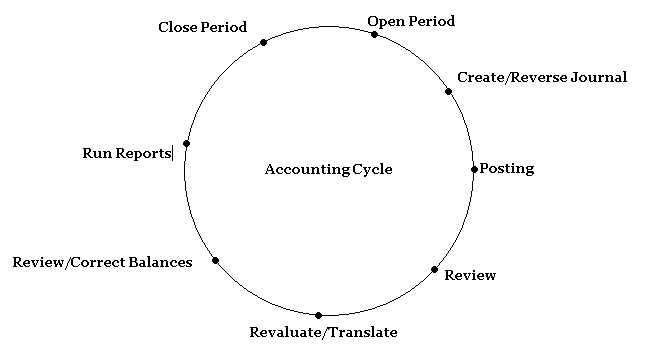
Common Setup
Accounting Setup Manager
Tasks involved
General Ledger Setups
Tasks involved
- View system generated data access sets
- Create Responsibility
- Assign a menu
- Fill in request group details
- Assign data access set to a responsibility
- Attach responsibility to the user
Basic Journal Entries
Task involved
Summary Accounts
Advanced Journal Entries
Task involved
- Create Skeleton Recurring Journal Batch
- Generate the journals for the current period
- Verify the process completes –View -Request
- Create the standard Recurring Journal Batch
- Generate the journals for the current period
- Verify the process completesView -Request
- Create the formula Recurring Journal Batch
- Generate the journals for the current period
- Verify the process completesView –Request
Task Involved
- Create a single Journal
- Generate Mass Allocation
- Verify the process completesView –Request
Task Involved
- Setup Accounting Sequencing
- Assign Sequence and Create new Sequence
Task Involved
- Enable reconciliation – Setup – Financials – Flexfields – Key – Values – Reconcile – Yes
- Enter reconciliation reference
Budgeting
Advanced Security
MultiCurrency
Consolidation
Period Close
Financials Reporting

I have explained the basics of singleton pattern here https://vtkrishn.wordpress.com/2010/03/26/singleton-pattern-revisited/
The design goes like this
1) private constructor
2) static method to return the single objects
In this post I am going to explain some additional restrictions on this pattern
1) Lazy initialization with double lock mechanism
2) Early initialization
3) Serialization
4) ClassLoaders
5) Restrict Cloning
Lazy instantiation using double locking mechanism
The standard implementation shown in the code above is a thread safe implementation, but it’s not the best thread-safe implementation because synchronization is very expensive when we are talking about the performance. We can see that the synchronized method getInstance does not need to be checked for synchronization after the object is initialized. If we see that the singleton object is already created we just have to return it without using any synchronized block. This optimization consist in checking in an un-synchronized block if the object is null and if not to check again and create it in an synchronized block. This is called double locking mechanism.
In this case case the singleton instance is created when the getInstance() method is called for the first time. This is called lazy instantiation and it ensures that the singleton instance is created only when it is needed.
//Lazy instantiation using double locking mechanism.
class Singleton
{
 private static Singleton m_instance;

 private Singleton()
 {
 System.out.println("Singleton(): Initializing Instance");
 }

 public static Singleton getInstance()
 {
 if (m_instance == null)
 {
 synchronized(Singleton.class)
 {
 if (m_instance == null)
 {
 System.out.println("getInstance(): First time getInstance was invoked!");
 m_instance = new Singleton();
 }
 }
 }

 return m_instance;
 }

 public void doSomething()
 {
 System.out.println("doSomething(): Singleton does something!");
 }
}
Early instantiation using implementation with static field
In the following implementattion the singleton object is instantiated when the class is loaded and not when it is first used, due to the fact that the m_instance member is declared static. This is why in this implementation we don’t need to syncronize any portion of the code. The class is loaded once this guarantee the unicity of the object
//Early instantiation using implementation with static field.
class Singleton
{
 private static Singleton m_instance = new Singleton();

 private Singleton()
 {
 System.out.println("Singleton(): Initializing Instance");
 }

 public static Singleton getInstance()
 {
 return m_instance;
 }

 public void doSomething()
 {
 System.out.println("doSomething(): Singleton does something!");
 }
}
Serialization
If the Singleton class implements the java.io.Serializable interface, when a singleton is serialized and then deserialized more than once, there will be multiple instances of Singleton created. In order to avoid this the readResolve method should be implemented. See Serializable () and readResolve Method () in javadocs.
 public class Singleton implements Serializable {
 ...

 // This method is called immediately after an object of this class is deserialized.
 // This method returns the singleton instance.
 protected Object readResolve() {
 return getInstance();
 }
 }
ClassLoaders
If you have multiple classloaders(possibilities in case of servlet container) then the patterns will allow for multiple instances to be created which is not expected
To overcome this you have to have the custom implementation like
private static Class getClass(String classname)
 throws ClassNotFoundException {
 ClassLoader classLoader = Thread.currentThread().getContextClassLoader();
 if(classLoader == null)
 classLoader = Singleton.class.getClassLoader();
 return (classLoader.loadClass(classname));
 }
}
Restrict Cloning
You can overcome cloning of the singleton object by explicitly throwing cloneNotSupportedException
public Object clone() throws CloneNotSupportedException {
 throw new CloneNotSupportedException();
 }
If we try to access the above singleton object using reflection then you will get
Exception in thread "Main Thread" java.lang.IllegalAccessException: Class com.example.thread.Main can not access a member of class com.simple.NormalClass with modifiers "private"
 at sun.reflect.Reflection.ensureMemberAccess(Reflection.java:65)
 at java.lang.Class.newInstance0(Class.java:349)
 at java.lang.Class.newInstance(Class.java:308)
 at com.example.thread.Main.main(Main.java:10)
if you are using java 1.5 and above you can use enum type which takes care of all the above
public enum Singleton{
INSTANCE;

public static void print(){
System.out.println("hi");
}

public class Main{

public static void main(String[] args) {
Singleton.INSTANCE.print();
}
}
}
Some of the main oodesign principles are available here
I hope this will help developers understand the oo concept more efficiently.
I suggest this link for those who wanted to refactor their code without any side effects
Found a good article on writing testable code
 They point the finger at me.. again!